The ServiceNow connector lets your AI agent act in each user's ServiceNow account. Each user signs in to ServiceNow once, and Scalekit stores and refreshes their tokens, so your agent never handles credentials. It comes with 112 tools.
- Tools
- 112
- What they doRead · write · destructive
- 56 · 46 · 1056 read46 write10 destructive
- Users sign in with
- OAuth
- OAuth app
- Your own ServiceNow app
Setup
Install the SDK
Terminal window npm install @scalekit-sdk/node dotenvTerminal window pip install scalekit-sdk-python python-dotenvSet your credentials
Add your Scalekit credentials to your
.envfile. Find values in app.scalekit.com > Developers > API Credentials..env SCALEKIT_ENVIRONMENT_URL=<your-environment-url>SCALEKIT_CLIENT_ID=<your-client-id>SCALEKIT_CLIENT_SECRET=<your-client-secret>Create the ServiceNow connection
In AgentKit > Connections, create a ServiceNow connection and copy its redirect URI. The name you give it is the
connection_nameyour code passes. See Configure connections.Register an OAuth app
ServiceNow connections use your own OAuth app. Register one with ServiceNow and add the redirect URI you copied.
Then enter the app's Client ID and Client Secret on the ServiceNow connection.
Console steps with screenshots
Register your Scalekit environment with ServiceNow so Scalekit handles the OAuth flow and token lifecycle for your users. Create an OAuth application registry in your ServiceNow instance, then add its Client ID and Client Secret to your Scalekit connection.
-
Copy the redirect URI from Scalekit
-
In the Scalekit dashboard, go to AgentKit > Connections > Create Connection. Find ServiceNow and click Create.
-
Click Use your own credentials and copy the redirect URI. It looks like
https://<SCALEKIT_ENVIRONMENT_URL>/sso/v1/oauth/<CONNECTION_ID>/callback.
-
-
Open Application Registry in ServiceNow
-
Log in to your ServiceNow instance.
-
Use the top navigation search to find Application Registry under System OAuth.
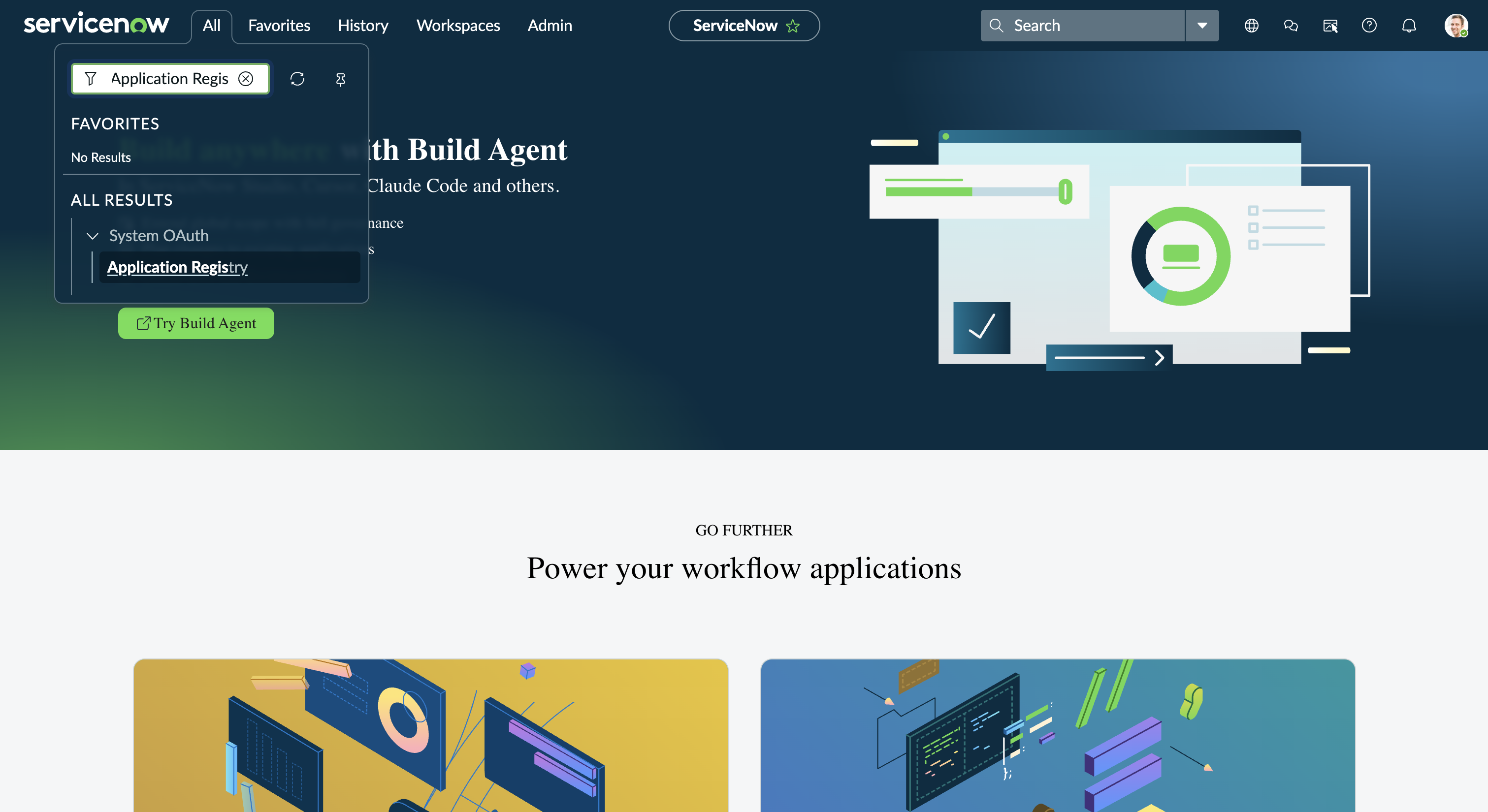
-
The Application Registries list shows every OAuth client and provider already configured on your instance.
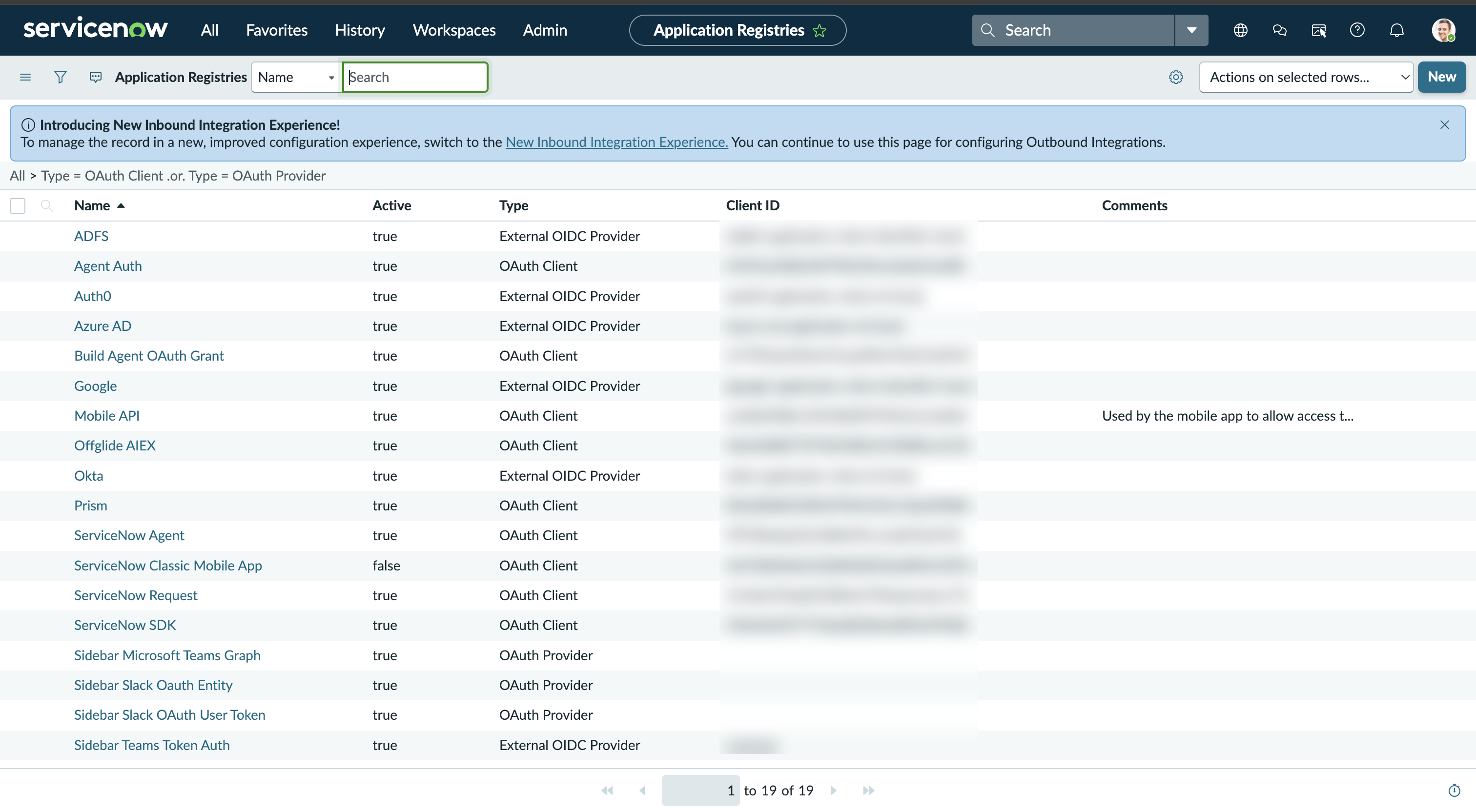
-
-
Create a new OAuth application
-
Click New. ServiceNow asks What kind of OAuth application?
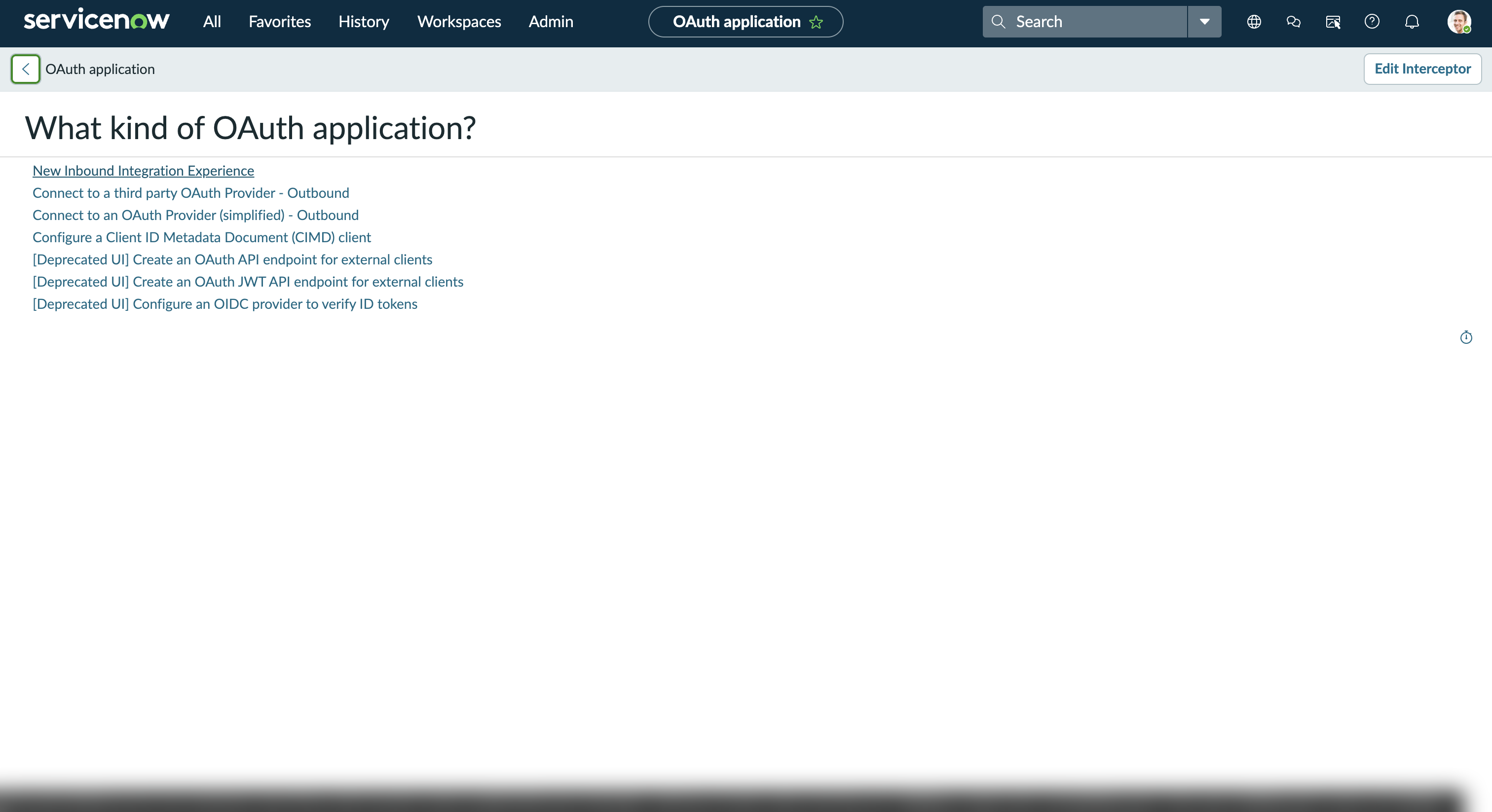
-
Select New Inbound Integration Experience.
-
Give the application a Name (for example,
Agent Auth) and paste the redirect URI you copied in step 1 into the Redirect URL field. -
Save the record.
-
-
Copy your Client ID and Client Secret
-
Open the application record you just created under Application Registries.
-
Copy the Client ID shown on the record.
-
Click the lock icon next to Client Secret to reveal and copy it.
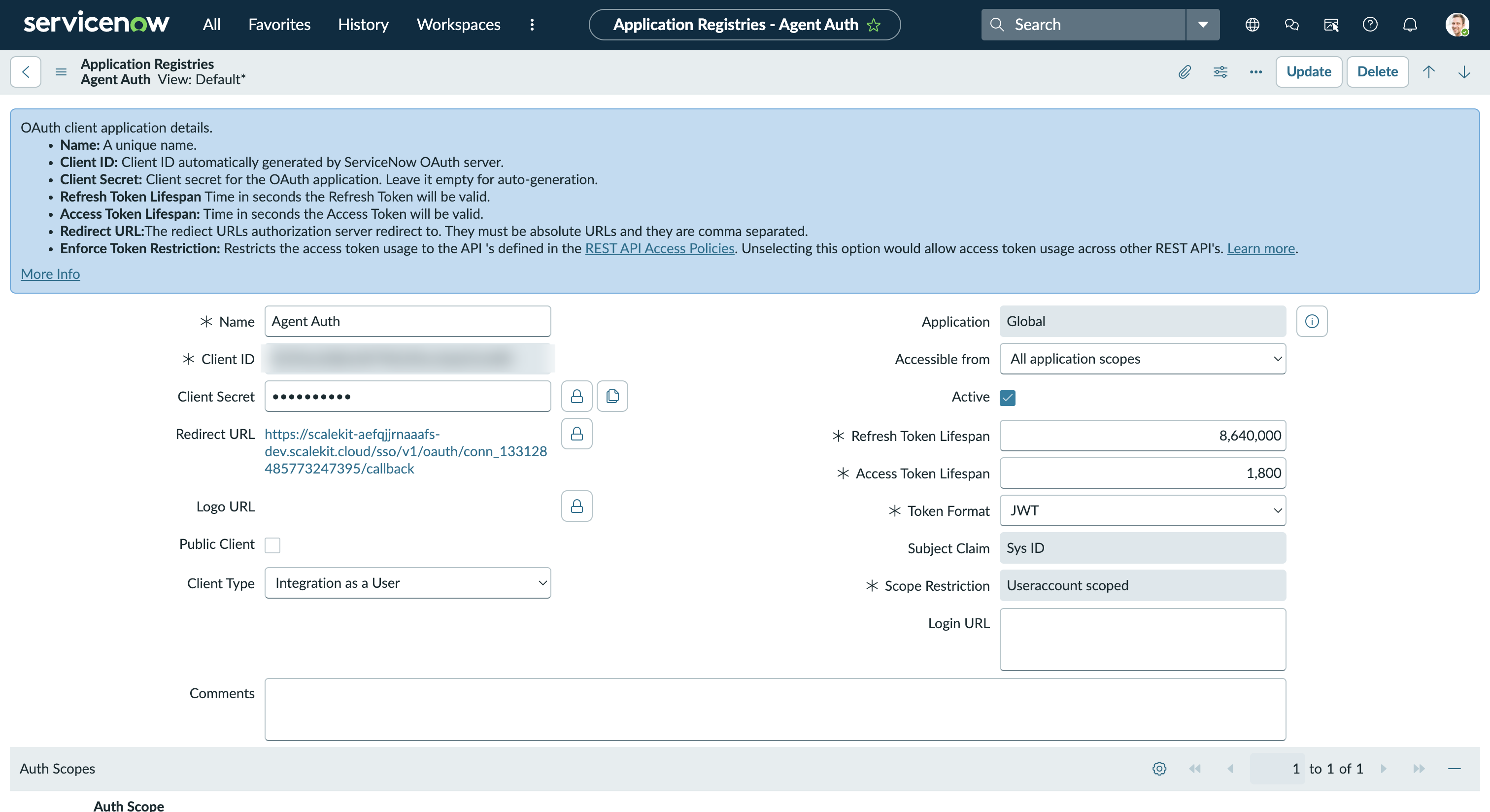
-
-
Add credentials in Scalekit
- Return to the connection you created in Scalekit and enter:
- Client ID — from your ServiceNow application registry
- Client Secret — from your ServiceNow application registry
- Click Save.
- Return to the connection you created in Scalekit and enter:
-
Authorize a user and make your first call
quickstart.mts import { ScalekitClient } from '@scalekit-sdk/node'import 'dotenv/config'import { createInterface } from 'node:readline/promises'const scalekit = new ScalekitClient(process.env.SCALEKIT_ENVIRONMENT_URL,process.env.SCALEKIT_CLIENT_ID,process.env.SCALEKIT_CLIENT_SECRET,)const actions = scalekit.actionsconst connector = 'servicenow'const identifier = 'user_123'// Generate an authorization link for the userconst { link } = await actions.getAuthorizationLink({ connectionName: connector, identifier })console.log('Authorize ServiceNow:', link)const rl = createInterface({ input: process.stdin, output: process.stdout })await rl.question('Press Enter after authorizing...')rl.close()// Make your first callconst result = await actions.executeTool({connector,identifier,toolName: 'servicenow_get_current_user',toolInput: {},})console.log(result)Terminal window npx tsx quickstart.mtsquickstart.py import osfrom scalekit import ScalekitClientfrom dotenv import load_dotenvload_dotenv()scalekit_client = ScalekitClient(env_url=os.getenv("SCALEKIT_ENVIRONMENT_URL"),client_id=os.getenv("SCALEKIT_CLIENT_ID"),client_secret=os.getenv("SCALEKIT_CLIENT_SECRET"),)actions = scalekit_client.actionsconnection_name = "servicenow"identifier = "user_123"# Generate an authorization link for the userlink_response = actions.get_authorization_link(connection_name=connection_name,identifier=identifier,)print("Authorize ServiceNow:", link_response.link)input("Press Enter after authorizing...")# Make your first callresult = actions.execute_tool(tool_input={},tool_name="servicenow_get_current_user",connection_name=connection_name,identifier=identifier,)print(result)Terminal window python quickstart.pyEach user signs in once. See Authorize a user for the full flow and statuses.
Tools
Pass the exact name toexecute_toolservicenow_aggregate_statsRetrieve aggregate statistics (COUNT, SUM, AVG, MIN, MAX) for any ServiceNow table.Read-onlyGet Aggregate Statistics
Retrieve aggregate statistics (COUNT, SUM, AVG, MIN, MAX) for any ServiceNow table. Group results by fields for dashboard-style analytics.
Inputs
table_namestringrequired- Name of the ServiceNow table to aggregate (e.g., incident, change_request)
sysparm_avg_fieldsstring- Comma-separated list of fields to compute the AVERAGE for
sysparm_countboolean- When true, include a COUNT of all matching records in the result
sysparm_display_valuestring- Return display values alongside actual values. Use 'true', 'false', or 'all'one of
truefalseall sysparm_group_bystring- Comma-separated fields to GROUP BY in the aggregate query
sysparm_max_fieldsstring- Comma-separated list of fields to find the MAXIMUM value for
sysparm_min_fieldsstring- Comma-separated list of fields to find the MINIMUM value for
sysparm_order_bystring- Field name to order grouped aggregate results by
sysparm_querystring- Encoded query string to filter records before aggregation (ServiceNow query syntax)
sysparm_sum_fieldsstring- Comma-separated list of fields to SUM
servicenow_attachment_downloadDownload the binary file contents of an attachment from ServiceNow.Read-onlyDownload Attachment
Download the binary file contents of an attachment from ServiceNow. Returns the raw file data. Use servicenow_attachment_get to first retrieve metadata (filename, content_type).
Inputs
sys_idstringrequired- The sys_id of the attachment record whose binary content to download.
servicenow_attachment_getRetrieve metadata for a specific attachment by its sys_id.Read-onlyGet Attachment
Retrieve metadata for a specific attachment by its sys_id. Returns details such as filename, content type, size, and the associated record.
Inputs
sys_idstringrequired- The sys_id of the attachment to retrieve.
servicenow_attachment_listRetrieve a list of attachments associated with a record in ServiceNow.Read-onlyList Attachments
Retrieve a list of attachments associated with a record in ServiceNow. Filter by table name and record sys_id to find attachments for a specific record.
Inputs
file_namestring- Filter attachments by filename.
sysparm_limitinteger- Maximum number of records to return (default: 10).
sysparm_offsetinteger- Number of records to skip for pagination.
table_namestring- Table name of the parent record (e.g., `incident`, `change_request`).
table_sys_idstring- sys_id of the parent record whose attachments to retrieve.
servicenow_catalog_cart_getRetrieve the current user's shopping cart contents.Read-onlyGet Service Catalog Cart
Retrieve the current user's shopping cart contents.
Inputs
This tool takes no inputs.
servicenow_catalog_categories_listList all Service Catalog categories from ServiceNow.Read-onlyList Catalog Categories
List all Service Catalog categories from ServiceNow. Returns category names, descriptions, and their parent catalog associations.
Inputs
sysparm_fieldsstring- Comma-separated list of fields to return in the response.
sysparm_limitinteger- Maximum number of records to return.
sysparm_offsetinteger- Number of records to skip for pagination.
servicenow_catalog_category_getRetrieve details of a specific service catalog category, including its catalog items.Read-onlyGet Catalog Category
Retrieve details of a specific service catalog category, including its catalog items.
Inputs
sys_idstringrequired- The sys_id of the catalog category to retrieve.
servicenow_catalog_getRetrieve details of a specific service catalog by its sys_id from the ServiceNow Service Catalog API.Read-onlyGet Service Catalog
Retrieve details of a specific service catalog by its sys_id from the ServiceNow Service Catalog API.
Inputs
sysparm_catalogstringrequired- The sys_id of the service catalog to retrieve
servicenow_catalog_item_getRetrieve details of a specific service catalog item including its variables and parameters.Read-onlyGet Catalog Item
Retrieve details of a specific service catalog item including its variables and parameters.
Inputs
sys_idstringrequired- The sys_id of the catalog item to retrieve.
sysparm_fieldsstring- Comma-separated list of fields to return in the response.
servicenow_catalog_item_listRetrieve a list of service catalog items available to the current user.Read-onlyList Catalog Items
Retrieve a list of service catalog items available to the current user.
Inputs
sysparm_categorystring- Filter catalog items by category sys_id.
sysparm_fieldsstring- Comma-separated list of fields to return in the response.
sysparm_limitinteger- Maximum number of records to return.
sysparm_offsetinteger- Number of records to skip for pagination.
sysparm_textstring- Full-text search filter to match catalog items by keyword.
servicenow_catalog_item_variables_getRetrieve the variable definitions (form fields) for a specific service catalog item.Read-onlyGet Catalog Item Variables
Retrieve the variable definitions (form fields) for a specific service catalog item.
Inputs
sys_idstringrequired- sys_id of the catalog item to retrieve variable definitions for.
servicenow_catalog_listList all service catalogs available in the ServiceNow Service Catalog.Read-onlyList Service Catalogs
List all service catalogs available in the ServiceNow Service Catalog.
Inputs
sysparm_limitinteger- Maximum number of records to return.
sysparm_offsetinteger- Number of records to skip for pagination.
servicenow_change_conflicts_getRetrieve the results of a conflict scan for a change request.Read-onlyGet Change Conflict Results
Retrieve the results of a conflict scan for a change request.
Inputs
change_sys_idstringrequired- sys_id of the change request to retrieve conflict results for.
servicenow_change_getRetrieve a change request using the dedicated Change Management API.Read-onlyGet Change Request (Change API)
Retrieve a change request using the dedicated Change Management API. Returns richer change-specific fields including workflow state, approvals, and risk assessment compared to the generic table API.
Inputs
change_sys_idstringrequired- The sys_id of the change request to retrieve.
servicenow_change_request_getRetrieve details of a specific change request by sys_id from ServiceNow.Read-onlyGet Change Request
Retrieve details of a specific change request by sys_id from ServiceNow.
Inputs
sys_idstringrequired- The sys_id of the change request to retrieve.
sysparm_display_valuestring- Return field display values instead of raw values. Options: `true`, `false`, or `all`.one of
truefalseall sysparm_fieldsstring- Comma-separated list of fields to return in the response.
servicenow_change_request_listRetrieve a list of change requests from ServiceNow with filtering and pagination.Read-onlyList Change Requests
Retrieve a list of change requests from ServiceNow with filtering and pagination. Use sysparm_query for encoded queries (e.g., `state=implement^type=normal`).
Inputs
sysparm_display_valuestring- Return field display values instead of raw values. Options: `true`, `false`, or `all`.one of
truefalseall sysparm_fieldsstring- Comma-separated list of fields to return in the response.
sysparm_limitinteger- Maximum number of records to return (default: 10, max: 10000).
sysparm_offsetinteger- Number of records to skip for pagination.
sysparm_querystring- Encoded query string to filter results (e.g., `state=implement^type=normal`).
servicenow_change_standard_templates_listRetrieve a list of available standard change templates.Read-onlyList Standard Change Templates
Retrieve a list of available standard change templates.
Inputs
sysparm_fieldsstring- Comma-separated list of fields to return in the response.
sysparm_limitinteger- Maximum number of templates to return.
sysparm_offsetinteger- Number of records to skip for pagination.
servicenow_change_task_getRetrieve the full details of a specific change task by its sys_id.Read-onlyGet Change Task
Retrieve the full details of a specific change task by its sys_id. Requires the parent change request sys_id and the task sys_id.
Inputs
change_sys_idstringrequired- sys_id of the parent change request
task_sys_idstringrequired- sys_id of the specific change task to retrieve
sysparm_fieldsstring- Comma-separated list of fields to return in the task record
servicenow_change_task_listRetrieve a list of tasks associated with a change request in ServiceNow.Read-onlyList Change Tasks
Retrieve a list of tasks associated with a change request in ServiceNow. Use the parent change request's sys_id to fetch all its related tasks with optional pagination and field filtering.
Inputs
change_sys_idstringrequired- The sys_id of the parent change request whose tasks to list
sysparm_fieldsstring- Comma-separated list of fields to return in each task record
sysparm_limitinteger- Maximum number of task records to return
sysparm_offsetinteger- Number of task records to skip for pagination
servicenow_cmdb_ci_getRetrieve details of a specific Configuration Item by sys_id.Read-onlyGet Configuration Item
Retrieve details of a specific Configuration Item by sys_id.
Inputs
sys_idstringrequired- The sys_id of the Configuration Item to retrieve.
sysparm_fieldsstring- Comma-separated list of fields to return in the response.
servicenow_cmdb_ci_listRetrieve a list of Configuration Items (CIs) from the CMDB.Read-onlyList CMDB Configuration Items
Retrieve a list of Configuration Items (CIs) from the CMDB. Filter by class using sysparm_query (e.g., `sys_class_name=cmdb_ci_server`).
Inputs
sysparm_fieldsstring- Comma-separated list of fields to return in the response.
sysparm_limitinteger- Maximum number of records to return (default: 10).
sysparm_offsetinteger- Number of records to skip for pagination.
sysparm_querystring- Encoded query string to filter results (e.g., `sys_class_name=cmdb_ci_server`).
servicenow_cmdb_ci_relationships_getGet all CI relationships for a Configuration Item.Read-onlyGet CI Relationships
Get all CI relationships for a Configuration Item. Returns both inbound and outbound relationships from the cmdb_rel_ci table.
Inputs
sys_idstringrequired- Sys ID of the Configuration Item.
sysparm_limitinteger- Maximum number of relationships to return.
sysparm_offsetinteger- Number of relationships to skip (for pagination).
servicenow_cmdb_meta_getRetrieve the class schema, attributes, and hierarchy for a CMDB CI class.Read-onlyGet CMDB Class Schema
Retrieve the class schema, attributes, and hierarchy for a CMDB CI class.
Inputs
class_namestringrequired- CI class name to retrieve the schema for (e.g., cmdb_ci_server).
servicenow_flow_execution_statusCheck the status and result of a triggered Flow Designer flow execution.Read-onlyGet Flow Execution Status
Check the status and result of a triggered Flow Designer flow execution.
Inputs
execution_idstringrequired- The execution ID returned by the flow trigger operation.
flow_api_namestringrequired- The API name of the Flow Designer flow.
servicenow_flow_getRetrieve details and schema of a specific Flow Designer flow by its API name.Read-onlyGet Flow
Retrieve details and schema of a specific Flow Designer flow by its API name.
Inputs
flow_api_namestringrequired- The API name of the Flow Designer flow to retrieve.
servicenow_flow_listList all Flow Designer flows available in the ServiceNow instance.Read-onlyList Flows
List all Flow Designer flows available in the ServiceNow instance.
Inputs
sysparm_limitinteger- Maximum number of flows to return.
sysparm_offsetinteger- Number of flows to skip for pagination.
servicenow_get_current_userRetrieve the ServiceNow user record for the identity behind the current OAuth access token.Read-onlyGet Current User
Retrieve the ServiceNow user record for the identity behind the current OAuth access token. Useful for confirming which account a connection is authenticated as.
Inputs
sysparm_fieldsstring- Comma-separated list of fields to return in the response.
servicenow_global_searchPerform a full-text search across all configured ServiceNow tables simultaneously.Read-onlyGlobal Text Search
Perform a full-text search across all configured ServiceNow tables simultaneously. Returns matching records from multiple tables in a single response.
Inputs
sysparm_searchstringrequired- Full-text search query to match against all indexed ServiceNow tables
sysparm_fieldsstring- Comma-separated list of fields to return in each matching record
sysparm_limitinteger- Maximum number of results to return per table
servicenow_import_set_getRetrieve the transform result and status for a previously inserted import set record to check if the transform succeeded and what target records were created or updated.Read-onlyGet Import Set Result
Retrieve the transform result and status for a previously inserted import set record to check if the transform succeeded and what target records were created or updated.
Inputs
staging_tablestringrequired- The name of the import staging table the record was inserted into.
sys_idstringrequired- The sys_id of the import set staging record to check.
servicenow_incident_getRetrieve details of a specific incident by its sys_id.Read-onlyGet Incident
Retrieve details of a specific incident by its sys_id.
Inputs
sys_idstringrequired- The unique sys_id of the incident to retrieve.
sysparm_display_valuestring- Return field display values instead of raw values. Options: `true`, `false`, or `all`.one of
truefalseall sysparm_fieldsstring- Comma-separated list of fields to return in the response.
servicenow_incident_listRetrieve a list of incidents from ServiceNow with filtering and pagination.Read-onlyList Incidents
Retrieve a list of incidents from ServiceNow with filtering and pagination. Use sysparm_query for encoded queries (e.g., `active=true^priority=1`).
Inputs
sysparm_display_valuestring- Return field display values instead of raw values. Options: `true`, `false`, or `all`.one of
truefalseall sysparm_fieldsstring- Comma-separated list of fields to return in the response.
sysparm_limitinteger- Maximum number of records to return (default: 10, max: 10000).
sysparm_offsetinteger- Number of records to skip for pagination.
sysparm_order_bystring- Field name to order results by.
sysparm_order_dirstring- Sort direction: `asc` or `desc`.one of
ascdesc sysparm_querystring- Encoded query string to filter results (e.g., `active=true^priority=1`).
servicenow_knowledge_article_getRetrieve details of a specific knowledge base article by sys_id.Read-onlyGet Knowledge Article
Retrieve details of a specific knowledge base article by sys_id.
Inputs
sys_idstringrequired- The sys_id of the knowledge article to retrieve.
sysparm_display_valuestring- Return field display values instead of raw values. Options: `true`, `false`, or `all`.one of
truefalseall sysparm_fieldsstring- Comma-separated list of fields to return in the response.
servicenow_knowledge_article_listRetrieve a list of knowledge base articles with filtering and pagination.Read-onlyList Knowledge Articles
Retrieve a list of knowledge base articles with filtering and pagination. Use sysparm_query to filter by workflow state, category, or other fields.
Inputs
sysparm_display_valuestring- Return field display values instead of raw values. Options: `true`, `false`, or `all`.one of
truefalseall sysparm_fieldsstring- Comma-separated list of fields to return in the response.
sysparm_limitinteger- Maximum number of records to return (default: 10).
sysparm_offsetinteger- Number of records to skip for pagination.
sysparm_querystring- Encoded query string to filter results (e.g., `workflow_state=published^kb_category=<sys_id>`).
servicenow_knowledge_base_getRetrieve a single knowledge base by sys_id, including its title, description, and active status.Read-onlyGet Knowledge Base
Retrieve a single knowledge base by sys_id, including its title, description, and active status.
Inputs
sys_idstringrequired- The sys_id of the knowledge base to retrieve.
sysparm_fieldsstring- Comma-separated list of fields to return in the response.
servicenow_knowledge_base_listRetrieve a list of knowledge bases available in ServiceNow.Read-onlyList Knowledge Bases
Retrieve a list of knowledge bases available in ServiceNow.
Inputs
sysparm_fieldsstring- Comma-separated list of fields to return for each knowledge base.
sysparm_limitinteger- Maximum number of knowledge bases to return.
sysparm_offsetinteger- Starting offset for pagination.
sysparm_querystring- Encoded query string to filter knowledge bases.
servicenow_pa_indicators_listList all Performance Analytics indicator definitions available in ServiceNow.Read-onlyList Performance Analytics Indicators
List all Performance Analytics indicator definitions available in ServiceNow. Use the returned sys_ids to filter scorecards via servicenow_pa_scorecards_get.
Inputs
sysparm_limitinteger- Maximum number of PA indicator records to return.
sysparm_offsetinteger- Number of records to skip for pagination.
servicenow_pa_scorecards_getRetrieve Performance Analytics scorecard data including KPI values, trend data, and targets from ServiceNow PA.Read-onlyGet Performance Analytics Scorecards
Retrieve Performance Analytics scorecard data including KPI values, trend data, and targets from ServiceNow PA.
Inputs
sysparm_breakdownstring- sys_id of a breakdown to segment scorecard data.
sysparm_fieldstring- sys_id of a specific PA indicator to filter scorecards.
sysparm_include_scoresboolean- Set to true to include historical score data points in the response.
sysparm_limitinteger- Maximum number of scorecard records to return.
servicenow_problem_getRetrieve details of a specific problem record by sys_id from ServiceNow.Read-onlyGet Problem
Retrieve details of a specific problem record by sys_id from ServiceNow.
Inputs
sys_idstringrequired- The sys_id of the problem record to retrieve.
sysparm_display_valuestring- Return field display values instead of raw values. Options: `true`, `false`, or `all`.one of
truefalseall sysparm_fieldsstring- Comma-separated list of fields to return in the response.
servicenow_problem_listRetrieve a list of problems from ServiceNow with filtering and pagination.Read-onlyList Problems
Retrieve a list of problems from ServiceNow with filtering and pagination. Use sysparm_query for encoded queries (e.g., `state=101^priority=1`).
Inputs
sysparm_display_valuestring- Return field display values instead of raw values. Options: `true`, `false`, or `all`.one of
truefalseall sysparm_fieldsstring- Comma-separated list of fields to return in the response.
sysparm_limitinteger- Maximum number of records to return (default: 10, max: 10000).
sysparm_offsetinteger- Number of records to skip for pagination.
sysparm_querystring- Encoded query string to filter results (e.g., `state=101^priority=1`).
servicenow_problem_task_getRetrieve a specific problem task by its sys_id.Read-onlyGet Problem Task
Retrieve a specific problem task by its sys_id. Returns all fields for the problem task record including state, assignment, and work notes.
Inputs
sys_idstringrequired- The sys_id of the problem task to retrieve.
servicenow_problem_task_listList problem tasks (investigation and resolution sub-tasks) associated with problems in ServiceNow.Read-onlyList Problem Tasks
List problem tasks (investigation and resolution sub-tasks) associated with problems in ServiceNow. Filter by problem sys_id using sysparm_query.
Inputs
sysparm_fieldsstring- Comma-separated list of field names to include in the response.
sysparm_limitinteger- Maximum number of problem task records to return.
sysparm_querystring- Encoded query string to filter problem tasks, e.g. `problem=<problem_sys_id>` or `state=1`.
servicenow_sc_req_item_getRetrieve a single Requested Item (RITM / sc_req_item) by sys_id.Read-onlyGet Request Item
Retrieve a single Requested Item (RITM / sc_req_item) by sys_id.
Inputs
sys_idstringrequired- The sys_id of the Requested Item (RITM) to retrieve.
sysparm_display_valuestring- Return field display values instead of raw values. Options: `true`, `false`, or `all`.one of
truefalseall sysparm_fieldsstring- Comma-separated list of fields to return in the response.
servicenow_sc_task_getRetrieve a specific catalog task (sc_task) by its sys_id.Read-onlyGet Catalog Task
Retrieve a specific catalog task (sc_task) by its sys_id. Returns all fields for the task record including state, assignment, and work notes.
Inputs
sys_idstringrequired- The sys_id of the catalog task to retrieve.
servicenow_sc_task_listRetrieve a list of catalog fulfillment tasks (sc_task) from ServiceNow, optionally filtered with an encoded query such as `request_item=<sys_id>` to scope to one Requested Item.Read-onlyList Catalog Tasks
Retrieve a list of catalog fulfillment tasks (sc_task) from ServiceNow, optionally filtered with an encoded query such as `request_item=<sys_id>` to scope to one Requested Item.
Inputs
sysparm_display_valuestring- Return field display values instead of raw values. Options: `true`, `false`, or `all`.one of
truefalseall sysparm_fieldsstring- Comma-separated list of fields to return in the response.
sysparm_limitinteger- Maximum number of records to return (default: 10, max: 10000).
sysparm_offsetinteger- Number of records to skip for pagination.
sysparm_querystring- Encoded query string to filter results. Use `request_item=<sys_id>` to filter by parent Requested Item.
servicenow_service_request_getRetrieve details of a specific service request by sys_id.Read-onlyGet Service Request
Retrieve details of a specific service request by sys_id.
Inputs
sys_idstringrequired- The sys_id of the service request to retrieve.
sysparm_display_valuestring- Return field display values instead of raw values. Options: `true`, `false`, or `all`.one of
truefalseall sysparm_fieldsstring- Comma-separated list of fields to return in the response.
servicenow_service_request_item_listRetrieve a list of requested items (sc_req_item) - individual line items within service requests.Read-onlyList Request Items
Retrieve a list of requested items (sc_req_item) - individual line items within service requests.
Inputs
sysparm_display_valuestring- Return field display values instead of raw values. Options: `true`, `false`, or `all`.one of
truefalseall sysparm_fieldsstring- Comma-separated list of fields to return in the response.
sysparm_limitinteger- Maximum number of records to return (default: 10, max: 10000).
sysparm_offsetinteger- Number of records to skip for pagination.
sysparm_querystring- Encoded query string to filter results. Use `request=<sys_id>` to filter by parent request.
servicenow_service_request_listRetrieve a list of service requests (sc_request) with filtering and pagination.Read-onlyList Service Requests
Retrieve a list of service requests (sc_request) with filtering and pagination.
Inputs
sysparm_display_valuestring- Return field display values instead of raw values. Options: `true`, `false`, or `all`.one of
truefalseall sysparm_fieldsstring- Comma-separated list of fields to return in the response.
sysparm_limitinteger- Maximum number of records to return (default: 10, max: 10000).
sysparm_offsetinteger- Number of records to skip for pagination.
sysparm_querystring- Encoded query string to filter results (e.g., `active=true^requested_for=abc123`).
servicenow_table_record_getRetrieve a single record from any ServiceNow table by sys_id.Read-onlyGet Table Record
Retrieve a single record from any ServiceNow table by sys_id. Specify the table name and the record's sys_id.
Inputs
sys_idstringrequired- The sys_id of the record to retrieve.
table_namestringrequired- Name of the ServiceNow table (e.g., `incident`, `task`, `change_request`).
sysparm_display_valuestring- Return field display values instead of raw values. Options: `true`, `false`, or `all`.one of
truefalseall sysparm_fieldsstring- Comma-separated list of fields to return in the response.
servicenow_table_record_listRetrieve records from any ServiceNow table using the generic Table API.Read-onlyList Table Records
Retrieve records from any ServiceNow table using the generic Table API. Specify the table name (e.g., `incident`, `task`, `sys_user`) to query any table in your instance.
Inputs
table_namestringrequired- Name of the ServiceNow table to query (e.g., `incident`, `task`, `change_request`).
sysparm_display_valuestring- Return field display values instead of raw values. Options: `true`, `false`, or `all`.one of
truefalseall sysparm_fieldsstring- Comma-separated list of fields to return in the response.
sysparm_limitinteger- Maximum number of records to return (default: 10).
sysparm_offsetinteger- Number of records to skip for pagination.
sysparm_querystring- Encoded query string to filter results (e.g., `active=true^state=1`).
servicenow_table_schema_getRetrieve the field definitions, types, labels, and reference relationships for any ServiceNow table.Read-onlyGet Table Schema
Retrieve the field definitions, types, labels, and reference relationships for any ServiceNow table. Useful for understanding table structure before querying or creating records.
Inputs
table_namestringrequired- The internal name of the ServiceNow table whose schema to retrieve.
servicenow_user_getRetrieve details of a specific user by sys_id.Read-onlyGet User
Retrieve details of a specific user by sys_id.
Inputs
sys_idstringrequired- The sys_id of the user record to retrieve.
sysparm_display_valuestring- Return display values for reference fields. Options: true, false, or all.one of
truefalseall sysparm_fieldsstring- Comma-separated list of fields to return in the response.
servicenow_user_group_getRetrieve details of a specific user group by sys_id.Read-onlyGet User Group
Retrieve details of a specific user group by sys_id.
Inputs
sys_idstringrequired- The sys_id of the user group record to retrieve.
sysparm_fieldsstring- Comma-separated list of fields to return in the response.
servicenow_user_group_listRetrieve a list of user groups from ServiceNow with filtering and pagination.Read-onlyList User Groups
Retrieve a list of user groups from ServiceNow with filtering and pagination.
Inputs
sysparm_display_valuestring- Return display values for reference fields. Options: true, false, or all.one of
truefalseall sysparm_fieldsstring- Comma-separated list of fields to return in the response.
sysparm_limitinteger- Maximum number of records to return.
sysparm_offsetinteger- Starting record index for pagination.
sysparm_querystring- Encoded query string to filter groups (e.g., active=true^nameSTARTSWITHNetwork).
servicenow_user_group_member_listRetrieve members of a user group from ServiceNow.Read-onlyList Group Members
Retrieve members of a user group from ServiceNow. Filter by group sys_id using group_sys_id parameter.
Inputs
group_sys_idstring- Filter results to members of a specific group by providing the group's sys_id.
sysparm_fieldsstring- Comma-separated list of fields to return in the response.
sysparm_limitinteger- Maximum number of records to return.
sysparm_offsetinteger- Starting record index for pagination.
servicenow_user_listRetrieve a list of users from ServiceNow with filtering and pagination.Read-onlyList Users
Retrieve a list of users from ServiceNow with filtering and pagination.
Inputs
sysparm_display_valuestring- Return display values for reference fields. Options: true, false, or all.one of
truefalseall sysparm_fieldsstring- Comma-separated list of fields to return in the response.
sysparm_limitinteger- Maximum number of records to return.
sysparm_offsetinteger- Starting record index for pagination.
sysparm_querystring- Encoded query string to filter users (e.g., active=true^department=IT).
servicenow_user_role_listRetrieve a list of all available roles defined in ServiceNow.Read-onlyList User Roles
Retrieve a list of all available roles defined in ServiceNow. Supports pagination and field filtering to narrow the returned data.
Inputs
sysparm_fieldsstring- Comma-separated list of fields to return for each role
sysparm_limitinteger- Maximum number of role records to return
sysparm_offsetinteger- Number of records to skip for pagination
sysparm_querystring- Encoded query string to filter roles (ServiceNow query syntax)
servicenow_attachment_uploadUpload a file attachment to a ServiceNow record using base64 data.WriteUpload Attachment
Upload a file attachment to a ServiceNow record using base64 data. Associates the file with the specified table record.
Inputs
file_contentstringrequired- Base64-encoded content of the file to upload.
file_namestringrequired- Filename including extension for the uploaded file.
table_namestringrequired- Target table name of the record to attach the file to (e.g., `incident`, `change_request`).
table_sys_idstringrequired- sys_id of the record to attach the file to.
content_typestring- MIME type of the file (e.g., `application/pdf`, `image/png`, `text/plain`).
servicenow_batch_requestExecute multiple ServiceNow REST API calls in a single HTTP request.WriteExecute Batch Requests
Execute multiple ServiceNow REST API calls in a single HTTP request. Each sub-request runs independently and all results are returned together.
Inputs
rest_requestsarrayrequired- Array of REST requests. Each request: {id: string, method: string, url: string (e.g. /api/now/table/incident), headers: [{name: string, value: string}], exclude_response_headers: bool, body: string (optional)}
batch_request_idstring- Optional identifier for the overall batch request.
servicenow_catalog_cart_checkoutPerform the first step of a two-step checkout in the ServiceNow Service Catalog.WriteCheckout Cart
Perform the first step of a two-step checkout in the ServiceNow Service Catalog. Returns the cart with pricing and validation before final submission. Follow up with servicenow_catalog_cart_submit to complete the order.
Inputs
This tool takes no inputs.
servicenow_catalog_cart_item_updateUpdate the quantity or variables for an item already in the ServiceNow service catalog cart.WriteUpdate Cart Item
Update the quantity or variables for an item already in the ServiceNow service catalog cart.
- Idempotent
Inputs
cart_item_idstringrequired- The sys_id of the cart item to update.
sysparm_quantityinteger- New quantity for the cart item.
variablesobject- Updated variable values for the cart item as a key-value object.
servicenow_catalog_cart_submitSubmit all items in the current user's shopping cart as a service request.WriteSubmit Cart Order
Submit all items in the current user's shopping cart as a service request.
Inputs
This tool takes no inputs.
servicenow_catalog_item_add_to_cartAdd a service catalog item to the current user's shopping cart.WriteAdd Item to Cart
Add a service catalog item to the current user's shopping cart.
Inputs
sys_idstringrequired- Sys ID of the catalog item to add to the cart.
sysparm_quantityinteger- Quantity of the item to add. Defaults to 1.
variablesobject- Catalog item variable values as key-value pairs.
servicenow_catalog_item_orderSubmit an order for a service catalog item.WriteOrder Catalog Item
Submit an order for a service catalog item. Returns the created request and request item sys_ids.
Inputs
sys_idstringrequired- The sys_id of the catalog item to order.
sysparm_item_guidstring- Cart item GUID for tracking the order in the shopping cart.
sysparm_quantityinteger- Number of items to order. Defaults to 1 if not specified.
variablesobject- Key-value pairs for catalog item variables/parameters required to fulfill the request.
servicenow_change_conflict_scanRun a conflict scan on a change request to detect scheduling conflicts with other changes.WriteScan Change for Conflicts
Run a conflict scan on a change request to detect scheduling conflicts with other changes.
Inputs
change_sys_idstringrequired- sys_id of the change request to scan for conflicts.
servicenow_change_request_createCreate a new change request in ServiceNow.WriteCreate Change Request
Create a new change request in ServiceNow. Returns the created record with its sys_id. Use type to specify normal, standard, or emergency change.
Inputs
short_descriptionstringrequired- Brief summary of the change request.
assigned_tostring- sys_id or username of the individual assigned to the change.
assignment_groupstring- sys_id or name of the group to assign the change request to.
descriptionstring- Detailed description of the change request.
end_datestring- Planned end date and time in ISO 8601 format.
implementation_planstring- Step-by-step plan for implementing the change.
justificationstring- Business justification for the change.
prioritystring- Priority: `1`=Critical, `2`=High, `3`=Moderate, `4`=Low.one of
1234 riskstring- Risk level: `1`=High, `2`=Moderate, `3`=Low, `4`=Very Low.one of
1234 start_datestring- Planned start date and time in ISO 8601 format.
typestring- Change type: `normal`, `standard`, or `emergency`.one of
normalstandardemergency
servicenow_change_request_emergency_createCreate an Emergency change request using the dedicated Change Management API for urgent, unplanned changes.WriteCreate Emergency Change Request
Create an Emergency change request using the dedicated Change Management API for urgent, unplanned changes.
Inputs
short_descriptionstringrequired- Brief summary of the emergency change request.
assigned_tostring- sys_id or username of the individual assigned to the emergency change.
assignment_groupstring- sys_id or name of the group to assign the emergency change to.
backout_planstring- Plan for reverting the emergency change if it fails.
cmdb_cistring- sys_id or name of the configuration item affected by this emergency change.
descriptionstring- Detailed description of the emergency change.
end_datestring- Planned end date and time in ISO 8601 format.
impactstring- Impact level: `1`=High, `2`=Medium, `3`=Low.one of
123 implementation_planstring- Step-by-step plan for implementing the emergency change.
justificationstring- Business justification for the emergency change.
riskstring- Risk level: `1`=High, `2`=Moderate, `3`=Low, `4`=Very Low.one of
1234 start_datestring- Planned start date and time in ISO 8601 format.
test_planstring- Plan for testing the emergency change after implementation.
servicenow_change_request_normal_createCreate a Normal change request using the dedicated Change Management API.WriteCreate Normal Change Request
Create a Normal change request using the dedicated Change Management API. Enforces workflow rules and approvals. Use this instead of the generic table API when workflow compliance is required.
Inputs
short_descriptionstringrequired- Brief summary of the normal change request.
assigned_tostring- sys_id or username of the individual assigned to the change.
assignment_groupstring- sys_id or name of the group to assign the change request to.
backout_planstring- Plan for reverting the change if it fails.
cmdb_cistring- sys_id or name of the configuration item affected by this change.
descriptionstring- Detailed description of the change.
end_datestring- Planned end date and time in ISO 8601 format.
impactstring- Impact level: `1`=High, `2`=Medium, `3`=Low.one of
123 implementation_planstring- Step-by-step plan for implementing the change.
justificationstring- Business justification for the change.
riskstring- Risk level: `1`=High, `2`=Moderate, `3`=Low, `4`=Very Low.one of
1234 start_datestring- Planned start date and time in ISO 8601 format.
test_planstring- Plan for testing the change after implementation.
servicenow_change_request_standard_createCreate a Standard change request from a pre-approved standard change template.WriteCreate Standard Change from Template
Create a Standard change request from a pre-approved standard change template.
Inputs
template_sys_idstringrequired- sys_id of the standard change template to use.
assigned_tostring- sys_id or username of the individual assigned to the change.
assignment_groupstring- sys_id or name of the group to assign the change to.
end_datestring- Planned end date and time in ISO 8601 format.
short_descriptionstring- Override the template's short description for this specific change.
start_datestring- Planned start date and time in ISO 8601 format.
servicenow_change_request_updateUpdate fields on an existing change request in ServiceNow.WriteUpdate Change Request
Update fields on an existing change request in ServiceNow. State values: assess=-5, authorize=-4, scheduled=-3, implement=-2, review=-1, closed=0.
- Idempotent
Inputs
sys_idstringrequired- The sys_id of the change request to update.
assigned_tostring- sys_id or username of the individual assigned to the change.
assignment_groupstring- sys_id or name of the group to assign the change request to.
close_notesstring- Closure notes summarizing the outcome of the change.
descriptionstring- Updated detailed description of the change.
riskstring- Risk level: `1`=High, `2`=Moderate, `3`=Low, `4`=Very Low.one of
1234 short_descriptionstring- Updated brief summary of the change request.
statestring- Change state: `-5`=assess, `-4`=authorize, `-3`=scheduled, `-2`=implement, `-1`=review, `0`=closed.one of
-5-4-3-2-10 work_notesstring- Internal work notes to add to the change request (not visible to end users).
servicenow_change_task_createCreate a task for a specific change request in ServiceNow.WriteCreate Change Task
Create a task for a specific change request in ServiceNow. Requires the parent change request sys_id and a short description. Optionally assign the task to a user or group and set planned start/end dates.
Inputs
change_sys_idstringrequired- sys_id of the parent change request this task belongs to
short_descriptionstringrequired- Brief summary of the change task
assigned_tostring- sys_id or user name of the user to assign the task to
assignment_groupstring- sys_id of the group to assign the task to
descriptionstring- Detailed description of the change task
planned_end_datestring- Planned end date and time for the task in ISO 8601 format
planned_start_datestring- Planned start date and time for the task in ISO 8601 format
servicenow_change_task_updateUpdate one or more fields on a specific change task.WriteUpdate Change Task
Update one or more fields on a specific change task. Provide only the fields you want to change. Supports updating the description, state, work notes, and assignment.
- Idempotent
Inputs
change_sys_idstringrequired- sys_id of the parent change request
task_sys_idstringrequired- sys_id of the specific change task to update
assigned_tostring- sys_id or username of the user to assign the task to
descriptionstring- Updated detailed description of the change task
short_descriptionstring- Updated brief summary of the change task
statestring- Task state: 1=Open, 2=Work in Progress, 3=Closed Complete, 4=Closed Incompleteone of
1234 work_notesstring- Work notes to append to the change task activity log
servicenow_change_updateUpdate a change request using the dedicated Change Management API.WriteUpdate Change Request (Change API)
Update a change request using the dedicated Change Management API. Enforces workflow rules and validations. Use this for state transitions and risk assessment updates.
- Idempotent
Inputs
change_sys_idstringrequired- The sys_id of the change request to update.
assigned_tostring- sys_id of the user assigned to implement the change.
assignment_groupstring- sys_id of the group assigned to implement the change.
descriptionstring- Detailed description of the change request.
end_datestring- Planned end date and time of the change (ISO 8601 format).
riskstring- Risk level of the change. 1=High, 2=Moderate, 3=Low, 4=Very Low.one of
1234 short_descriptionstring- Brief summary of the change request.
start_datestring- Planned start date and time of the change (ISO 8601 format).
statestring- New state value for the change request (workflow-controlled).
servicenow_cmdb_ci_createCreate a new Configuration Item in the CMDB.WriteCreate Configuration Item
Create a new Configuration Item in the CMDB. Returns the created CI record with its sys_id.
Inputs
namestringrequired- Display name of the Configuration Item.
assigned_tostring- sys_id of the user assigned to this CI.
ip_addressstring- IP address of the Configuration Item.
manufacturerstring- Manufacturer of the CI hardware or software.
model_idstring- sys_id of the model record for this CI.
osstring- Operating system running on the CI.
short_descriptionstring- Brief description of the Configuration Item.
support_groupstring- sys_id of the support group responsible for this CI.
sys_class_namestring- CI class that determines the type of configuration item (e.g., `cmdb_ci_server`, `cmdb_ci_application`).
servicenow_cmdb_ci_identify_reconcileCreate or update a Configuration Item via ServiceNow's Identification and Reconciliation Engine (IRE), which deduplicates by the CI class's identifier rules instead of blind-inserting a new record.WriteIdentify and Reconcile CI
Create or update a Configuration Item via ServiceNow's Identification and Reconciliation Engine (IRE), which deduplicates by the CI class's identifier rules instead of blind-inserting a new record. Use this instead of servicenow_cmdb_ci_create when syncing from an external system of record, so re-running the sync updates the same CI rather than creating duplicates.
Inputs
class_namestringrequired- CI class that determines the type of configuration item (e.g. cmdb_ci_server, cmdb_ci_linux_server).
data_sourcestringrequired- Identifies where this data is coming from. Must be a valid entry in the discovery_source field on the cmdb_ci table (e.g. an integration name registered by your ServiceNow admin, or 'ServiceNow' for the built-in default).
valuesobjectrequired- The CI's identifying and descriptive fields, e.g. name, serial_number, ip_address, mac_address. The Identification Engine uses whichever of these fields the class's identifier rules require to decide whether this matches an existing CI (update) or is new (insert).
relationsarray- Optional CI relationships to establish alongside the identify/reconcile call, e.g. 'Runs on::Runs' links to another CI. Each item follows the IRE relations payload shape (parent/child class and identifying values plus relationship type).
servicenow_cmdb_ci_relationships_createCreate a relationship between two Configuration Items in the CMDB.WriteCreate CI Relationship
Create a relationship between two Configuration Items in the CMDB.
Inputs
childstringrequired- Sys ID of the child (target) CI
parentstringrequired- Sys ID of the parent (source) CI
typestringrequired- Sys ID of the relationship type from cmdb_rel_type table
servicenow_cmdb_ci_updateUpdate fields on an existing Configuration Item in the CMDB.WriteUpdate Configuration Item
Update fields on an existing Configuration Item in the CMDB. Only fields provided will be updated.
- Idempotent
Inputs
sys_idstringrequired- The sys_id of the Configuration Item to update.
assigned_tostring- sys_id of the user assigned to this CI.
install_statusstring- Installation status of the CI (e.g., `1`=Installed, `2`=In Stock, `6`=Retired).
ip_addressstring- Updated IP address of the Configuration Item.
namestring- Updated display name of the Configuration Item.
osstring- Updated operating system running on the CI.
short_descriptionstring- Updated brief description of the Configuration Item.
support_groupstring- sys_id of the support group responsible for this CI.
servicenow_flow_triggerTrigger a Flow Designer flow by its API name.WriteTrigger Flow
Trigger a Flow Designer flow by its API name.
Inputs
flow_api_namestringrequired- API name of the Flow Designer flow to trigger.
inputsobject- Input values for the flow as key-value pairs.
servicenow_import_set_insertInsert a single record into a ServiceNow import set staging table and trigger transform maps to process it.WriteInsert Import Set Record
Insert a single record into a ServiceNow import set staging table and trigger transform maps to process it. Returns the transformed record's sys_id and status.
Inputs
record_dataobjectrequired- Key-value pairs matching the columns of the staging table to insert
staging_tablestringrequired- Name of the import set staging table to insert into (e.g., u_import_incidents)
servicenow_import_set_insert_multipleInsert multiple records into a ServiceNow import set staging table asynchronously.WriteInsert Multiple Import Set Records
Insert multiple records into a ServiceNow import set staging table asynchronously. Returns an import set ID for polling results.
Inputs
recordsarrayrequired- Array of record objects to insert into the staging table.
staging_tablestringrequired- Name of the import set staging table to insert records into.
servicenow_incident_closeClose a resolved incident by setting its state to Closed (7).WriteClose Incident
Close a resolved incident by setting its state to Closed (7). The incident must already be in Resolved state before it can be closed.
- Idempotent
Inputs
sys_idstringrequired- The unique sys_id of the incident to close.
close_notesstring- Optional closing notes to append to the incident.
servicenow_incident_createCreate a new incident in ServiceNow.WriteCreate Incident
Create a new incident in ServiceNow. Returns the created incident record with its sys_id.
Inputs
short_descriptionstringrequired- Brief summary of the incident.
assigned_tostring- sys_id or username of the individual assigned to resolve the incident.
assignment_groupstring- sys_id or name of the group assigned to resolve the incident.
caller_idstring- sys_id or username of the person reporting the incident.
categorystring- Incident category (e.g., `Network`, `Software`, `Hardware`).
cmdb_cistring- sys_id of the affected Configuration Item (CI) in the CMDB.
descriptionstring- Detailed description of the incident.
impactstring- Impact of the incident: `1`=High, `2`=Medium, `3`=Low.one of
123 prioritystring- Incident priority: `1`=Critical, `2`=High, `3`=Moderate, `4`=Low.one of
1234 subcategorystring- Incident subcategory under the selected category.
urgencystring- Urgency of the incident: `1`=High, `2`=Medium, `3`=Low.one of
123
servicenow_incident_resolveResolve an incident by setting its state to Resolved (6).WriteResolve Incident
Resolve an incident by setting its state to Resolved (6). Requires a resolution code and resolution notes.
- Idempotent
Inputs
close_codestringrequired- Resolution code describing how the incident was resolved.
close_notesstringrequired- Detailed notes explaining how the incident was resolved.
sys_idstringrequired- The unique sys_id of the incident to resolve.
work_notesstring- Internal work notes visible only to support staff.
servicenow_incident_updateUpdate fields on an existing incident.WriteUpdate Incident
Update fields on an existing incident. Only provided fields are modified; omitted fields are left unchanged.
- Idempotent
Inputs
sys_idstringrequired- The unique sys_id of the incident to update.
assigned_tostring- Updated sys_id or username of the individual assigned to resolve the incident.
assignment_groupstring- Updated sys_id or name of the assignment group.
commentsstring- Customer-visible comments added to the incident activity log.
descriptionstring- Updated detailed description of the incident.
prioritystring- Updated priority: `1`=Critical, `2`=High, `3`=Moderate, `4`=Low.one of
1234 short_descriptionstring- Updated brief summary of the incident.
statestring- Updated incident state: `1`=New, `2`=In Progress, `3`=On Hold, `6`=Resolved, `7`=Closed.one of
12367 work_notesstring- Internal work notes visible only to support staff.
servicenow_knowledge_article_createCreate a new knowledge base article in ServiceNow.WriteCreate Knowledge Article
Create a new knowledge base article in ServiceNow. Returns the created article record with its sys_id.
Inputs
short_descriptionstringrequired- Title or summary of the knowledge article.
authorstring- sys_id of the user who authored this article.
kb_categorystring- sys_id of the knowledge base category for this article.
kb_knowledge_basestring- sys_id of the knowledge base this article belongs to.
textstring- Body content of the article (supports HTML or plain text).
workflow_statestring- Publication state of the article: `draft`, `published`, or `retired`.one of
draftpublishedretired
servicenow_knowledge_article_updateUpdate fields on an existing knowledge base article.WriteUpdate Knowledge Article
Update fields on an existing knowledge base article. Only provided fields are modified; omitted fields are left unchanged.
- Idempotent
Inputs
sys_idstringrequired- The sys_id of the knowledge article to update.
kb_knowledge_basestring- sys_id of the target knowledge base to associate this article with.
short_descriptionstring- Updated article title.
textstring- Updated article body content in HTML.
workflow_statestring- Updated article workflow state, e.g. `draft`, `review`, `published`.one of
draftreviewpublished
servicenow_problem_createCreate a new problem record in ServiceNow to track root causes of recurring incidents.WriteCreate Problem
Create a new problem record in ServiceNow to track root causes of recurring incidents. Returns the created record with its sys_id.
Inputs
short_descriptionstringrequired- Brief summary of the problem.
assigned_tostring- sys_id or username of the individual assigned to investigate the problem.
assignment_groupstring- sys_id or name of the group to assign the problem to.
cmdb_cistring- sys_id of the Configuration Item (CI) related to the problem.
descriptionstring- Detailed description of the problem.
prioritystring- Priority: `1`=Critical, `2`=High, `3`=Moderate, `4`=Low.one of
1234 workaroundstring- Temporary workaround to mitigate the problem until a fix is implemented.
servicenow_problem_mark_known_errorMark a problem as a known error by setting its state to Known Error (102) once the root cause has been identified.WriteMark Problem as Known Error
Mark a problem as a known error by setting its state to Known Error (102) once the root cause has been identified. Optionally record a temporary workaround.
- Idempotent
Inputs
sys_idstringrequired- The sys_id of the problem to mark as a known error.
work_notesstring- Optional internal work notes describing how the root cause was identified.
workaroundstring- Temporary workaround to mitigate the problem while a permanent fix is developed.
servicenow_problem_resolveResolve a problem by setting its state to Closed/Resolved (104) and recording the permanent fix.WriteResolve Problem
Resolve a problem by setting its state to Closed/Resolved (104) and recording the permanent fix. Use servicenow_problem_mark_known_error first if a workaround exists but the fix is not yet in place.
- Idempotent
Inputs
fix_notesstringrequired- Notes describing the permanent fix applied to resolve the problem.
sys_idstringrequired- The sys_id of the problem to resolve.
work_notesstring- Optional internal work notes to add when resolving the problem.
servicenow_problem_task_createCreate a new problem task to track investigation, root cause analysis, or resolution steps for a Problem record.WriteCreate Problem Task
Create a new problem task to track investigation, root cause analysis, or resolution steps for a Problem record.
Inputs
problem_idstringrequired- The sys_id of the parent Problem record this task belongs to.
short_descriptionstringrequired- Brief summary of what this problem task is for.
assigned_tostring- Username or sys_id of the person assigned to this problem task.
assignment_groupstring- Name or sys_id of the group responsible for this problem task.
descriptionstring- Detailed description of the problem task scope and objectives.
servicenow_problem_task_updateUpdate fields on an existing problem task.WriteUpdate Problem Task
Update fields on an existing problem task. Only provided fields are modified; omitted fields are left unchanged.
- Idempotent
Inputs
sys_idstringrequired- The sys_id of the problem task to update.
assigned_tostring- Updated username or sys_id of the assignee.
descriptionstring- Updated detailed description of the problem task.
short_descriptionstring- Updated brief summary of the problem task.
statestring- Updated state: `1`=Open, `2`=Work in Progress, `3`=Closed Incomplete, `4`=Closed Complete.one of
1234 work_notesstring- Internal work notes to append to the problem task activity log.
servicenow_problem_updateUpdate fields on an existing problem record in ServiceNow.WriteUpdate Problem
Update fields on an existing problem record in ServiceNow. State values: 101=Open, 102=Known Error, 103=Pending Change, 104=Closed/Resolved.
- Idempotent
Inputs
sys_idstringrequired- The sys_id of the problem record to update.
assigned_tostring- sys_id or username of the individual assigned to the problem.
assignment_groupstring- sys_id or name of the group to assign the problem to.
descriptionstring- Updated detailed description of the problem.
fix_notesstring- Notes describing the permanent fix applied to resolve the problem.
known_errorstring- Mark as a known error (`true` or `false`).one of
truefalse short_descriptionstring- Updated brief summary of the problem.
statestring- Problem state: `101`=Open, `102`=Known Error, `103`=Pending Change, `104`=Closed/Resolved.one of
101102103104 work_notesstring- Internal work notes to add to the problem (not visible to end users).
workaroundstring- Temporary workaround to mitigate the problem.
servicenow_sc_req_item_updateUpdate fields on a specific Requested Item (RITM / sc_req_item).WriteUpdate Request Item
Update fields on a specific Requested Item (RITM / sc_req_item).
- Idempotent
Inputs
sys_idstringrequired- Sys ID of the Requested Item (RITM) to update.
assigned_tostring- Sys ID of the user to assign the request item to.
assignment_groupstring- Sys ID of the group to assign the request item to.
statestring- State value to set on the request item (e.g., '1' for Open, '3' for Closed Complete).
work_notesstring- Work notes to add to the request item.
servicenow_sc_task_createCreate a fulfillment task (sc_task) for a specific Requested Item in ServiceNow Service Catalog.WriteCreate Catalog Task
Create a fulfillment task (sc_task) for a specific Requested Item in ServiceNow Service Catalog.
Inputs
request_itemstringrequired- sys_id of the parent Requested Item (sc_req_item / RITM) this task belongs to.
short_descriptionstringrequired- Brief summary of the catalog task.
assigned_tostring- sys_id or username of the user to assign the task to.
assignment_groupstring- sys_id of the group to assign the task to.
descriptionstring- Detailed description of the catalog task.
servicenow_sc_task_updateUpdate fields on an existing catalog task (sc_task), such as its state, assignment, or work notes.WriteUpdate Catalog Task
Update fields on an existing catalog task (sc_task), such as its state, assignment, or work notes.
- Idempotent
Inputs
sys_idstringrequired- The sys_id of the catalog task to update.
assigned_tostring- sys_id or username of the user to assign the task to.
assignment_groupstring- sys_id of the group to assign the task to.
short_descriptionstring- Updated brief summary of the catalog task.
statestring- Task state: `1`=Open, `2`=Work in Progress, `3`=Closed Complete, `4`=Closed Incomplete.one of
1234 work_notesstring- Work notes to append to the catalog task activity log.
servicenow_table_record_createCreate a new record in any ServiceNow table using the generic Table API.WriteCreate Table Record
Create a new record in any ServiceNow table using the generic Table API. Provide the table name and field values as a JSON object in `record_data`.
Inputs
record_dataobjectrequired- JSON object containing field name-value pairs for the new record.
table_namestringrequired- Name of the ServiceNow table in which to create the record (e.g., `incident`, `task`, `change_request`).
servicenow_table_record_updateUpdate fields on an existing record in any ServiceNow table using the generic Table API.WriteUpdate Table Record
Update fields on an existing record in any ServiceNow table using the generic Table API. Only fields provided in `record_data` will be updated.
- Idempotent
Inputs
record_dataobjectrequired- JSON object containing field name-value pairs to update on the record.
sys_idstringrequired- The sys_id of the record to update.
table_namestringrequired- Name of the ServiceNow table containing the record to update (e.g., `incident`, `task`, `change_request`).
servicenow_user_createCreate a new user in ServiceNow.WriteCreate User
Create a new user in ServiceNow. Returns the created user record with its sys_id.
Inputs
user_namestringrequired- Username (login ID) for the new user.
activeboolean- Whether the user account is active.
departmentstring- Department of the user. Can be a sys_id or department name.
emailstring- Email address of the user.
first_namestring- First name of the user.
last_namestring- Last name of the user.
managerstring- sys_id of the user's manager.
mobile_phonestring- Mobile phone number of the user.
phonestring- Business phone number of the user.
titlestring- Job title of the user.
servicenow_user_group_createCreate a new user group in ServiceNow.WriteCreate User Group
Create a new user group in ServiceNow. Returns the created group record with its sys_id.
Inputs
namestringrequired- Name of the user group.
activeboolean- Whether the group is active.
descriptionstring- Description of the user group.
emailstring- Email address for the group.
managerstring- sys_id or username of the group manager.
servicenow_user_group_member_addAdd a user to a user group in ServiceNow by creating a group member record in the sys_user_grmember table.WriteAdd User to Group
Add a user to a user group in ServiceNow by creating a group member record in the sys_user_grmember table.
Inputs
groupstringrequired- The sys_id of the group to add the user to.
userstringrequired- The sys_id of the user to add to the group.
servicenow_user_group_updateUpdate fields on an existing user group in ServiceNow, such as its name, description, manager, or active status.WriteUpdate User Group
Update fields on an existing user group in ServiceNow, such as its name, description, manager, or active status.
- Idempotent
Inputs
sys_idstringrequired- The sys_id of the sys_user_group record to update.
activeboolean- Whether the group is active.
descriptionstring- Updated description of the user group.
emailstring- Updated email address for the group.
managerstring- Updated sys_id or username of the group manager.
namestring- Updated name of the user group.
servicenow_user_role_assignAssign a role to a ServiceNow user by creating a sys_user_has_role record linking the user's sys_id to the role's sys_id.WriteAssign Role to User
Assign a role to a ServiceNow user by creating a sys_user_has_role record linking the user's sys_id to the role's sys_id.
Inputs
rolestringrequired- sys_id of the role to assign to the user
userstringrequired- sys_id of the user to assign the role to
servicenow_user_updateUpdate fields on an existing user record in ServiceNow.WriteUpdate User
Update fields on an existing user record in ServiceNow. Only the fields provided will be updated.
- Idempotent
Inputs
sys_idstringrequired- The sys_id of the user record to update.
activeboolean- Whether the user account is active.
departmentstring- Updated department. Can be a sys_id or department name.
emailstring- Updated email address of the user.
first_namestring- Updated first name of the user.
last_namestring- Updated last name of the user.
managerstring- Updated sys_id of the user's manager.
mobile_phonestring- Updated mobile phone number.
phonestring- Updated business phone number.
titlestring- Updated job title of the user.
servicenow_attachment_deleteDelete a file attachment from a ServiceNow record.DestructiveDelete Attachment
Delete a file attachment from a ServiceNow record. This action is permanent.
- Idempotent
Inputs
sys_idstringrequired- Sys ID of the attachment to delete.
servicenow_catalog_cart_item_deleteRemove an item from the ServiceNow service catalog cart.DestructiveRemove Cart Item
Remove an item from the ServiceNow service catalog cart.
Inputs
cart_item_idstringrequired- The sys_id of the cart item to remove.
servicenow_cmdb_ci_deleteDelete a Configuration Item from the ServiceNow CMDB using the Table API.DestructiveDelete CI
Delete a Configuration Item from the ServiceNow CMDB using the Table API. This action is irreversible.
Inputs
sys_idstringrequired- The sys_id of the CMDB Configuration Item to delete.
servicenow_cmdb_ci_relationships_deleteDelete a relationship between two Configuration Items in the CMDB.DestructiveDelete CI Relationship
Delete a relationship between two Configuration Items in the CMDB. This removes the edge only; neither Configuration Item record is affected.
Inputs
sys_idstringrequired- The sys_id of the cmdb_rel_ci relationship record to delete (not the CI's own sys_id).
servicenow_knowledge_article_deleteDelete a knowledge base article by sys_id.DestructiveDelete Knowledge Article
Delete a knowledge base article by sys_id. This action is irreversible and permanently removes the article.
Inputs
sys_idstringrequired- The sys_id of the knowledge article to delete.
servicenow_table_record_deleteDelete a record from any ServiceNow table by sys_id.DestructiveDelete Table Record
Delete a record from any ServiceNow table by sys_id. This action is permanent and irreversible.
- Idempotent
Inputs
sys_idstringrequired- The sys_id of the record to delete.
table_namestringrequired- Name of the ServiceNow table containing the record to delete (e.g., `incident`, `task`, `change_request`).
servicenow_user_deleteDelete a user record from ServiceNow.DestructiveDelete User
Delete a user record from ServiceNow. This action is irreversible. Deactivating the user (setting active=false) is typically preferred over deletion.
Inputs
sys_idstringrequired- The sys_id of the sys_user record to delete.
servicenow_user_group_deleteDelete a user group from ServiceNow.DestructiveDelete User Group
Delete a user group from ServiceNow. This action is irreversible and removes the group and all its membership records.
Inputs
sys_idstringrequired- The sys_id of the sys_user_group record to delete.
servicenow_user_group_member_removeRemove a user from a ServiceNow user group by deleting the group membership record (sys_user_grmember).DestructiveRemove User from Group
Remove a user from a ServiceNow user group by deleting the group membership record (sys_user_grmember). Use servicenow_user_group_member_list to find the membership record sys_id.
Inputs
sys_idstringrequired- The sys_id of the sys_user_grmember record (group membership record) to delete.
servicenow_user_role_removeRemove a role from a ServiceNow user by deleting the sys_user_has_role record that links the user to the role.DestructiveRemove Role from User
Remove a role from a ServiceNow user by deleting the sys_user_has_role record that links the user to the role. Provide the sys_id of the sys_user_has_role record (not the user or role sys_id).
- Idempotent
Inputs
sys_idstringrequired- sys_id of the sys_user_has_role record to delete
No tools match.
Workflows
Don’t worry about your ServiceNow instance domain in the path. Scalekit automatically resolves {{domain}} from the connected account’s configuration. For example, a request with path="/api/now/table/sys_user" will be sent to https://mycompany.service-now.com/api/now/table/sys_user automatically.
Proxy API call
const result = await actions.request({ connectionName: 'servicenow', identifier: 'user_123', path: '/api/now/table/sys_user', method: 'GET',});console.log(result);result = actions.request( connection_name='servicenow', identifier='user_123', path="/api/now/table/sys_user", method="GET")print(result)Execute a tool
const result = await actions.executeTool({ connector: 'servicenow', identifier: 'user_123', toolName: 'servicenow_user_list', toolInput: {},});console.log(result);result = actions.execute_tool( tool_input={}, tool_name='servicenow_user_list', connection_name='servicenow', identifier='user_123',)print(result)