


The Attio connector lets your AI agent act in each user's Attio account. Each user signs in to Attio once, and Scalekit stores and refreshes their tokens, so your agent never handles credentials. It comes with 109 tools.
- Tools
- 109
- What they doRead · write · destructive
- 52 · 41 · 1652 read41 write16 destructive
- Users sign in with
- OAuth
- OAuth app
- Scalekit's or your own
Setup
Install the SDK
Terminal window npm install @scalekit-sdk/node dotenvTerminal window pip install scalekit-sdk-python python-dotenvSet your credentials
Add your Scalekit credentials to your
.envfile. Find values in app.scalekit.com > Developers > API Credentials..env SCALEKIT_ENVIRONMENT_URL=<your-environment-url>SCALEKIT_CLIENT_ID=<your-client-id>SCALEKIT_CLIENT_SECRET=<your-client-secret>Create the Attio connection
In AgentKit > Connections, create an Attio connection. The name you give it is the
connection_nameyour code passes. See Configure connections.Scalekit credentials are available for Attio, so you don't need to register an OAuth app. To show your own app on the consent screen, use your own credentials instead.
Use your own OAuth app
Register your Attio OAuth app credentials with Scalekit so it can manage the OAuth 2.0 authentication flow and token lifecycle on your behalf. You’ll need a Client ID and Client Secret from the Attio Developer Portal.
-
Create a connection in Scalekit and copy the redirect URI
-
Sign in to your Scalekit dashboard and go to AgentKit in the left sidebar.
-
Click Create Connection, search for Attio, and click Create.
-
On the connection configuration panel, locate the Redirect URI field. It looks like:
https://<SCALEKIT_ENVIRONMENT_URL>/sso/v1/oauth/<CONNECTION_ID>/callback -
Click the copy icon next to the Redirect URI to copy it to your clipboard.
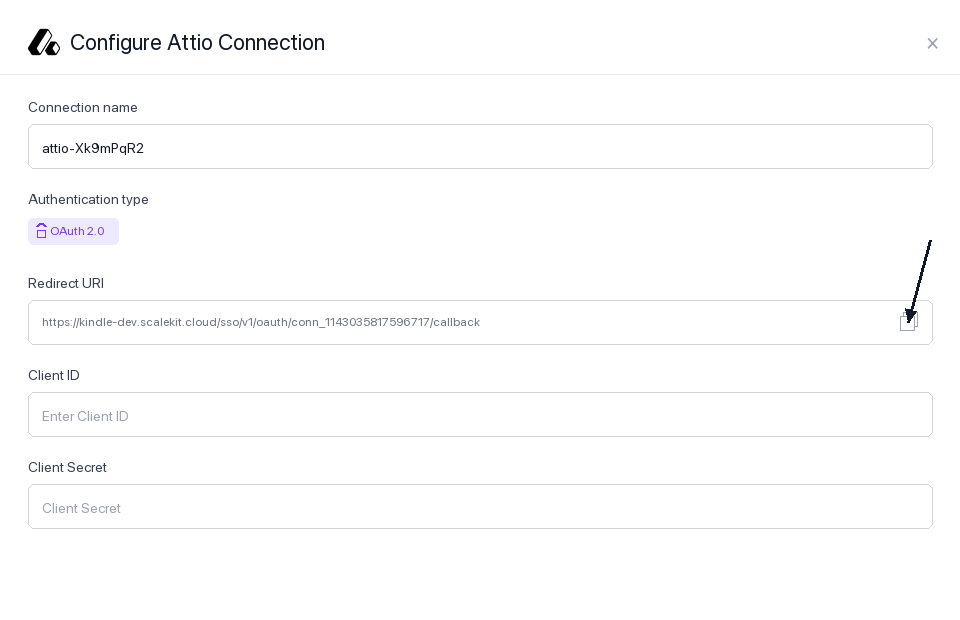
Keep this tab open — you’ll return to it in step 3.
-
-
Register the redirect URI in your Attio OAuth app
-
Sign in to build.attio.com and open the app you want to connect. If you don’t have one yet, click Create app.
-
In the left sidebar, click OAuth to open the OAuth settings tab for your app.
-
You’ll see your Client ID and Client Secret near the top of the page. Copy both values and save them somewhere safe — you’ll need them in step 3.
-
Scroll down to the Redirect URIs section. Click + New redirect URI.
-
Paste the Redirect URI you copied from Scalekit into the input field and confirm.
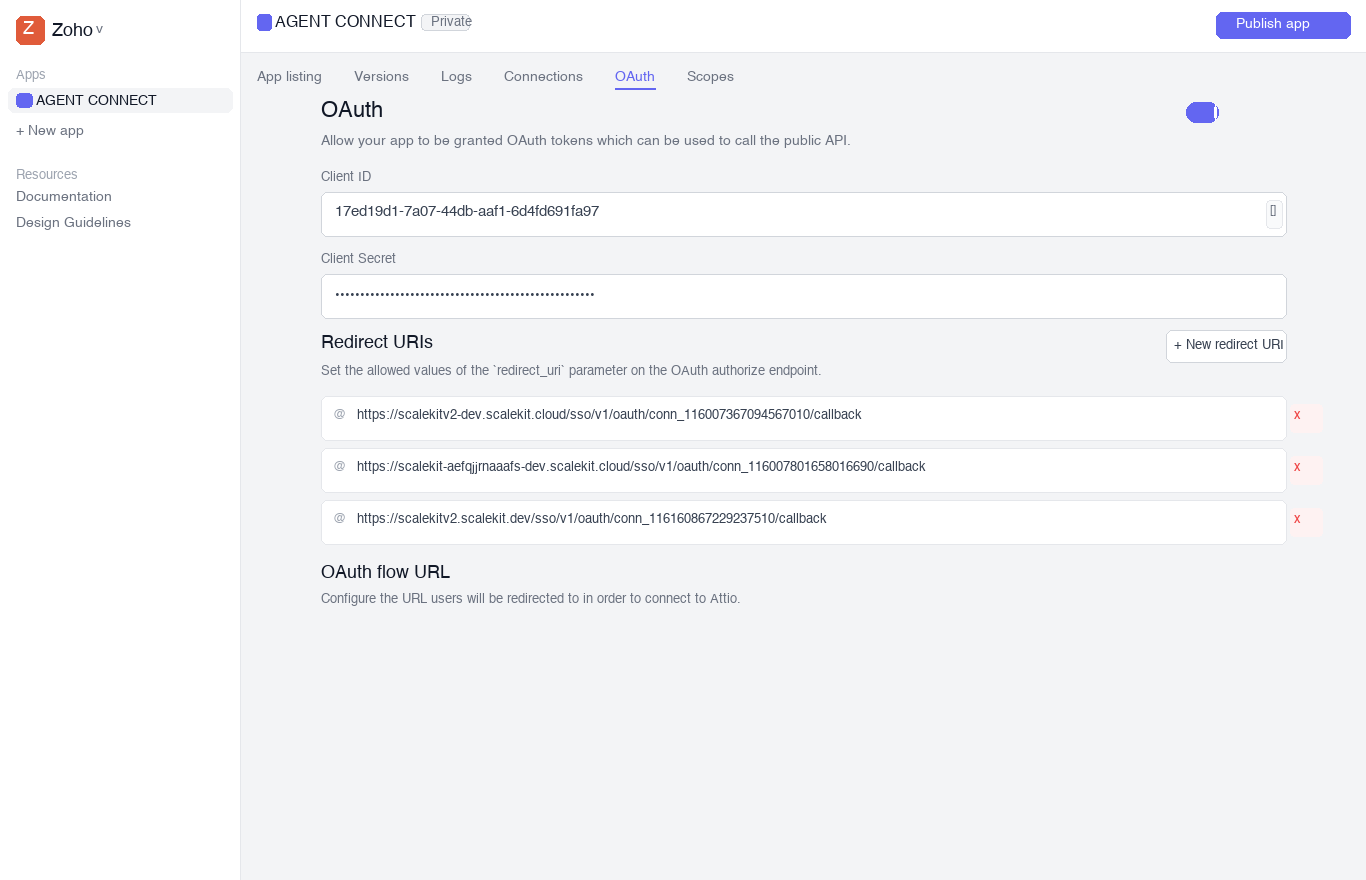
-
-
Add credentials and scopes in Scalekit
-
Return to your Scalekit dashboard → AgentKit > Connections and open the Attio connection you created in step 1.
-
Fill in the following fields:
-
Client ID — paste the Client ID from your Attio OAuth app
-
Client Secret — paste the Client Secret from your Attio OAuth app
-
Permissions — select the OAuth scopes your app requires. Choose the minimum scopes needed. Common scopes:
Scope What it allows record_permission:readRead CRM records (people, companies, deals) record_permission:read-writeRead and write CRM records object_configuration:readRead object and attribute schemas list_configuration:readRead list schemas list_entry:readRead list entries list_entry:read-writeRead and write list entries note:readRead notes note:read-writeRead and write notes task:read-writeRead and write tasks comment:read-writeRead and write comments webhook:read-writeManage webhooks user_management:readRead workspace members For a full list, see the Attio OAuth scopes reference.
-
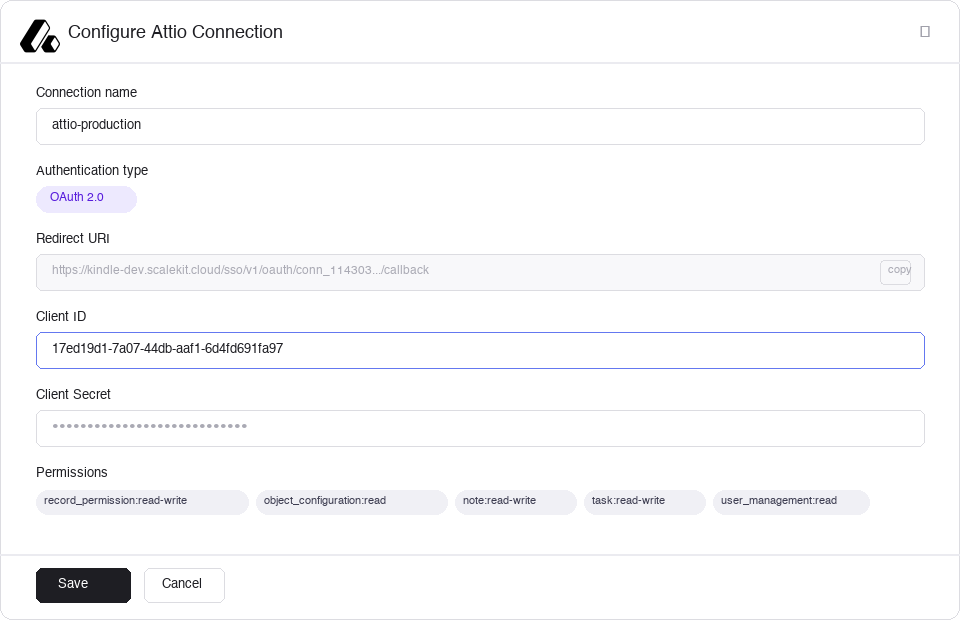
- Click Save. Scalekit will validate the credentials and mark the connection as active.
-
-
Authorize a user and make your first call
quickstart.mts import { ScalekitClient } from '@scalekit-sdk/node'import 'dotenv/config'import { createInterface } from 'node:readline/promises'const scalekit = new ScalekitClient(process.env.SCALEKIT_ENVIRONMENT_URL,process.env.SCALEKIT_CLIENT_ID,process.env.SCALEKIT_CLIENT_SECRET,)const actions = scalekit.actionsconst connector = 'attio'const identifier = 'user_123'// Generate an authorization link for the userconst { link } = await actions.getAuthorizationLink({ connectionName: connector, identifier })console.log('Authorize Attio:', link)const rl = createInterface({ input: process.stdin, output: process.stdout })await rl.question('Press Enter after authorizing...')rl.close()// Make your first callconst result = await actions.executeTool({connector,identifier,toolName: 'attio_get_current_token_info',toolInput: {},})console.log(result)Terminal window npx tsx quickstart.mtsquickstart.py import osfrom scalekit import ScalekitClientfrom dotenv import load_dotenvload_dotenv()scalekit_client = ScalekitClient(env_url=os.getenv("SCALEKIT_ENVIRONMENT_URL"),client_id=os.getenv("SCALEKIT_CLIENT_ID"),client_secret=os.getenv("SCALEKIT_CLIENT_SECRET"),)actions = scalekit_client.actionsconnection_name = "attio"identifier = "user_123"# Generate an authorization link for the userlink_response = actions.get_authorization_link(connection_name=connection_name,identifier=identifier,)print("Authorize Attio:", link_response.link)input("Press Enter after authorizing...")# Make your first callresult = actions.execute_tool(tool_input={},tool_name="attio_get_current_token_info",connection_name=connection_name,identifier=identifier,)print(result)Terminal window python quickstart.pyEach user signs in once. See Authorize a user for the full flow and statuses.
Tools
Pass the exact name toexecute_toolattio_download_fileDownloads a file by redirecting to a signed URL.Read-onlyDownload File
Downloads a file by redirecting to a signed URL. Use attio_get_file first if you only need file metadata such as name, size, or MIME type. This endpoint is in beta.
Inputs
file_idstringrequired- The UUID of the file to download.
attio_get_attributeRetrieves details of a single attribute on an Attio object or list, including its type, slug, configuration, and metadata.Read-onlyGet Attribute
Retrieves details of a single attribute on an Attio object or list, including its type, slug, configuration, and metadata.
Inputs
attributestringrequired- Attribute slug or UUID.
objectstringrequired- Object slug or UUID.
attio_get_call_recordingRetrieves a single call recording by its ID from Attio.Read-onlyGet Call Recording
Retrieves a single call recording by its ID from Attio. Returns recording metadata including duration and associated meeting.
Inputs
meeting_idstringrequired- The UUID of the meeting the call recording belongs to.
recording_idstringrequired- The UUID of the call recording to retrieve.
attio_get_call_transcriptRetrieves the transcript for a call recording in Attio.Read-onlyGet Call Transcript
Retrieves the transcript for a call recording in Attio. Returns the full transcript text with speaker attribution and timestamps.
Inputs
meeting_idstringrequired- The UUID of the meeting the call recording belongs to.
recording_idstringrequired- The UUID of the call recording to get the transcript for.
attio_get_commentRetrieves a single comment by its comment_id in Attio.Read-onlyGet Comment
Retrieves a single comment by its comment_id in Attio. Returns the comment's content, author, thread, and resolution status.
Inputs
comment_idstringrequired- The unique identifier of the comment.
attio_get_companyRetrieves a single company record by its record_id from Attio.Read-onlyGet Company
Retrieves a single company record by its record_id from Attio. Returns all attribute values with temporal and audit metadata.
Inputs
record_idstringrequired- The unique identifier of the company record.
attio_get_current_token_infoIdentifies the current access token, the workspace it is linked to, and its permissions.Read-onlyGet Current Token Info
Identifies the current access token, the workspace it is linked to, and its permissions. Use to verify token validity or retrieve workspace information.
Inputs
This tool takes no inputs.
attio_get_dealRetrieves a single deal record by its record_id from Attio.Read-onlyGet Deal
Retrieves a single deal record by its record_id from Attio. Returns all attribute values with temporal and audit metadata.
Inputs
record_idstringrequired- The unique identifier of the deal record.
attio_get_fileRetrieves metadata for a single file stored in Attio by its file ID.Read-onlyGet File
Retrieves metadata for a single file stored in Attio by its file ID. Returns name, size, MIME type, and other metadata. Use attio_download_file to get the file content.
Inputs
file_idstringrequired- The UUID of the file to retrieve.
attio_get_listRetrieves details of a single list in the Attio workspace by its UUID or slug.Read-onlyGet List
Retrieves details of a single list in the Attio workspace by its UUID or slug.
Inputs
list_idstringrequired- The unique identifier or slug of the list.
attio_get_list_entryRetrieves a single list entry by its entry_id.Read-onlyGet List Entry
Retrieves a single list entry by its entry_id. Returns detailed information about a specific entry in an Attio list.
Inputs
entry_idstringrequired- The unique identifier of the list entry.
list_idstringrequired- The unique identifier or slug of the list.
attio_get_meetingRetrieves a single meeting by its ID from Attio.Read-onlyGet Meeting
Retrieves a single meeting by its ID from Attio. Returns meeting details including title, participants, start/end times, and linked records. This endpoint is in beta.
Inputs
meeting_idstringrequired- The UUID of the meeting to retrieve.
attio_get_noteRetrieves a single note by its note_id in Attio.Read-onlyGet Note
Retrieves a single note by its note_id in Attio. Returns the note's title, content (plaintext and markdown), tags, and creator information.
Inputs
note_idstringrequired- The unique identifier of the note.
attio_get_objectRetrieves details of a single object by its slug or UUID in Attio.Read-onlyGet Object
Retrieves details of a single object by its slug or UUID in Attio.
Inputs
objectstringrequired- Object slug or UUID.
attio_get_personRetrieves a single person record by its record_id from Attio.Read-onlyGet Person
Retrieves a single person record by its record_id from Attio. Returns all attribute values with temporal and audit metadata.
Inputs
record_idstringrequired- The unique identifier of the person record.
attio_get_recordRetrieve a specific record from Attio by its object type and record ID.Read-onlyGet Record
Retrieve a specific record from Attio by its object type and record ID. Returns the full record including all attribute values with their complete audit trail (created_by_actor, active_from, active_until). Supports people, companies, deals, and custom objects.
Inputs
objectstringrequired- The slug or UUID of the object type the record belongs to. Common slugs: "people", "companies", "deals".
record_idstringrequired- The UUID of the record to retrieve.
attio_get_record_attribute_valuesRetrieves all values for a given attribute on a record in Attio.Read-onlyGet Record Attribute Values
Retrieves all values for a given attribute on a record in Attio. Can include historic values using show_historic parameter. Not available for COMINT or enriched attributes.
Inputs
attributestringrequired- Attribute slug or UUID.
objectstringrequired- Object slug or UUID.
record_idstringrequired- The unique identifier of the record.
show_historicboolean- Whether to include historic values.
attio_get_taskRetrieves a single task by its task_id in Attio.Read-onlyGet Task
Retrieves a single task by its task_id in Attio. Returns the task's content, deadline, assignees, and linked records.
Inputs
task_idstringrequired- The unique identifier of the task.
attio_get_threadRetrieves a single comment thread by its ID from Attio.Read-onlyGet Thread
Retrieves a single comment thread by its ID from Attio. Returns the thread and all comments within it.
Inputs
thread_idstringrequired- The UUID of the comment thread to retrieve.
attio_get_user_recordRetrieves a single user record by its record_id from Attio.Read-onlyGet User Record
Retrieves a single user record by its record_id from Attio. Returns all attribute values with temporal and audit metadata.
Inputs
record_idstringrequired- The unique identifier of the user record.
attio_get_webhookRetrieves a single webhook by its webhook_id in Attio.Read-onlyGet Webhook
Retrieves a single webhook by its webhook_id in Attio. Returns the webhook's target URL, event subscriptions, status, and metadata.
Inputs
webhook_idstringrequired- The unique identifier of the webhook.
attio_get_workspace_memberRetrieves a single workspace member by their workspace_member_id.Read-onlyGet Workspace Member
Retrieves a single workspace member by their workspace_member_id. Returns name, email, access level, and avatar information.
Inputs
workspace_member_idstringrequired- The unique identifier of the workspace member.
attio_get_workspace_recordRetrieves a single workspace record by its record_id from Attio.Read-onlyGet Workspace Record
Retrieves a single workspace record by its record_id from Attio. Returns all attribute values with temporal and audit metadata.
Inputs
record_idstringrequired- The unique identifier of the workspace record.
attio_list_attribute_optionsLists all select options for a select or multiselect attribute on an Attio object or list.Read-onlyList Attribute Options
Lists all select options for a select or multiselect attribute on an Attio object or list.
Inputs
attributestringrequired- Attribute slug or UUID of the select/multiselect attribute.
objectstringrequired- Object slug or UUID.
attio_list_attribute_statusesLists all statuses for a status attribute on an Attio object or list.Read-onlyList Attribute Statuses
Lists all statuses for a status attribute on an Attio object or list. Returns status IDs, titles, and configuration.
Inputs
attributestringrequired- Attribute slug or UUID of the status attribute.
objectstringrequired- Object slug or UUID.
attio_list_attributesLists the attribute schema for an Attio object or list, including slugs, types, and select/status configuration.Read-onlyList Attributes
Lists the attribute schema for an Attio object or list, including slugs, types, and select/status configuration. Use to discover what attributes exist and their types before filtering or writing.
Inputs
objectstringrequired- Object slug or UUID to list attributes for.
attio_list_call_recordingsLists all call recordings for a specific meeting in Attio.Read-onlyList Call Recordings
Lists all call recordings for a specific meeting in Attio. Returns recording metadata including duration.
Inputs
meeting_idstringrequired- The UUID of the meeting to list call recordings for.
cursorstring- Pagination cursor returned by a previous response to fetch the next page.
limitinteger- Maximum number of results to return. Defaults to 50, maximum 200.
attio_list_companiesLists company records in Attio with optional filtering and sorting.Read-onlyList Companies
Lists company records in Attio with optional filtering and sorting. Use filter and sorts fields to narrow results. Returns paginated results.
Inputs
filterobject- Filter criteria for querying companies.
limitnumber- Maximum number of records to return.
offsetnumber- Number of records to skip for pagination.
sortsarray- Sorting criteria for the results.
attio_list_dealsLists deal records in Attio with optional filtering and sorting.Read-onlyList Deals
Lists deal records in Attio with optional filtering and sorting. Returns paginated results.
Inputs
filterobject- Filter criteria for querying deals.
limitnumber- Maximum number of records to return.
offsetnumber- Number of records to skip for pagination.
sortsarray- Sorting criteria for the results.
attio_list_emailsList email metadata (participants, subject line, timestamps) from your workspace's connected mailboxes.Read-onlyList Emails
List email metadata (participants, subject line, timestamps) from your workspace's connected mailboxes. Email content is never returned. At least one of linked_object with linked_record_ids, participants, or domain must be supplied — there is no way to list every email. This endpoint is in alpha and enabled per workspace; contact support@attio.com to request access.
Inputs
cursorstring- A pagination cursor used to fetch the next page of emails, from a previous response's pagination.next_cursor.
domainstring- A domain to filter emails by. Emails with at least one participant at this domain are returned.
limitinteger- The maximum number of emails to return. Must be between 1 and 50. Defaults to 25.default
25 linked_objectstring- The object to filter emails by — the slug or ID of either the people or companies object. If provided, linked_record_ids must also be provided.
linked_record_idsstring- Comma-separated list of up to 10 record IDs to filter emails by. All IDs must belong to the object given in linked_object.
participantsstring- Comma-separated list of up to 10 email addresses. Emails that include at least one of them as a participant are returned.
sent_afterstring- Only return emails sent after this ISO 8601 timestamp (exclusive).
sent_beforestring- Only return emails sent before this ISO 8601 timestamp (exclusive).
attio_list_entriesLists entries in a given Attio list with optional filtering and sorting.Read-onlyList Entries
Lists entries in a given Attio list with optional filtering and sorting. Returns records that belong to the specified list.
Inputs
list_idstringrequired- The unique identifier or slug of the list.
filterobject- Filter criteria for querying entries.
limitnumber- Maximum number of entries to return.
offsetnumber- Number of entries to skip for pagination.
sortsarray- Sorting criteria for the results.
attio_list_entry_attribute_valuesRetrieves all values for a specific attribute on a list entry in Attio.Read-onlyList Entry Attribute Values
Retrieves all values for a specific attribute on a list entry in Attio. Can include historic values. Not available for COMINT or enriched attributes.
Inputs
attributestringrequired- The slug or UUID of the attribute to retrieve values for.
entry_idstringrequired- The UUID of the list entry.
list_idstringrequired- The slug or UUID of the list.
show_historicboolean- Whether to include historic values.
attio_list_filesLists files attached to a specific record in Attio.Read-onlyList Files
Lists files attached to a specific record in Attio. Optionally filter by storage provider or parent folder. Supports cursor-based pagination.
Inputs
objectstringrequired- The slug of the object type the record belongs to (e.g. 'people', 'companies').
record_idstringrequired- The UUID of the record to list files for.
cursorstring- Pagination cursor returned by a previous response to fetch the next page.
limitinteger- Maximum number of files to return. Must be between 1 and 200. Defaults to 50.
parent_folder_idstring- Filter files by parent folder UUID. When omitted, all files at all nesting levels are returned.
storage_providerstring- Filter files by storage provider. One of: attio, dropbox, box, google-drive, microsoft-onedrive.one of
attiodropboxboxgoogle-drivemicrosoft-onedrive
attio_list_listsRetrieve all CRM lists available in the Attio workspace, along with their entries for a specific record.Read-onlyList Lists
Retrieve all CRM lists available in the Attio workspace, along with their entries for a specific record. Lists are used to track pipeline stages, outreach targets, or custom groupings of records. Optionally filter entries by a parent record ID and object type.
Inputs
limitnumber- Maximum number of list entries to return per list. Defaults to 20.
offsetnumber- Number of list entries to skip for pagination. Defaults to 0.
attio_list_meetingsLists all meetings in the Attio workspace.Read-onlyList Meetings
Lists all meetings in the Attio workspace. Optionally filter by participants or linked records. This endpoint is in beta.
Inputs
limitnumber- Maximum number of results to return.
offsetnumber- Number of results to skip for pagination.
attio_list_notesList notes in Attio.Read-onlyList Notes
List notes in Attio. Optionally filter by a parent object and record to retrieve notes attached to a specific person, company, deal, or other object. Supports pagination via limit (max 50) and offset.
Inputs
limitnumber- Maximum number of notes to return. Default is 10, maximum is 50.
offsetnumber- Number of notes to skip before returning results. Default is 0. Use with limit for pagination.
parent_objectstring- Filter notes by parent object slug or UUID. Examples: "people", "companies", "deals". Must be provided together with parent_record_id to filter by a specific record.
parent_record_idstring- Filter notes by parent record UUID. Must be provided together with parent_object.
attio_list_objectsRetrieves all available objects (both system-defined and user-defined) in the Attio workspace.Read-onlyList Objects
Retrieves all available objects (both system-defined and user-defined) in the Attio workspace. Fundamental for understanding workspace structure.
Inputs
This tool takes no inputs.
attio_list_peopleLists person records in Attio with optional filtering and sorting.Read-onlyList People
Lists person records in Attio with optional filtering and sorting. Use filter and sorts fields to narrow results. Returns paginated results.
Inputs
filterobject- Filter criteria for querying people.
limitnumber- Maximum number of records to return.
offsetnumber- Number of records to skip for pagination.
sortsarray- Sorting criteria for the results.
attio_list_record_entriesLists all entries across all lists for which a specific record is the parent in Attio.Read-onlyList Record Entries
Lists all entries across all lists for which a specific record is the parent in Attio. Returns list IDs, slugs, entry IDs, and creation timestamps.
Inputs
objectstringrequired- Object slug or UUID.
record_idstringrequired- The unique identifier of the parent record.
attio_list_recordsList and query records for a specific Attio object type (e.g.Read-onlyList Records
List and query records for a specific Attio object type (e.g. people, companies, deals). Supports filtering by attribute values, sorting, and pagination with limit and offset. Returns guaranteed up-to-date data unlike the Search Records endpoint.
Inputs
objectstringrequired- The slug or UUID of the object type to list records for. Common slugs: "people", "companies", "deals".
filterobject- Filter object to narrow results to a subset of records. Structure depends on the attributes of the target object. Example: {"email_addresses": {"email_address": {"$eq": "alice@example.com"}}}
limitnumber- Maximum number of records to return. Defaults to 500.
offsetnumber- Number of records to skip before returning results. Defaults to 0. Use with limit for pagination.
sortsarray- Array of sort objects to order results. Each sort object specifies a direction ("asc" or "desc"), an attribute slug or ID, and an optional field. Example: [{"direction": "asc", "attribute": "name"}]
attio_list_select_optionsLists all select options for a select-type attribute in Attio.Read-onlyList Select Options
Lists all select options for a select-type attribute in Attio. Returns each option's title, color, and ID.
Inputs
attributestringrequired- The slug of the select-type attribute.
objectstringrequired- The slug of the object type the attribute belongs to.
attio_list_statusesLists all status options for a status-type attribute in Attio (e.g.Read-onlyList Statuses
Lists all status options for a status-type attribute in Attio (e.g. deal stages). Returns the status title, color, and ID.
Inputs
attributestringrequired- The slug of the status-type attribute (e.g. 'stage').
objectstringrequired- The slug of the object type the attribute belongs to (e.g. 'deals', 'companies').
attio_list_tasksList tasks in Attio, optionally filtered by linked record.Read-onlyList Tasks
List tasks in Attio, optionally filtered by linked record. Returns tasks with their content, deadline, completion status, assignees, and linked records. Use record filters to retrieve tasks associated with a specific contact, company, or deal.
Inputs
is_completedboolean- Filter tasks by completion status. Set to true to return only completed tasks, false for only incomplete tasks, or omit to return all tasks.
limitnumber- Maximum number of tasks to return. Defaults to 20.
linked_objectstring- Filter tasks linked to records of this object type. Use with linked_record_id. Common slugs: "people", "companies", "deals".
linked_record_idstring- Filter tasks linked to this specific record UUID. Use with linked_object to specify the object type.
offsetnumber- Number of tasks to skip for pagination. Defaults to 0.
attio_list_threadsLists threads of comments on a record or list entry in Attio.Read-onlyList Threads
Lists threads of comments on a record or list entry in Attio. Returns all comment threads associated with a specific record or list entry.
Inputs
parent_objectstringrequired- Object slug of the parent record.
parent_record_idstringrequired- The unique identifier of the parent record.
attio_list_user_recordsLists user records in Attio with optional filtering and sorting.Read-onlyList User Records
Lists user records in Attio with optional filtering and sorting. Returns paginated results.
Inputs
filterobject- Filter criteria for querying user records.
limitnumber- Maximum number of records to return.
offsetnumber- Number of records to skip for pagination.
sortsarray- Sorting criteria for the results.
attio_list_views_for_listLists saved views (table or board layouts) for a list.Read-onlyList Views for List
Lists saved views (table or board layouts) for a list. Results are ordered by view ID ascending.
Inputs
liststringrequired- A UUID or slug identifying the list.
cursorstring- A pagination cursor from a previous response's pagination.next_cursor. Omit for the first page.
limitinteger- The maximum number of views to return. Must be between 1 and 1000. Defaults to 500.default
500 show_archivedboolean- Set to true to include archived views.default
false
attio_list_views_for_objectLists saved views (table or board layouts) for an object.Read-onlyList Views for Object
Lists saved views (table or board layouts) for an object. Results are ordered by view ID ascending.
Inputs
objectstringrequired- The slug or UUID of the object type to list views for. Common slugs: "people", "companies", "deals".
cursorstring- A pagination cursor from a previous response's pagination.next_cursor. Omit for the first page.
limitinteger- The maximum number of views to return. Must be between 1 and 1000. Defaults to 500.default
500 show_archivedboolean- Set to true to include archived views.default
false
attio_list_webhooksRetrieves all webhooks in the Attio workspace.Read-onlyList Webhooks
Retrieves all webhooks in the Attio workspace. Returns webhook configurations, subscriptions, and statuses. Supports optional limit and offset pagination parameters.
Inputs
limitnumber- Maximum number of webhooks to return.
offsetnumber- Number of webhooks to skip for pagination.
attio_list_workspace_membersLists all workspace members in the Attio workspace.Read-onlyList Workspace Members
Lists all workspace members in the Attio workspace. Use to retrieve workspace member IDs needed for assigning owners or actor-reference attributes.
Inputs
This tool takes no inputs.
attio_list_workspace_recordsLists workspace records in Attio with optional filtering and sorting.Read-onlyList Workspace Records
Lists workspace records in Attio with optional filtering and sorting. Returns paginated results.
Inputs
filterobject- Filter criteria for querying workspace records.
limitnumber- Maximum number of records to return.
offsetnumber- Number of records to skip for pagination.
sortsarray- Sorting criteria for the results.
attio_query_sqlExecutes a SQL query against the Attio workspace data.Read-onlyQuery SQL
Executes a SQL query against the Attio workspace data. Supports SELECT statements across objects, lists, and their attributes. Useful for complex analytical queries and bulk data retrieval.
Inputs
querystringrequired- The SQL SELECT query to execute against Attio data. Use object slugs as table names (e.g. SELECT * FROM people LIMIT 10).
attio_search_recordsSearch for records in Attio for a given object type (people, companies, deals, or custom objects) using a fuzzy text query.Read-onlySearch Records
Search for records in Attio for a given object type (people, companies, deals, or custom objects) using a fuzzy text query. Returns matching records with their IDs, labels, and key attributes.
Inputs
objectstringrequired- The slug or UUID of the object type to search within. Common slugs: "people", "companies", "deals".
querystringrequired- Fuzzy text search string matched against names, emails, domains, phone numbers, and social handles. Pass an empty string to return all records.
limitinteger- Maximum number of results to return per page. Defaults to 20.
offsetinteger- Number of results to skip for pagination. Defaults to 0.
attio_add_to_listAdd a record (contact, company, deal, or custom object) to a specific Attio list.WriteAdd to List
Add a record (contact, company, deal, or custom object) to a specific Attio list. Returns the newly created list entry with its entry ID, which can be used to remove it later. If the record is already in the list, a new entry is created.
Inputs
list_idstringrequired- The UUID of the Attio list to add the record to. Use the List Lists tool (attio_list_lists) to retrieve available lists and their UUIDs.
parent_objectstringrequired- The object type slug the record belongs to. Must match the object type the list is configured for — run attio_list_lists to check the list's parent object before adding.
parent_record_idstringrequired- The UUID of the record to add to the list. Must be a valid UUID — obtain this from search or list records results.
entry_valuesobject- Optional attribute values to set on the list entry itself (not the underlying record). Keys are attribute slugs, values are the data to set. Example: {"stage": "qualified"}
attio_append_record_valuesUpdate a record's attributes in Attio, appending to multiselect attributes instead of replacing them.WriteAppend Record Values
Update a record's attributes in Attio, appending to multiselect attributes instead of replacing them. New multiselect values are prepended to the values that already exist. Use attio_update_record instead if you want to overwrite/remove existing multiselect values. Supports people, companies, deals, and custom objects.
Inputs
objectstringrequired- The slug or UUID of the object type the record belongs to. Common slugs: "people", "companies", "deals".
record_idstringrequired- The UUID of the record to update.
valuesobjectrequired- Attribute values to update. Keys are attribute API slugs; values are the new data. For multiselect attributes, the supplied array is prepended to any values that already exist.
attio_create_attributeCreates a new attribute on an Attio object or list.WriteCreate Attribute
Creates a new attribute on an Attio object or list. Requires api_slug, title, type, description, is_required, is_unique, is_mct, and config. The config object varies by type — for most types pass an empty object {}. For select/multiselect, config can include options. For record-reference, config includes the target object.
Inputs
api_slugstringrequired- Snake_case identifier for the new attribute. Must be unique within the object.
configobjectrequired- Type-specific configuration object. For most types (text, number, date, checkbox, etc.) pass an empty object {}. For record-reference, pass {"relationship": {"object": "companies"}}.
descriptionstringrequired- Human-readable description of what this attribute is used for.
is_multiselectbooleanrequired- Whether this attribute allows multiple values per record.
is_requiredbooleanrequired- Whether this attribute is required when creating records of this object type.
is_uniquebooleanrequired- Whether values for this attribute must be unique across all records of this object type.
objectstringrequired- Slug or UUID of the object to create the attribute on. Common slugs: people, companies, deals.
titlestringrequired- Human-readable display title for the attribute.
typestringrequired- Data type of the attribute. Supported values: text, number, select, multiselect, status, date, timestamp, checkbox, currency, record-reference, actor-reference, location, domain, email-address, phone-number, interaction.
attio_create_call_recordingCreate a call recording for a meeting in Attio.WriteCreate Call Recording
Create a call recording for a meeting in Attio. A transcript should always be provided — a recording created without one will be missing summaries and other transcript-derived features. The video is optional; a transcript-only recording is fully supported. This endpoint is in beta and rate limited to 1 request per second.
Inputs
meeting_idstringrequired- The UUID of the meeting this recording belongs to.
transcriptarray- JSON array of transcript speech segments. Each item needs speech, start_time, end_time (all in seconds), and a speaker object with a name and optional email_address.
video_urlstring- A publicly accessible HTTPS URL to an .mp4 video file of the call recording, up to 1GB. Attio downloads the video from this URL asynchronously. Omit for a transcript-only recording.
attio_create_commentCreates a new comment on a record in Attio.WriteCreate Comment
Creates a new comment on a record in Attio. Requires author_id (workspace member UUID), content, record_object (e.g. people, companies, deals), and record_id. Optionally provide thread_id to reply to an existing thread. Format is always plaintext.
Inputs
author_idstringrequired- UUID of the workspace member who is authoring the comment. Use the List Workspace Members tool to find member UUIDs.
contentstringrequired- Plaintext content of the comment.
record_idstringrequired- UUID of the record to attach the comment to.
record_objectstringrequired- Object slug or UUID of the record to comment on. Common slugs: people, companies, deals.
thread_idstring- UUID of an existing comment thread to reply to. Leave empty to start a new top-level comment.
attio_create_companyCreates a new company record in Attio.WriteCreate Company
Creates a new company record in Attio. Throws an error on conflicts of unique attributes like domains. Use Assert Company if you prefer to update on conflicts. Note: The logo_url attribute cannot currently be set via the API.
Inputs
valuesobjectrequired- Attribute values for the new company record.
attio_create_dealCreates a new deal record in Attio.WriteCreate Deal
Creates a new deal record in Attio. Throws an error on conflicts of unique attributes. Provide at least one attribute value in the values field.
Inputs
valuesobjectrequired- Attribute values for the new deal record.
attio_create_folderCreates a native Attio folder entry on an object record, to organize files.WriteCreate Folder
Creates a native Attio folder entry on an object record, to organize files. This endpoint is in beta.
Inputs
namestringrequired- The folder name.
objectstringrequired- The slug or UUID of the object type the record belongs to. Common slugs: "people", "companies", "deals".
record_idstringrequired- The UUID of the record to create the folder entry on.
parent_folder_idstring- Optional UUID of the parent folder to nest this folder under. Omit to create a top-level folder.
attio_create_listCreates a new list in Attio.WriteCreate List
Creates a new list in Attio. Requires workspace_access (one of: full-access, read-and-write, read-only) and workspace_member_access array. After creation, add attributes using Create Attribute and records using Create Entry.
Inputs
api_slugstringrequired- Snake_case identifier for the new list used in API access.
namestringrequired- Human-readable display name for the new list.
parent_objectstringrequired- Object slug the list tracks. Must be a valid object slug such as people, companies, or deals.
workspace_accessstringrequired- Access level for all workspace members. Must be one of: full-access, read-and-write, read-only. Use full-access to give all members full control.one of
full-accessread-and-writeread-only workspace_member_accessarray- Optional array of per-member access overrides. Leave empty for uniform access via workspace_access. Each item: {"workspace_member_id": "uuid", "level": "full-access"}.
attio_create_meetingCreates a new meeting in Attio.WriteCreate Meeting
Creates a new meeting in Attio. New person records and companies are automatically created based on participant email addresses. This endpoint is in beta.
Inputs
end_datetimestringrequired- ISO 8601 datetime when the meeting ends (exclusive), or an ISO 8601 date if is_all_day is true.
start_datetimestringrequired- ISO 8601 datetime when the meeting starts, or an ISO 8601 date if is_all_day is true.
titlestringrequired- The title of the meeting, up to 1,000 characters.
descriptionstring- The description of the meeting, up to 10,000 characters.
end_timezonestring- IANA timezone the meeting ends in, used when end_datetime has no UTC offset. Ignored for all-day meetings.
is_all_dayboolean- Whether the meeting is an all-day event. When true, start/end must be dates (no time). When false, they must be datetimes.default
false participantsarray- JSON array of participant objects. Each item needs an email_address (or a name, if email is omitted) and an optional is_organizer boolean.
start_timezonestring- IANA timezone the meeting starts in, used when start_datetime has no UTC offset. Ignored for all-day meetings.
attio_create_noteCreate a note on an Attio record (person, company, deal, or custom object).WriteCreate Note
Create a note on an Attio record (person, company, deal, or custom object). Notes support plaintext or Markdown formatting. You can optionally backdate the note by specifying a created_at timestamp, or associate it with an existing meeting via meeting_id.
Inputs
contentstringrequired- Body of the note. Use plain text or Markdown depending on the format field. Line breaks are supported via \n in plaintext mode. IMPORTANT: This input field is called 'content', NOT 'content_markdown'. The field 'content_markdown' only appears in the API response and is not a valid input.
formatstringrequired- Format of the note content. Must be either "plaintext" or "markdown".one of
plaintextmarkdown parent_objectstringrequired- The slug or UUID of the parent object the note will be attached to. Common slugs: "people", "companies", "deals".
parent_record_idstringrequired- UUID of the parent record the note will be attached to.
titlestringrequired- Plaintext title for the note. No formatting is allowed in the title.
created_atstring- ISO 8601 timestamp for backdating the note. Defaults to the current time if not provided. Example: "2024-01-15T10:30:00Z"
meeting_idstring- UUID of an existing meeting to associate with this note. Optional.
attio_create_objectCreates a new custom object in the Attio workspace.WriteCreate Object
Creates a new custom object in the Attio workspace. Use when you need an object type beyond the standard types (people, companies, deals, users, workspaces).
Inputs
api_slugstringrequired- Snake_case identifier for the new object.
plural_nounstringrequired- Plural noun for the new object type.
singular_nounstringrequired- Singular noun for the new object type.
attio_create_personCreates a new person record in Attio.WriteCreate Person
Creates a new person record in Attio. Throws an error on conflicts of unique attributes like email_addresses. Use Assert Person if you prefer to update on conflicts. Note: The avatar_url attribute cannot currently be set via the API.
Inputs
valuesobjectrequired- Attribute values for the new person record.
attio_create_recordCreate a new record in Attio for a given object type (e.g.WriteCreate Record
Create a new record in Attio for a given object type (e.g. people, companies, deals). Provide attribute values as a JSON object mapping attribute API slugs or IDs to their values. Throws an error if a unique attribute conflict is detected — use the Assert Record endpoint instead to upsert on conflict.
Inputs
objectstringrequired- The slug or UUID of the object type to create the record in. Common slugs: "people", "companies", "deals".
valuesobjectrequired- Attribute values for the new record. Keys are attribute API slugs or UUIDs; values are the data to set. For multi-value attributes, supply an array. Example for a person: {"name": [{"first_name": "Alice", "last_name": "Smith"}], "email_addresses": [{"email_address": "alice@example.com"}]}
attio_create_select_optionCreates a new select option for a select or multiselect attribute in Attio.WriteCreate Select Option
Creates a new select option for a select or multiselect attribute in Attio. Requires object_configuration:read-write scope.
Inputs
attributestringrequired- The slug of the select-type attribute.
objectstringrequired- The slug of the object type the attribute belongs to (e.g. 'people', 'companies').
titlestringrequired- Display title for the select option.
colorstring- Color for the select option (e.g. 'red', 'green', 'blue', 'yellow', 'orange', 'purple', 'pink', 'cyan', 'grey').
attio_create_statusCreates a new status option for a status attribute in Attio.WriteCreate Status
Creates a new status option for a status attribute in Attio. Requires object_configuration:read-write scope.
Inputs
attributestringrequired- The slug of the select-type attribute.
objectstringrequired- The slug of the object type the attribute belongs to (e.g. 'people', 'companies').
titlestringrequired- Display title for the status.
celebration_enabledboolean- Whether to show a celebration animation when a record reaches this status.
colorstring- Color for the status (e.g. 'red', 'green', 'blue', 'yellow', 'orange', 'purple').
attio_create_taskCreate a new task in Attio.WriteCreate Task
Create a new task in Attio. Tasks can be linked to one or more records (people, companies, deals, etc.) and assigned to workspace members. Supports setting a deadline and initial completion status. Only plaintext format is supported for task content.
Inputs
contentstringrequired- The text content of the task. Maximum 2000 characters. Only plaintext is supported.
deadline_atstringrequired- ISO 8601 datetime for the task deadline. Must include milliseconds and timezone, e.g. 2024-03-31T17:00:00.000Z.
assigneesarray- Array of assignees for this task. Each item must have either referenced_actor_id (UUID) with referenced_actor_type set to workspace-member, or workspace_member_email_address. Example: [{"referenced_actor_type": "workspace-member", "referenced_actor_id": "d4a8e6f2-3b1c-4d5e-9f0a-1b2c3d4e5f6a"}]
is_completedboolean- Whether the task is already completed. Defaults to false.
linked_recordsarray- Array of records to link this task to. Each item must have a target_object (slug or UUID) and either target_record_id (UUID) or an attribute-based match. Example: [{"target_object": "people", "target_record_id": "bf071e1f-6035-429d-b874-d83ea64ea13b"}]
attio_create_user_recordCreates a new user record in Attio.WriteCreate User Record
Creates a new user record in Attio. Users represent end-users of a product. Throws an error on conflicts of unique attributes. Use attio_upsert_user_record to update on conflicts.
Inputs
valuesobjectrequired- Attribute values for the new user record.
attio_create_webhookCreates a new webhook in Attio to receive event notifications at a target URL.WriteCreate Webhook
Creates a new webhook in Attio to receive event notifications at a target URL. Requires webhook:read-write scope. The target URL must use HTTPS.
Inputs
subscriptionsarrayrequired- Array of event subscriptions. Each item must have an event_type (e.g. 'record.created', 'note.created', 'task.created') and a filter (use null to receive all events of that type).
target_urlstringrequired- The HTTPS URL where webhook events will be delivered.
attio_create_workspace_recordCreates a new workspace record in Attio.WriteCreate Workspace Record
Creates a new workspace record in Attio. Workspaces represent customer workspaces or tenants. Throws an error on conflicts of unique attributes. Use attio_upsert_workspace_record to update on conflicts.
Inputs
valuesobjectrequired- Attribute values for the new workspace record.
attio_update_attributeUpdates the configuration of an attribute in Attio (e.g.WriteUpdate Attribute
Updates the configuration of an attribute in Attio (e.g. its title, description, or default value). Requires object_configuration:read-write scope.
Inputs
attributestringrequired- The slug or UUID of the attribute to update.
identifierstringrequired- Slug or UUID of the object (when target is "objects") or list (when target is "lists").
targetstringrequired- Whether the attribute belongs to an object or a list. Use 'objects' for standard objects (people, companies, deals) and 'lists' for lists.one of
objectslists descriptionstring- New description for the attribute.
is_requiredboolean- Whether this attribute is required when creating a record.
titlestring- New display title for the attribute.
attio_update_companyUpdates an existing company record in Attio by appending to multiselect attribute values.WriteUpdate Company
Updates an existing company record in Attio by appending to multiselect attribute values. Use attio_update_record (PUT) to overwrite multiselect values instead.
Inputs
record_idstringrequired- The UUID of the company record to update.
valuesobjectrequired- Attribute values to update on the company record. Keys are attribute slugs.
attio_update_dealUpdates an existing deal record in Attio by appending to multiselect attribute values.WriteUpdate Deal
Updates an existing deal record in Attio by appending to multiselect attribute values. Use attio_update_record (PUT) to overwrite multiselect values instead.
Inputs
record_idstringrequired- The UUID of the deal record to update.
valuesobjectrequired- Attribute values to update on the deal record. Keys are attribute slugs.
attio_update_listUpdates the configuration of a list in Attio (e.g.WriteUpdate List
Updates the configuration of a list in Attio (e.g. its name or description). Requires list_configuration:read-write scope.
Inputs
list_idstringrequired- The slug or UUID of the list to update.
descriptionstring- New description for the list.
namestring- New display name for the list.
attio_update_list_entryUpdates attribute values on a list entry in Attio.WriteUpdate List Entry
Updates attribute values on a list entry in Attio. Multiselect attribute values are appended (not overwritten). Use to update entry-level attributes like stage, owner, or custom fields on list entries.
Inputs
entry_idstringrequired- The UUID of the list entry to update.
entry_valuesobjectrequired- Attribute values to update on the list entry. Keys are entry-level attribute slugs.
list_idstringrequired- The slug or UUID of the list containing the entry.
attio_update_objectUpdates the configuration of an object (e.g.WriteUpdate Object
Updates the configuration of an object (e.g. its singular noun, plural noun, or API slug) in Attio. Requires object_configuration:read-write scope.
Inputs
object_idstringrequired- The slug or UUID of the object to update.
api_slugstring- New API slug for the object (URL-safe, lowercase, hyphenated).
plural_nounstring- New plural noun for the object (e.g. 'Contacts').
singular_nounstring- New singular noun for the object (e.g. 'Contact').
attio_update_personUpdates an existing person record in Attio by appending to multiselect attribute values.WriteUpdate Person
Updates an existing person record in Attio by appending to multiselect attribute values. Use attio_update_record (PUT) to overwrite multiselect values instead.
Inputs
record_idstringrequired- The UUID of the person record to update.
valuesobjectrequired- Attribute values to update on the person record. Keys are attribute slugs.
attio_update_recordUpdate an existing record's attributes in Attio.WriteUpdate Record
Update an existing record's attributes in Attio. For multiselect attributes, the supplied values will overwrite (replace) the existing list of values. Use the Append Multiselect endpoint instead if you want to add values without removing existing ones. Supports people, companies, deals, and custom objects. IMPORTANT: Prefer using specific update tools when available — use attio_update_person for people records, attio_update_company for company records, attio_update_deal for deal records, attio_update_task for tasks, attio_update_attribute for attributes, attio_update_list for lists, attio_update_list_entry for list entries, attio_update_webhook for webhooks, attio_update_workspace_record for workspace records, and attio_update_user_record for user records. Use this generic tool only for custom objects or when no specific tool exists.
- Idempotent
Inputs
objectstringrequired- The slug or UUID of the object type the record belongs to. Common slugs: "people", "companies", "deals".
record_idstringrequired- The UUID of the record to update.
valuesobjectrequired- Attribute values to update. Keys are attribute API slugs; values are the new data. For multiselect attributes, the supplied array replaces all existing values.
attio_update_select_optionUpdates a select option for a select or multiselect attribute in Attio.WriteUpdate Select Option
Updates a select option for a select or multiselect attribute in Attio. Requires object_configuration:read-write scope.
Inputs
attributestringrequired- The slug of the select-type attribute.
objectstringrequired- The slug of the object type the attribute belongs to (e.g. 'people', 'companies').
option_idstringrequired- The UUID of the select option to update.
colorstring- New color for the select option (e.g. 'red', 'green', 'blue').
titlestring- New display title for the select option.
attio_update_statusUpdates a status option for a status attribute in Attio.WriteUpdate Status
Updates a status option for a status attribute in Attio. Requires object_configuration:read-write scope.
Inputs
attributestringrequired- The slug of the select-type attribute.
objectstringrequired- The slug of the object type the attribute belongs to (e.g. 'people', 'companies').
status_idstringrequired- The UUID of the status to update.
celebration_enabledboolean- Whether to show a celebration animation when a record reaches this status.
colorstring- New color for the status (e.g. 'red', 'green', 'blue').
titlestring- New display title for the status.
attio_update_taskUpdates an existing task in Attio.WriteUpdate Task
Updates an existing task in Attio. Supports updating content, deadline, completion status, assignees, and linked records. Requires task:read-write scope.
Inputs
task_idstringrequired- The UUID of the task to update.
assigneesarray- Updated list of assignees. Each item must have referenced_actor_type and referenced_actor_id, or workspace_member_email_address.
contentstring- New text content for the task. Maximum 2000 characters. Only plaintext is supported.
deadline_atstring- New ISO 8601 datetime for the task deadline, e.g. 2024-03-31T17:00:00.000Z.
is_completedboolean- Whether the task is completed.
linked_recordsarray- Updated list of records linked to this task.
attio_update_user_recordUpdates an existing user record in Attio by appending to multiselect attribute values.WriteUpdate User Record
Updates an existing user record in Attio by appending to multiselect attribute values.
Inputs
record_idstringrequired- The UUID of the user record to update.
valuesobjectrequired- Attribute values to update on the user record. Keys are attribute slugs.
attio_update_webhookUpdates an existing webhook in Attio.WriteUpdate Webhook
Updates an existing webhook in Attio. Can update the target URL and/or event subscriptions. Requires webhook:read-write scope.
Inputs
webhook_idstringrequired- The UUID of the webhook to update.
subscriptionsarray- Updated list of event subscriptions. Each item must have an event_type and filter (use null to receive all events of that type).
target_urlstring- New HTTPS URL where webhook events will be delivered.
attio_update_workspace_recordUpdates an existing workspace record in Attio by appending to multiselect attribute values.WriteUpdate Workspace Record
Updates an existing workspace record in Attio by appending to multiselect attribute values.
Inputs
record_idstringrequired- The UUID of the workspace record to update.
valuesobjectrequired- Attribute values to update on the workspace record. Keys are attribute slugs.
attio_upsert_companyCreates or updates a company record in Attio based on a matching attribute (e.g.WriteUpsert Company
Creates or updates a company record in Attio based on a matching attribute (e.g. domain). If a matching record is found, it is updated; otherwise a new record is created. Multiselect values are overwritten on update.
- Idempotent
Inputs
matching_attributestringrequired- The attribute slug used to match an existing company record (e.g. 'domains'). If a record with this attribute value exists, it will be updated.
valuesobjectrequired- Attribute values for the company record. Must include the matching attribute.
attio_upsert_dealCreates or updates a deal record in Attio based on a matching attribute.WriteUpsert Deal
Creates or updates a deal record in Attio based on a matching attribute. If a matching record is found, it is updated; otherwise a new record is created. Multiselect values are overwritten on update.
- Idempotent
Inputs
matching_attributestringrequired- The attribute slug used to match an existing deal record (e.g. 'name'). If a record with this attribute value exists, it will be updated.
valuesobjectrequired- Attribute values for the deal record. Must include the matching attribute.
attio_upsert_list_entryCreates or updates a list entry in Attio by matching on the parent record.WriteUpsert List Entry
Creates or updates a list entry in Attio by matching on the parent record. If an entry for the specified parent record already exists in the list, it is updated; otherwise a new entry is created. Multiselect values are overwritten on update.
- Idempotent
Inputs
list_idstringrequired- The slug or UUID of the list.
parent_objectstringrequired- The object type slug the parent record belongs to (e.g. 'companies', 'people', 'deals').
parent_record_idstringrequired- The UUID of the parent record to upsert the entry for.
entry_valuesobject- Attribute values to set on the list entry itself. Keys are entry-level attribute slugs.
attio_upsert_personCreates or updates a person record in Attio based on a matching attribute (e.g.WriteUpsert Person
Creates or updates a person record in Attio based on a matching attribute (e.g. email_addresses). If a matching record is found, it is updated; otherwise a new record is created. Multiselect values are overwritten on update.
- Idempotent
Inputs
matching_attributestringrequired- The attribute slug used to match an existing person record (e.g. 'email_addresses'). If a record with this attribute value exists, it will be updated.
valuesobjectrequired- Attribute values for the person record. Must include the matching attribute.
attio_upsert_recordCreates or updates a record of any object type in Attio based on a matching attribute.WriteUpsert Record
Creates or updates a record of any object type in Attio based on a matching attribute. If a matching record is found, it is updated; otherwise a new record is created. Multiselect values are overwritten on update. Use specific upsert tools when available (attio_upsert_company, attio_upsert_person, attio_upsert_deal) — use this generic tool only for custom objects.
- Idempotent
Inputs
matching_attributestringrequired- The attribute slug used to match an existing record. If a record with this attribute value exists, it will be updated.
objectstringrequired- The slug or UUID of the object type. Common slugs: 'people', 'companies', 'deals'.
valuesobjectrequired- Attribute values for the record. Must include the matching attribute.
attio_upsert_user_recordCreates or updates a user record in Attio based on a matching attribute.WriteUpsert User Record
Creates or updates a user record in Attio based on a matching attribute. If a matching record is found, it is updated; otherwise a new record is created.
- Idempotent
Inputs
matching_attributestringrequired- The attribute slug used to match an existing user record (e.g. 'primary_email_address').
valuesobjectrequired- Attribute values for the user record. Must include the matching attribute.
attio_upsert_workspace_recordCreates or updates a workspace record in Attio based on a matching attribute.WriteUpsert Workspace Record
Creates or updates a workspace record in Attio based on a matching attribute. If a matching record is found, it is updated; otherwise a new record is created.
- Idempotent
Inputs
matching_attributestringrequired- The attribute slug used to match an existing workspace record.
valuesobjectrequired- Attribute values for the workspace record. Must include the matching attribute.
attio_delete_call_recordingDeletes the specified call recording.DestructiveDelete Call Recording
Deletes the specified call recording. This removes the call recording and all associated data, including its transcript. This endpoint is in beta.
Inputs
meeting_idstringrequired- The UUID of the meeting this call recording belongs to.
recording_idstringrequired- The UUID of the call recording to delete.
attio_delete_commentPermanently deletes a comment by its comment_id.DestructiveDelete Comment
Permanently deletes a comment by its comment_id. If the comment is at the head of a thread, all messages in the thread are also deleted.
Inputs
comment_idstringrequired- The unique identifier of the comment to delete.
attio_delete_companyPermanently deletes a company record from Attio by its record_id.DestructiveDelete Company
Permanently deletes a company record from Attio by its record_id. This operation is irreversible.
Inputs
record_idstringrequired- The unique identifier of the company record to delete.
attio_delete_dealPermanently deletes a deal record from Attio by its record_id.DestructiveDelete Deal
Permanently deletes a deal record from Attio by its record_id. This operation is irreversible.
Inputs
record_idstringrequired- The unique identifier of the deal record to delete.
attio_delete_filePermanently deletes a file from Attio by its file ID.DestructiveDelete File
Permanently deletes a file from Attio by its file ID. This action cannot be undone.
- Idempotent
Inputs
file_idstringrequired- The UUID of the file to delete.
attio_delete_list_entryRemoves an entry from a list in Attio.DestructiveDelete List Entry
Removes an entry from a list in Attio. The parent record is not deleted, only its membership in this list.
- Idempotent
Inputs
entry_idstringrequired- The UUID of the list entry to delete.
list_idstringrequired- The slug or UUID of the list.
attio_delete_notePermanently deletes a note from Attio by its note_id.DestructiveDelete Note
Permanently deletes a note from Attio by its note_id. This operation is irreversible.
Inputs
note_idstringrequired- The unique identifier of the note to delete.
attio_delete_personPermanently deletes a person record from Attio by its record_id.DestructiveDelete Person
Permanently deletes a person record from Attio by its record_id. This operation is irreversible.
Inputs
record_idstringrequired- The unique identifier of the person record to delete.
attio_delete_recordPermanently delete a record from Attio by its object type and record ID.DestructiveDelete Record
Permanently delete a record from Attio by its object type and record ID. This action is irreversible. Returns an empty response on success. Returns 404 if the record does not exist.
Inputs
objectstringrequired- The slug or UUID of the object type the record belongs to. Common slugs: "people", "companies", "deals".
record_idstringrequired- The UUID of the record to delete.
attio_delete_taskPermanently deletes a task from Attio by its task_id.DestructiveDelete Task
Permanently deletes a task from Attio by its task_id. This operation is irreversible.
Inputs
task_idstringrequired- The unique identifier of the task to delete.
attio_delete_user_recordPermanently deletes a user record from Attio by its record_id.DestructiveDelete User Record
Permanently deletes a user record from Attio by its record_id. This operation is irreversible.
Inputs
record_idstringrequired- The unique identifier of the user record to delete.
attio_delete_webhookPermanently deletes a webhook by its webhook_id from Attio.DestructiveDelete Webhook
Permanently deletes a webhook by its webhook_id from Attio. This operation is irreversible.
Inputs
webhook_idstringrequired- The unique identifier of the webhook to delete.
attio_delete_workspace_recordPermanently deletes a workspace record from Attio by its record_id.DestructiveDelete Workspace Record
Permanently deletes a workspace record from Attio by its record_id. This operation is irreversible.
Inputs
record_idstringrequired- The unique identifier of the workspace record to delete.
attio_merge_recordsMerges two records of the same object together.DestructiveMerge Two Records
Merges two records of the same object together. Where both records have a value for the same attribute, the primary record's value takes precedence. Merging produces a new record — new_record_id matches neither original — and both original records are marked as merged and can no longer be read or written. This endpoint is not idempotent: repeating the same request returns 404. Rate limited to 5 requests per second. This endpoint is in beta.
Inputs
objectstringrequired- The slug or UUID of the object type both records belong to. Common slugs: "people", "companies", "deals".
primary_record_idstringrequired- The UUID of the record to keep values from. Where both records have a value for the same attribute, this record's value takes precedence.
secondary_record_idstringrequired- The UUID of the record to merge into the primary record. Its values are only kept where the primary record has no value for that attribute.
attio_overwrite_list_entryUpdate attribute values on a list entry in Attio, overwriting (replacing/removing) any existing multiselect values.DestructiveOverwrite List Entry Values
Update attribute values on a list entry in Attio, overwriting (replacing/removing) any existing multiselect values. Use attio_update_list_entry instead if you want to append multiselect values without removing existing ones.
- Idempotent
Inputs
entry_idstringrequired- The UUID of the list entry to update.
entry_valuesobjectrequired- Attribute values to update on the list entry. Keys are entry-level attribute slugs. For multiselect attributes, the supplied array overwrites/removes any values that already exist.
list_idstringrequired- The slug or UUID of the list containing the entry.
attio_remove_from_listRemove a specific entry from an Attio list by its entry ID.DestructiveRemove from List
Remove a specific entry from an Attio list by its entry ID. This deletes the list entry but does not delete the underlying record. Obtain the entry ID from the Add to List response or by querying list entries. Returns 404 if the entry does not exist.
- Idempotent
Inputs
entry_idstringrequired- The UUID of the list entry to remove. This is the entry ID returned when the record was added to the list, not the record ID itself.
list_idstringrequired- The slug or UUID of the Attio list to remove the entry from.
No tools match.
Workflows
Proxy API call
// --- Query people records with a filter ---const people = await actions.request({ connectionName: 'attio', identifier: 'user_123', path: '/v2/objects/people/records/query', method: 'POST', body: { filter: { email_addresses: [{ email_address: { $eq: 'alice@example.com' } }], }, limit: 10, },});console.log('People:', people.data);
// --- Create a company record ---const company = await actions.request({ connectionName: 'attio', identifier: 'user_123', path: '/v2/objects/companies/records', method: 'POST', body: { data: { values: { name: [{ value: 'Acme Corp' }], domains: [{ domain: 'acme.com' }], }, }, },});const companyId = company.data.data.id.record_id;console.log('Created company:', companyId);
// --- Create a person record and associate with the company ---const person = await actions.request({ connectionName: 'attio', identifier: 'user_123', path: '/v2/objects/people/records', method: 'POST', body: { data: { values: { name: [{ first_name: 'Alice', last_name: 'Smith' }], email_addresses: [{ email_address: 'alice@acme.com', attribute_type: 'email' }], company: [{ target_record_id: companyId }], }, }, },});const personId = person.data.data.id.record_id;console.log('Created person:', personId);
// --- Add a note to the person record ---const note = await actions.request({ connectionName: 'attio', identifier: 'user_123', path: '/v2/notes', method: 'POST', body: { data: { parent_object: 'people', parent_record_id: personId, title: 'Initial outreach', content: 'Spoke with Alice about Q2 pricing. Follow up next week.', format: 'plaintext', }, },});console.log('Created note:', note.data.data.id.note_id);
// --- Create a task linked to the person ---const deadlineAt = new Date(Date.now() + 7 * 24 * 60 * 60 * 1000).toISOString(); // 7 days from nowconst task = await actions.request({ connectionName: 'attio', identifier: 'user_123', path: '/v2/tasks', method: 'POST', body: { data: { content: 'Send Q2 pricing proposal to Alice', deadline_at: deadlineAt, is_completed: false, linked_records: [{ target_object: 'people', target_record_id: personId }], }, },});console.log('Created task:', task.data.data.id.task_id);
// --- Verify current token and workspace ---const tokenInfo = await actions.request({ connectionName: 'attio', identifier: 'user_123', path: '/v2/self', method: 'GET',});console.log('Connected to workspace:', tokenInfo.data.data.workspace.name);console.log('Granted scopes:', tokenInfo.data.data.scopes.join(', '));# --- Query people records with a filter ---people = actions.request( connection_name='attio', identifier='user_123', path="/v2/objects/people/records/query", method="POST", body={ "filter": { "email_addresses": [{"email_address": {"$eq": "alice@example.com"}}], }, "limit": 10, },)print("People:", people)
# --- Create a company record ---company = actions.request( connection_name='attio', identifier='user_123', path="/v2/objects/companies/records", method="POST", body={ "data": { "values": { "name": [{"value": "Acme Corp"}], "domains": [{"domain": "acme.com"}], }, }, },)company_id = company["data"]["id"]["record_id"]print("Created company:", company_id)
# --- Create a person record and associate with the company ---person = actions.request( connection_name='attio', identifier='user_123', path="/v2/objects/people/records", method="POST", body={ "data": { "values": { "name": [{"first_name": "Alice", "last_name": "Smith"}], "email_addresses": [{"email_address": "alice@acme.com", "attribute_type": "email"}], "company": [{"target_record_id": company_id}], }, }, },)person_id = person["data"]["id"]["record_id"]print("Created person:", person_id)
# --- Add a note to the person record ---note = actions.request( connection_name='attio', identifier='user_123', path="/v2/notes", method="POST", body={ "data": { "parent_object": "people", "parent_record_id": person_id, "title": "Initial outreach", "content": "Spoke with Alice about Q2 pricing. Follow up next week.", "format": "plaintext", }, },)print("Created note:", note["data"]["id"]["note_id"])
# --- Create a task linked to the person ---from datetime import datetime, timedeltadeadline_at = (datetime.now() + timedelta(days=7)).isoformat()task = actions.request( connection_name='attio', identifier='user_123', path="/v2/tasks", method="POST", body={ "data": { "content": "Send Q2 pricing proposal to Alice", "deadline_at": deadline_at, "is_completed": False, "linked_records": [{"target_object": "people", "target_record_id": person_id}], }, },)print("Created task:", task["data"]["id"]["task_id"])
# --- Verify current token and workspace ---token_info = actions.request( connection_name='attio', identifier='user_123', path="/v2/self", method="GET",)print("Connected to workspace:", token_info["data"]["workspace"]["name"])print("Granted scopes:", ", ".join(token_info["data"]["scopes"]))Execute a tool
const result = await actions.executeTool({ connector: 'attio', identifier: 'user_123', toolName: 'attio_add_to_list', toolInput: {},});console.log(result);result = actions.execute_tool( connection_name='attio', identifier='user_123', tool_name='attio_add_to_list', tool_input={},)print(result)

