


Calendly connector
OAuth 2.0ProductivityCalendarConnect to Calendly. Access user profile, events, and scheduling workflows.
Calendly connector
-
Install the SDK
Section titled “Install the SDK”Terminal window npm install @scalekit-sdk/nodeTerminal window pip install scalekit -
Set your credentials
Section titled “Set your credentials”Add your Scalekit credentials to your
.envfile. Find values in app.scalekit.com > Developers > API Credentials..env SCALEKIT_ENVIRONMENT_URL=<your-environment-url>SCALEKIT_CLIENT_ID=<your-client-id>SCALEKIT_CLIENT_SECRET=<your-client-secret> -
Set up the connector
Section titled “Set up the connector”Register your Calendly credentials with Scalekit so it handles the token lifecycle. You do this once per environment.
Dashboard setup steps
Register your Scalekit environment with the Calendly connector so Scalekit handles the OAuth flow and token lifecycle for your users. Follow every step below from start to finish — by the end you will have a working connection.
-
Create a Calendly OAuth application
You need a Calendly OAuth app to get the Client ID and Client Secret that Scalekit will use to authorize your users.
Go to the Calendly Developer Portal:
- Open developer.calendly.com in your browser.
- Click Log In at the top right and sign in with your Calendly account (the same account you use to log in to calendly.com).
- After signing in, you land on the developer portal home page.
Create a new app:
-
In the top navigation bar, click My Apps.
-
Click the Create New App button (top right of the page).
-
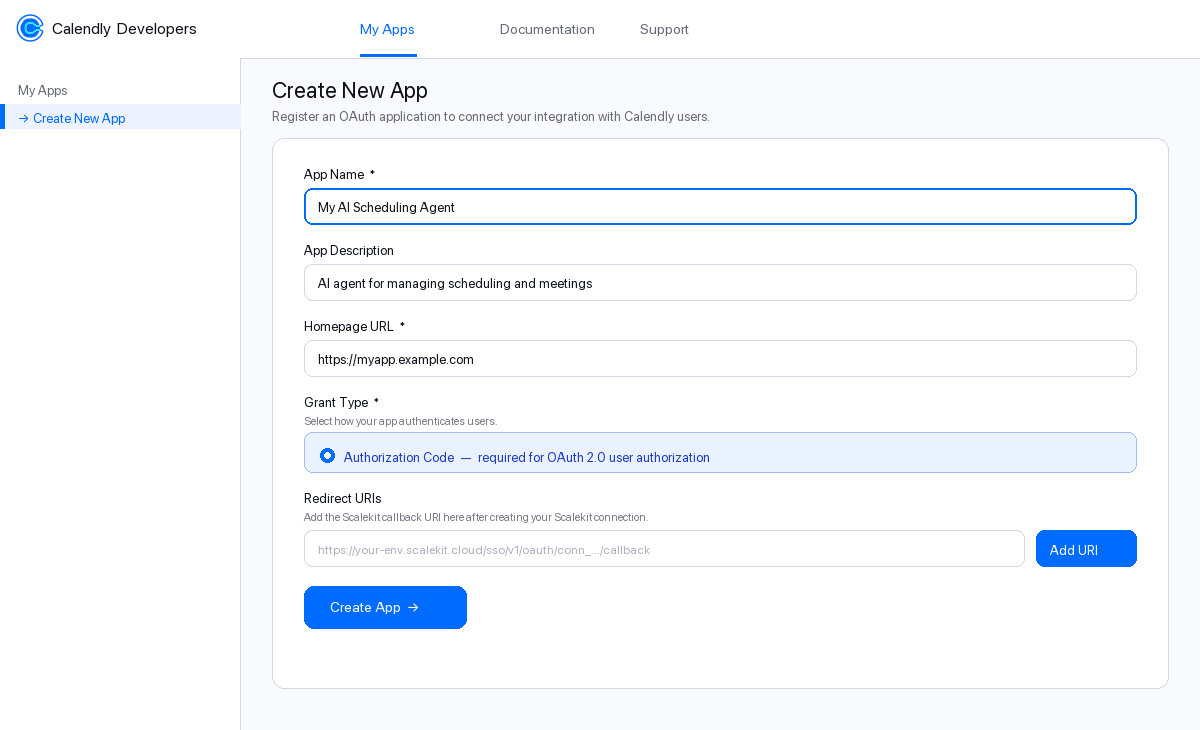
Fill in the form:
Field What to enter App Name A recognizable name for your integration, e.g. My AI Scheduling AgentApp Description Brief description, e.g. AI agent for managing schedulingHomepage URL Your app’s public URL. For testing you can use https://localhostGrant Type Select Authorization Code — this is required for OAuth 2.0 -
Leave Redirect URIs blank for now. You will add it in the next step.
-
Click Create App.
After the app is created, Calendly takes you to the app’s OAuth Settings page. Keep this tab open.
-
Copy the redirect URI from Scalekit
Scalekit gives you a callback URL that Calendly will redirect users back to after they authorize your app. You need to register this URL in your Calendly OAuth app.
In the Scalekit dashboard:
- Go to app.scalekit.com and sign in.
- In the left sidebar, click AgentKit.
- Click Create Connection.
- Search for Calendly and click Create.
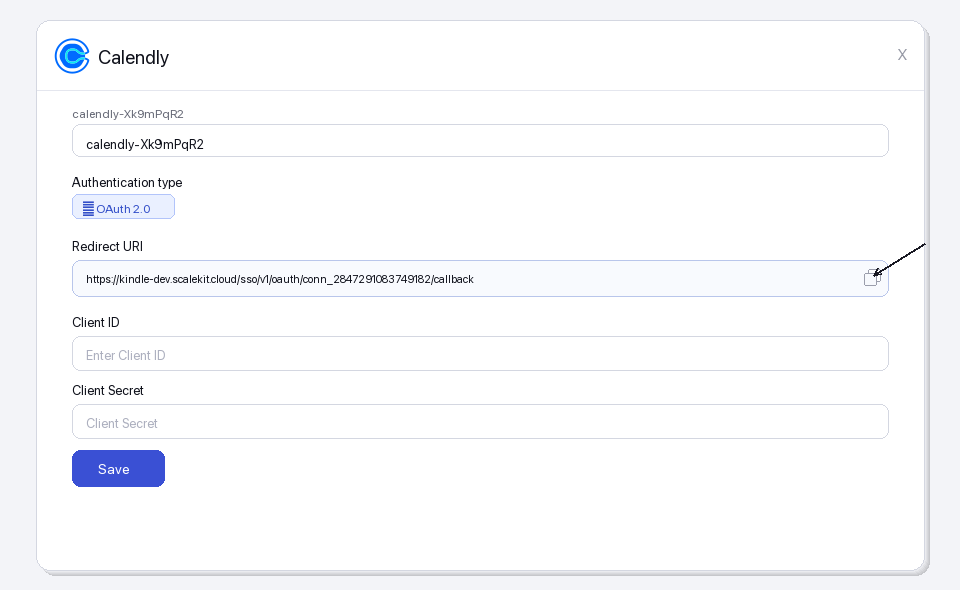
- A connection details panel opens. Find the Redirect URI field — it looks like:
https://<YOUR_ENV>.scalekit.cloud/sso/v1/oauth/conn_<ID>/callback
- Click the copy icon next to the Redirect URI to copy it to your clipboard.
-
Register the redirect URI in Calendly
Switch back to the Calendly Developer Portal tab you left open.
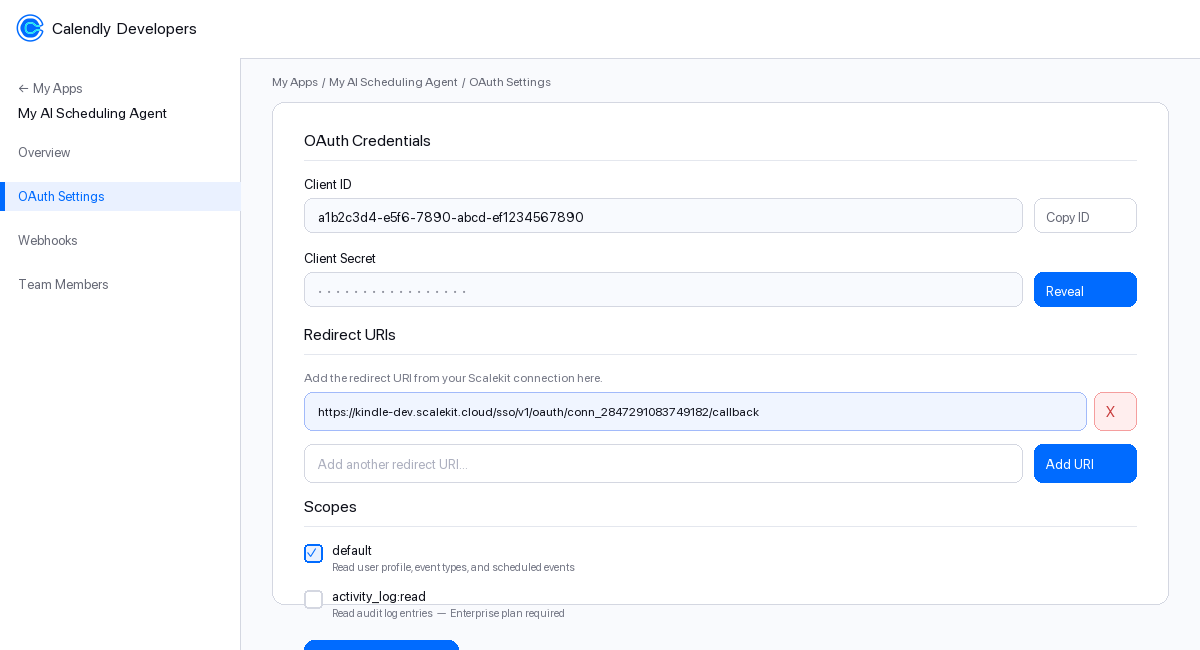
- Make sure you are on the OAuth Settings page of your app.
- Scroll down to the Redirect URIs section.
- Click in the text box and paste the redirect URI you copied from Scalekit.
- Click Add URI — the URI appears in the list above the input box.
- Click Save Changes at the bottom of the page.
-
Enable OAuth scopes
Scopes control which Calendly API resources your app can access on behalf of the user. You must enable the same scopes in your Calendly app that you will request in Scalekit.
-
On the OAuth Settings page, scroll to the Scopes section.
-
Check the box next to each scope you need:
Scope Access granted Plan required defaultUser profile, event types, scheduled events, availability All plans activity_log:readAudit log entries (read-only) Enterprise only -
For most integrations, checking
defaultis sufficient. -
Click Save Changes.
-
-
Copy your Client ID and Client Secret
Still on the OAuth Settings page in Calendly:
- Scroll to the OAuth Credentials section at the top.
- Client ID — this is shown in plain text. Click Copy ID to copy it.
- Client Secret — click Reveal to show the secret, then copy it.
Paste both values somewhere safe (a password manager or secrets vault). You will enter them into Scalekit in the next step.
-
Add credentials in Scalekit
Switch back to the Scalekit dashboard tab.
-
Go to AgentKit > Connections and click the Calendly connection you created in Step 2.
-
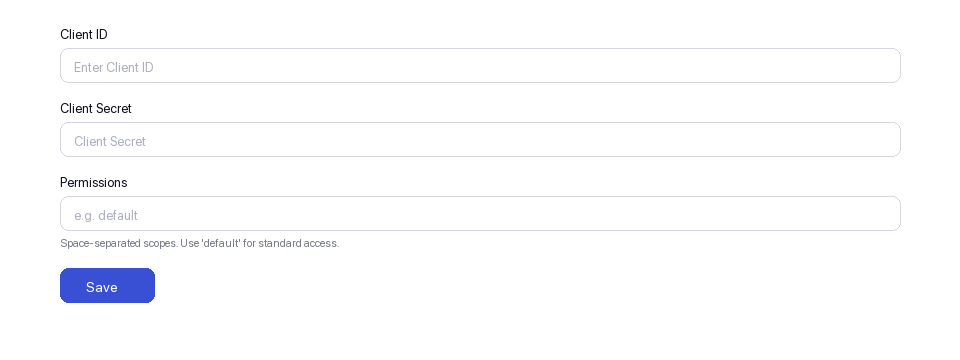
Fill in the credentials form:
Field Value Client ID Paste the Client ID from Step 5 Client Secret Paste the Client Secret from Step 5 Permissions Enter the scopes you enabled in Step 4, e.g. default -
Click Save.
Your Calendly connection is now configured. Scalekit will use these credentials to run the OAuth flow whenever a user connects their Calendly account.
-
-
-
Authorize and make your first call
Section titled “Authorize and make your first call”quickstart.ts import { ScalekitClient } from '@scalekit-sdk/node'import 'dotenv/config'const scalekit = new ScalekitClient(process.env.SCALEKIT_ENV_URL,process.env.SCALEKIT_CLIENT_ID,process.env.SCALEKIT_CLIENT_SECRET,)const actions = scalekit.actionsconst connector = 'calendly'const identifier = 'user_123'// Generate an authorization link for the userconst { link } = await actions.getAuthorizationLink({ connectionName: connector, identifier })console.log('Authorize Calendly:', link)process.stdout.write('Press Enter after authorizing...')await new Promise(r => process.stdin.once('data', r))// Make your first callconst result = await actions.executeTool({connector,identifier,toolName: 'calendly_current_user_get',toolInput: {},})console.log(result)quickstart.py import osfrom scalekit.client import ScalekitClientfrom dotenv import load_dotenvload_dotenv()scalekit_client = ScalekitClient(env_url=os.getenv("SCALEKIT_ENV_URL"),client_id=os.getenv("SCALEKIT_CLIENT_ID"),client_secret=os.getenv("SCALEKIT_CLIENT_SECRET"),)actions = scalekit_client.actionsconnection_name = "calendly"identifier = "user_123"# Generate an authorization link for the userlink_response = actions.get_authorization_link(connection_name=connection_name,identifier=identifier,)print("Authorize Calendly:", link_response.link)input("Press Enter after authorizing...")# Make your first callresult = actions.execute_tool(tool_input={},tool_name="calendly_current_user_get",connection_name=connection_name,identifier=identifier,)print(result)
What you can do
Section titled “What you can do”Connect this agent connector to let your agent:
- Delete webhook subscription, data compliance events, data compliance invitees — Deletes a Calendly webhook subscription, stopping future event notifications
- List event type availability schedules, group relationships, groups — Returns a list of availability schedules for the specified Calendly event type
- Create invitee no show, organization invitation, share — Marks a specific invitee as a no-show for a scheduled Calendly event
- Get sample webhook data, organization membership, organization invitation — Returns a sample webhook payload for the specified event type, useful for testing webhook integrations
- Update event type availability schedules, event type — Updates the availability schedules (rules) for the specified Calendly event type
- Revoke organization invitation — Revokes a pending invitation to a Calendly organization
Common workflows
Section titled “Common workflows”Proxy API call
const result = await actions.request({ connectionName: 'calendly', identifier: 'user_123', path: '/users/me', method: 'GET',});console.log(result);result = actions.request( connection_name='calendly', identifier='user_123', path="/users/me", method="GET")print(result)Execute a tool
const result = await actions.executeTool({ connector: 'calendly', identifier: 'user_123', toolName: 'calendly_activity_log_list', toolInput: {},});console.log(result);result = actions.execute_tool( tool_input={}, tool_name='calendly_activity_log_list', connection_name='calendly', identifier='user_123',)print(result)Tool list
Section titled “Tool list”Use the exact tool names from the Tool list below when you call execute_tool. If you’re not sure which name to use, list the tools available for the current user first.
calendly_activity_log_list#Returns a list of activity log entries for a Calendly organization. Requires Enterprise plan.8 params
Returns a list of activity log entries for a Calendly organization. Requires Enterprise plan.
organizationstringrequiredOrganization URI, e.g. https://api.calendly.com/organizations/{uuid}.actionstringoptionalFilter by action type (e.g. user.created, event_type.updated).actorstringoptionalFilter by actor user URI.countintegeroptionalNumber of results per page (max 100).max_occurred_atstringoptionalFilter entries occurring before this time (ISO 8601).min_occurred_atstringoptionalFilter entries occurring at or after this time (ISO 8601).page_tokenstringoptionalToken for fetching the next page of results.sortstringoptionalSort field and direction, e.g. occurred_at:asc or occurred_at:desc.calendly_current_user_get#Returns the profile of the currently authenticated Calendly user.0 params
Returns the profile of the currently authenticated Calendly user.
calendly_data_compliance_events_delete#Deletes all Calendly event data within the specified time range for compliance purposes. This is a destructive operation.2 params
Deletes all Calendly event data within the specified time range for compliance purposes. This is a destructive operation.
end_timestringrequiredEnd of the time range for event data deletion in ISO 8601 format.start_timestringrequiredStart of the time range for event data deletion in ISO 8601 format.calendly_data_compliance_invitees_delete#Deletes all Calendly invitee data for the specified email addresses for compliance purposes. This is a destructive operation.1 param
Deletes all Calendly invitee data for the specified email addresses for compliance purposes. This is a destructive operation.
emailsarrayrequiredArray of invitee email addresses whose data should be deleted.calendly_event_invitee_get#Returns the details of a specific invitee for a scheduled Calendly event.2 params
Returns the details of a specific invitee for a scheduled Calendly event.
event_uuidstringrequiredThe UUID of the scheduled event.invitee_uuidstringrequiredThe UUID of the invitee.calendly_event_invitees_list#Returns a list of invitees for a specific scheduled Calendly event.5 params
Returns a list of invitees for a specific scheduled Calendly event.
uuidstringrequiredThe UUID of the scheduled event.countintegeroptionalNumber of results per page (max 100).emailstringoptionalFilter invitees by email address.page_tokenstringoptionalToken for fetching the next page of results.statusstringoptionalFilter invitees by status: active or canceled.calendly_event_type_availability_schedules_list#Returns a list of availability schedules for the specified Calendly event type.2 params
Returns a list of availability schedules for the specified Calendly event type.
event_typestringrequiredThe URI of the event type, e.g. https://api.calendly.com/event_types/xxx.userstringoptionalThe URI of the user to filter schedules by, e.g. https://api.calendly.com/users/xxx.calendly_event_type_availability_schedules_update#Updates the availability schedules (rules) for the specified Calendly event type.3 params
Updates the availability schedules (rules) for the specified Calendly event type.
event_typestringrequiredThe URI of the event type whose availability schedules to update, e.g. https://api.calendly.com/event_types/xxx.rulesarrayrequiredArray of availability rule objects. Each rule has type, intervals, and wday fields.timezonestringoptionalTimezone for the availability rules (e.g. America/New_York).calendly_event_type_available_times_list#Returns available scheduling times for a specific event type within a given date range.3 params
Returns available scheduling times for a specific event type within a given date range.
end_timestringrequiredEnd of the availability window in ISO 8601 format.event_typestringrequiredFull URI of the event type, e.g. https://api.calendly.com/event_types/{uuid}.start_timestringrequiredStart of the availability window in ISO 8601 format.calendly_event_type_create#Creates a new event type in a Calendly organization for a specified host.6 params
Creates a new event type in a Calendly organization for a specified host.
durationintegerrequiredDuration of the event in minutes.hoststringrequiredThe URI of the user who will host this event type, e.g. https://api.calendly.com/users/xxx.namestringrequiredName of the event type.organizationstringrequiredThe URI of the organization this event type belongs to, e.g. https://api.calendly.com/organizations/xxx.colorstringoptionalHex color code for the event type, e.g. '#FF5733'.descriptionstringoptionalOptional description of the event type.calendly_event_type_get#Returns the details of a specific Calendly event type by its UUID.1 param
Returns the details of a specific Calendly event type by its UUID.
uuidstringrequiredThe UUID of the event type.calendly_event_type_memberships_list#Returns a list of memberships (hosts) associated with the specified Calendly event type.3 params
Returns a list of memberships (hosts) associated with the specified Calendly event type.
event_typestringrequiredThe URI of the event type, e.g. https://api.calendly.com/event_types/xxx.countintegeroptionalNumber of results to return per page.page_tokenstringoptionalToken for paginating to the next set of results.calendly_event_type_update#Updates an existing Calendly event type. Only the fields provided will be updated.5 params
Updates an existing Calendly event type. Only the fields provided will be updated.
uuidstringrequiredThe UUID of the event type to update.colorstringoptionalHex color code for the event type, e.g. '#FF5733'.descriptionstringoptionalUpdated description for the event type.durationintegeroptionalUpdated duration of the event in minutes.namestringoptionalUpdated name of the event type.calendly_event_types_list#Returns a list of event types for a user or organization. Provide either user or organization URI.5 params
Returns a list of event types for a user or organization. Provide either user or organization URI.
activebooleanoptionalIf true, only return active event types.countintegeroptionalNumber of results to return per page (max 100).organizationstringoptionalFilter by organization URI, e.g. https://api.calendly.com/organizations/{uuid}.page_tokenstringoptionalToken for fetching the next page of results.userstringoptionalFilter by user URI, e.g. https://api.calendly.com/users/{uuid}.calendly_group_get#Returns a single Calendly group record by UUID.1 param
Returns a single Calendly group record by UUID.
uuidstringrequiredThe UUID of the group to retrieve.calendly_group_relationship_get#Returns a single Calendly group relationship record by UUID.1 param
Returns a single Calendly group relationship record by UUID.
uuidstringrequiredThe UUID of the group relationship to retrieve.calendly_group_relationships_list#Returns a list of group relationships in the specified Calendly organization.3 params
Returns a list of group relationships in the specified Calendly organization.
organizationstringrequiredThe URI of the organization whose group relationships to list, e.g. https://api.calendly.com/organizations/xxx.countintegeroptionalNumber of results to return per page.page_tokenstringoptionalToken for paginating to the next set of results.calendly_groups_list#Returns a list of groups in the specified Calendly organization.4 params
Returns a list of groups in the specified Calendly organization.
organizationstringrequiredThe URI of the organization whose groups to list, e.g. https://api.calendly.com/organizations/xxx.countintegeroptionalNumber of results to return per page. Default is 20.page_tokenstringoptionalToken for paginating to the next set of results.sortstringoptionalSort order for the results, e.g. 'created_at:asc' or 'created_at:desc'.calendly_invitee_create#Creates a new invitee for a scheduled Calendly event.4 params
Creates a new invitee for a scheduled Calendly event.
emailstringrequiredEmail address of the invitee.eventstringrequiredThe URI of the scheduled event to add this invitee to, e.g. https://api.calendly.com/scheduled_events/xxx.namestringrequiredFull name of the invitee.timezonestringoptionalIANA timezone string for the invitee, e.g. 'America/New_York'.calendly_invitee_no_show_create#Marks a specific invitee as a no-show for a scheduled Calendly event.1 param
Marks a specific invitee as a no-show for a scheduled Calendly event.
inviteestringrequiredThe full URI of the invitee, e.g. https://api.calendly.com/scheduled_events/{event_uuid}/invitees/{invitee_uuid}.calendly_invitee_no_show_delete#Removes the no-show mark from an invitee on a scheduled Calendly event.1 param
Removes the no-show mark from an invitee on a scheduled Calendly event.
uuidstringrequiredThe UUID of the invitee no-show record.calendly_invitee_no_show_get#Returns a specific invitee no-show record by UUID.1 param
Returns a specific invitee no-show record by UUID.
uuidstringrequiredThe UUID of the invitee no-show record.calendly_locations_list#Returns a list of meeting locations available in the specified Calendly organization or for a specific user.4 params
Returns a list of meeting locations available in the specified Calendly organization or for a specific user.
userstringrequiredThe URI of the user to filter locations by, e.g. https://api.calendly.com/users/xxx.countintegeroptionalNumber of results to return per page.organizationstringoptionalThe URI of the organization to filter locations by, e.g. https://api.calendly.com/organizations/xxx.page_tokenstringoptionalToken for paginating to the next set of results.calendly_one_off_event_type_create#Creates a one-off event type in Calendly with a specific date, host, and optional co-hosts.7 params
Creates a one-off event type in Calendly with a specific date, host, and optional co-hosts.
date_settingobjectrequiredObject defining the date setting for the one-off event. Must include 'type' (e.g. 'date_range') and 'start_date'/'end_date' or 'date'.durationintegerrequiredDuration of the event in minutes.hoststringrequiredThe URI of the user who will host this event type, e.g. https://api.calendly.com/users/xxx.namestringrequiredName of the one-off event type.co_hostsarrayoptionalArray of user URIs for co-hosts, e.g. ['https://api.calendly.com/users/xxx'].descriptionstringoptionalOptional description for the one-off event type.locationobjectoptionalOptional location object, e.g. {"kind": "physical", "location": "123 Main St"}.calendly_organization_get#Returns the details of a specific Calendly organization by its UUID.1 param
Returns the details of a specific Calendly organization by its UUID.
uuidstringrequiredThe UUID of the organization.calendly_organization_invitation_create#Sends an invitation for a user to join a Calendly organization.2 params
Sends an invitation for a user to join a Calendly organization.
emailstringrequiredEmail address of the user to invite.uuidstringrequiredThe UUID of the organization.calendly_organization_invitation_get#Returns the details of a specific invitation sent to join a Calendly organization.2 params
Returns the details of a specific invitation sent to join a Calendly organization.
org_uuidstringrequiredThe UUID of the organization that sent the invitation.uuidstringrequiredThe UUID of the invitation to retrieve.calendly_organization_invitation_revoke#Revokes a pending invitation to a Calendly organization.2 params
Revokes a pending invitation to a Calendly organization.
invitation_uuidstringrequiredThe UUID of the invitation to revoke.org_uuidstringrequiredThe UUID of the organization.calendly_organization_invitations_list#Returns a list of pending invitations for a Calendly organization.5 params
Returns a list of pending invitations for a Calendly organization.
uuidstringrequiredThe UUID of the organization.countintegeroptionalNumber of results per page (max 100).emailstringoptionalFilter by invitee email address.page_tokenstringoptionalToken for fetching the next page of results.statusstringoptionalFilter by invitation status: pending, accepted, or declined.calendly_organization_membership_delete#Removes a user from a Calendly organization by deleting their membership.1 param
Removes a user from a Calendly organization by deleting their membership.
uuidstringrequiredThe UUID of the organization membership to remove.calendly_organization_membership_get#Returns details of a specific organization membership by UUID.1 param
Returns details of a specific organization membership by UUID.
uuidstringrequiredThe UUID of the organization membership.calendly_organization_memberships_list#Returns a list of organization memberships. Filter by organization URI or user URI.5 params
Returns a list of organization memberships. Filter by organization URI or user URI.
countintegeroptionalNumber of results per page (max 100).emailstringoptionalFilter by member email address.organizationstringoptionalFilter by organization URI, e.g. https://api.calendly.com/organizations/{uuid}.page_tokenstringoptionalToken for fetching the next page of results.userstringoptionalFilter by user URI, e.g. https://api.calendly.com/users/{uuid}.calendly_outgoing_communications_list#Returns a list of outgoing communications (emails and notifications) for the specified Calendly organization.4 params
Returns a list of outgoing communications (emails and notifications) for the specified Calendly organization.
organizationstringrequiredThe URI of the organization whose outgoing communications to list, e.g. https://api.calendly.com/organizations/xxx.countintegeroptionalNumber of results to return per page.page_tokenstringoptionalToken for paginating to the next set of results.sortstringoptionalSort order for the results, e.g. 'created_at:asc' or 'created_at:desc'.calendly_routing_form_get#Returns the details of a specific Calendly routing form by its UUID.1 param
Returns the details of a specific Calendly routing form by its UUID.
uuidstringrequiredThe UUID of the routing form.calendly_routing_form_submission_get#Returns the details of a specific routing form submission by its UUID.1 param
Returns the details of a specific routing form submission by its UUID.
uuidstringrequiredThe UUID of the routing form submission.calendly_routing_form_submission_get_by_uuid#Returns a single routing form submission by UUID.1 param
Returns a single routing form submission by UUID.
uuidstringrequiredThe UUID of the routing form submission to retrieve.calendly_routing_form_submissions_list#Returns a list of all routing form submissions across the specified Calendly organization.3 params
Returns a list of all routing form submissions across the specified Calendly organization.
formstringrequiredThe URI of the routing form to list submissions for.countintegeroptionalNumber of results.page_tokenstringoptionalToken for next page.calendly_routing_forms_list#Returns a list of routing forms for a Calendly organization.3 params
Returns a list of routing forms for a Calendly organization.
organizationstringrequiredOrganization URI, e.g. https://api.calendly.com/organizations/{uuid}.countintegeroptionalNumber of results per page (max 100).page_tokenstringoptionalToken for fetching the next page of results.calendly_sample_webhook_data_get#Returns a sample webhook payload for the specified event type, useful for testing webhook integrations.4 params
Returns a sample webhook payload for the specified event type, useful for testing webhook integrations.
eventstringrequiredThe webhook event type to get sample data for, e.g. 'invitee.created'.organizationstringrequiredThe URI of the organization, e.g. https://api.calendly.com/organizations/xxx.scopestringrequiredThe scope of the webhook, either 'organization' or 'user'.userstringoptionalThe URI of the user, required when scope is 'user', e.g. https://api.calendly.com/users/xxx.calendly_scheduled_event_cancel#Cancels a scheduled Calendly event. Optionally includes a reason for cancellation.2 params
Cancels a scheduled Calendly event. Optionally includes a reason for cancellation.
uuidstringrequiredThe UUID of the scheduled event to cancel.reasonstringoptionalOptional reason for the cancellation.calendly_scheduled_event_get#Returns the details of a specific scheduled event by its UUID.1 param
Returns the details of a specific scheduled event by its UUID.
uuidstringrequiredThe UUID of the scheduled event.calendly_scheduled_events_list#Returns a list of scheduled events for a user or organization, with optional time range and status filters.8 params
Returns a list of scheduled events for a user or organization, with optional time range and status filters.
countintegeroptionalNumber of results per page (max 100).max_start_timestringoptionalFilter events starting before this time (ISO 8601).min_start_timestringoptionalFilter events starting at or after this time (ISO 8601).organizationstringoptionalFilter by organization URI, e.g. https://api.calendly.com/organizations/{uuid}.page_tokenstringoptionalToken for fetching the next page of results.sortstringoptionalSort field and direction, e.g. start_time:asc or start_time:desc.statusstringoptionalFilter by event status: active or canceled.userstringoptionalFilter by user URI, e.g. https://api.calendly.com/users/{uuid}.calendly_scheduling_link_create#Creates a single-use or limited-use scheduling link for a specified Calendly event type.3 params
Creates a single-use or limited-use scheduling link for a specified Calendly event type.
max_event_countintegerrequiredMaximum number of events that can be booked using this scheduling link.ownerstringrequiredThe URI of the event type that owns this scheduling link, e.g. https://api.calendly.com/event_types/xxx.owner_typestringrequiredThe type of owner for the scheduling link. Use 'EventType'.calendly_user_availability_schedule_get#Returns a single availability schedule for a Calendly user by UUID.1 param
Returns a single availability schedule for a Calendly user by UUID.
uuidstringrequiredThe UUID of the availability schedule to retrieve.calendly_user_availability_schedules_list#Returns a list of availability schedules for the specified Calendly user.1 param
Returns a list of availability schedules for the specified Calendly user.
userstringrequiredThe URI of the user whose availability schedules to list, e.g. https://api.calendly.com/users/xxx.calendly_user_busy_times_list#Returns a list of busy time blocks for a Calendly user within the specified time range.3 params
Returns a list of busy time blocks for a Calendly user within the specified time range.
end_timestringrequiredEnd of the time range in ISO 8601 format.start_timestringrequiredStart of the time range in ISO 8601 format.userstringrequiredThe URI of the user whose busy times to list, e.g. https://api.calendly.com/users/xxx.calendly_user_get#Returns the profile of a specific Calendly user by their UUID.1 param
Returns the profile of a specific Calendly user by their UUID.
uuidstringrequiredThe UUID of the user.calendly_webhook_subscription_create#Creates a new webhook subscription to receive Calendly event notifications at a callback URL.6 params
Creates a new webhook subscription to receive Calendly event notifications at a callback URL.
eventsstringrequiredJSON array of event names to subscribe to, e.g. ["invitee.created","invitee.canceled"].organizationstringrequiredOrganization URI to scope the subscription.scopestringrequiredScope of the webhook: user or organization.urlstringrequiredThe HTTPS callback URL that will receive webhook payloads.signing_keystringoptionalOptional signing key used to sign webhook payloads for verification.userstringoptionalUser URI if scope is user-level.calendly_webhook_subscription_delete#Deletes a Calendly webhook subscription, stopping future event notifications.1 param
Deletes a Calendly webhook subscription, stopping future event notifications.
uuidstringrequiredThe UUID of the webhook subscription to delete.calendly_webhook_subscription_get#Returns the details of a specific Calendly webhook subscription.1 param
Returns the details of a specific Calendly webhook subscription.
uuidstringrequiredThe UUID of the webhook subscription.calendly_webhook_subscriptions_list#Returns a list of webhook subscriptions for a user or organization.5 params
Returns a list of webhook subscriptions for a user or organization.
countintegeroptionalNumber of results per page (max 100).organizationstringoptionalFilter by organization URI, e.g. https://api.calendly.com/organizations/{uuid}.page_tokenstringoptionalToken for fetching the next page of results.scopestringoptionalFilter by webhook scope: user or organization.userstringoptionalFilter by user URI, e.g. https://api.calendly.com/users/{uuid}.