


Diarize connector
Bearer Token transcriptionmediaproductivityanalyticsConnect to Diarize to transcribe and diarize audio and video content from YouTube, X, Instagram, and TikTok. Submit transcription jobs and retrieve...
Diarize connector
-
Install the SDK
Section titled “Install the SDK”Terminal window npm install @scalekit-sdk/nodeTerminal window pip install scalekit -
Set your credentials
Section titled “Set your credentials”Add your Scalekit credentials to your
.envfile. Find values in app.scalekit.com > Developers > API Credentials..env SCALEKIT_ENVIRONMENT_URL=<your-environment-url>SCALEKIT_CLIENT_ID=<your-client-id>SCALEKIT_CLIENT_SECRET=<your-client-secret> -
Set up the connector
Section titled “Set up the connector”Register your Diarize credentials with Scalekit so it can authenticate requests on your behalf. You do this once per environment.
Dashboard setup steps
Register your Diarize API key with Scalekit so it can authenticate and proxy transcription requests on behalf of your users. Unlike OAuth connectors, Diarize uses API key authentication — there is no redirect URI or OAuth flow.
-
Get a Diarize API key
-
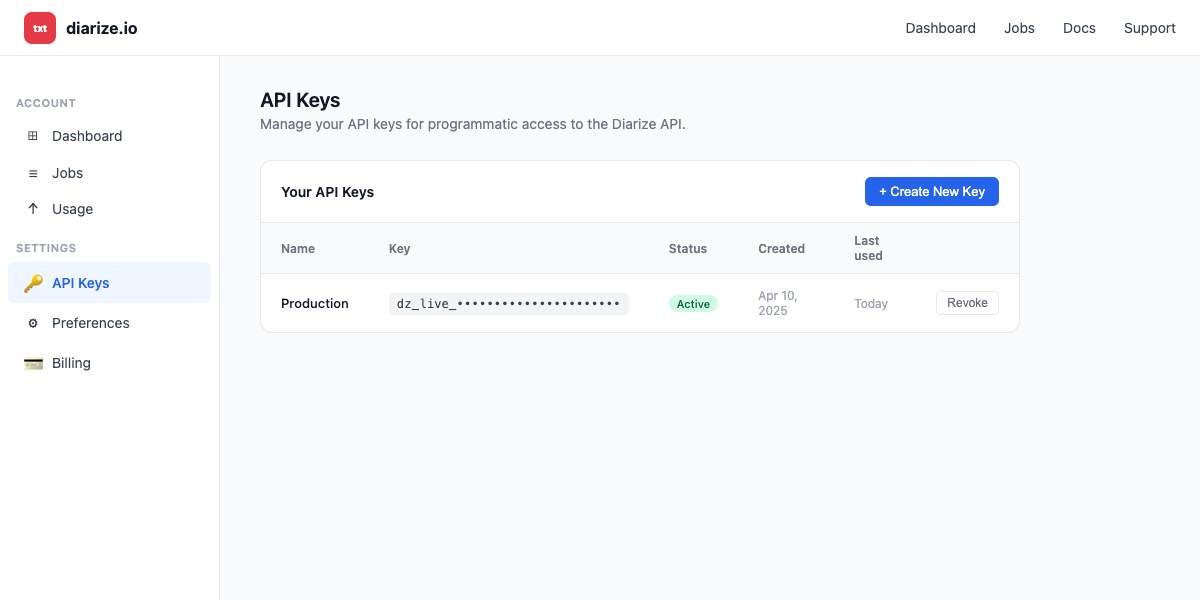
Sign in to diarize.io and go to Settings → API Keys.
-
Click + Create New Key, give it a name (e.g.,
Agent Auth), and confirm. -
Copy the key value — store it securely, as you will not be able to view it again.
-
-
Create a connection in Scalekit
-
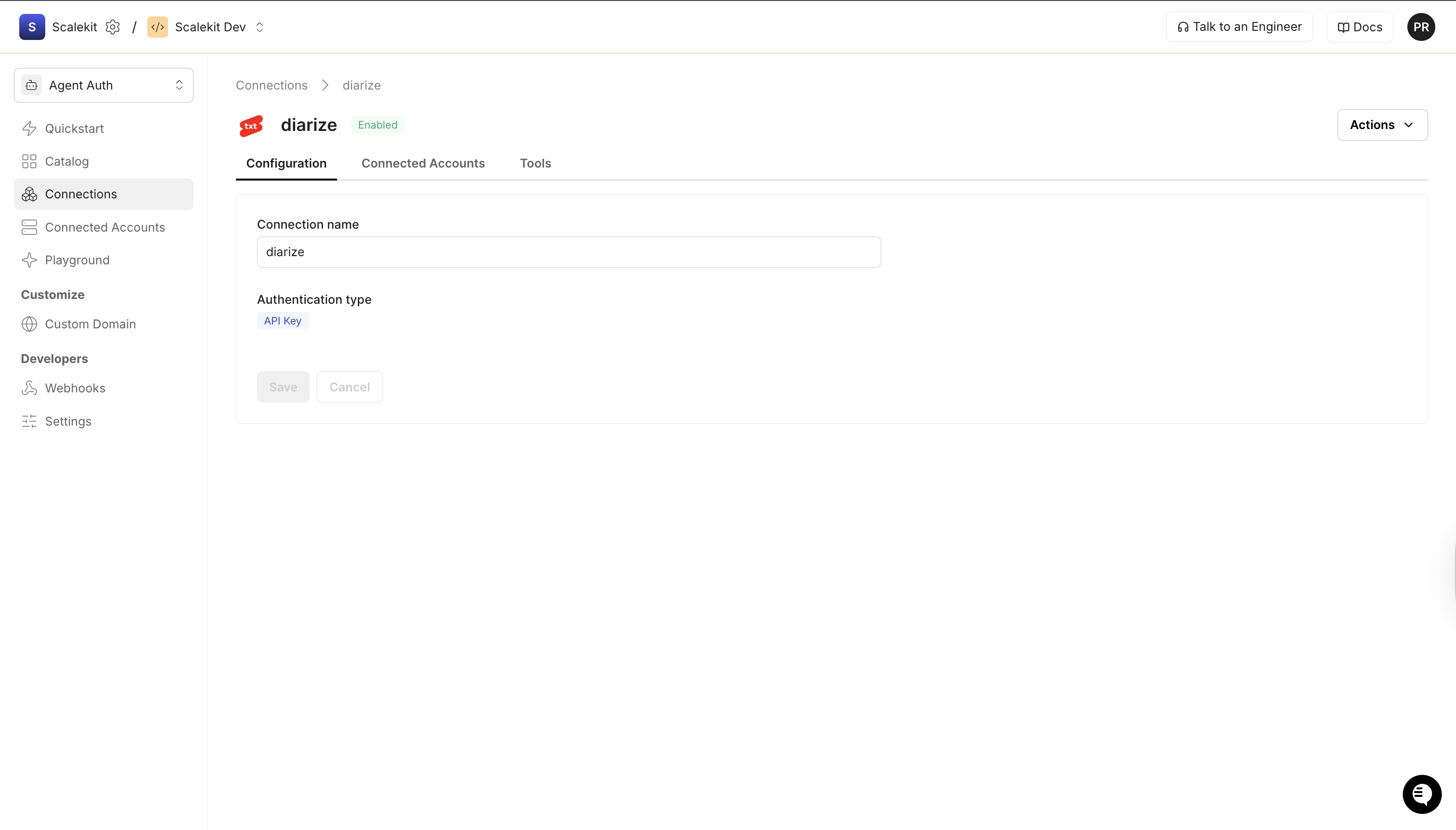
In Scalekit dashboard, go to AgentKit > Connections > Create Connection. Find Diarize and click Create.
-
Note the Connection name — you will use this as
connection_namein your code (e.g.,diarize). -
Click Save.
-
-
Add a connected account
Connected accounts link a specific user identifier in your system to a Diarize API key. Add accounts via the dashboard for testing, or via the Scalekit API in production.
Via dashboard (for testing)
-
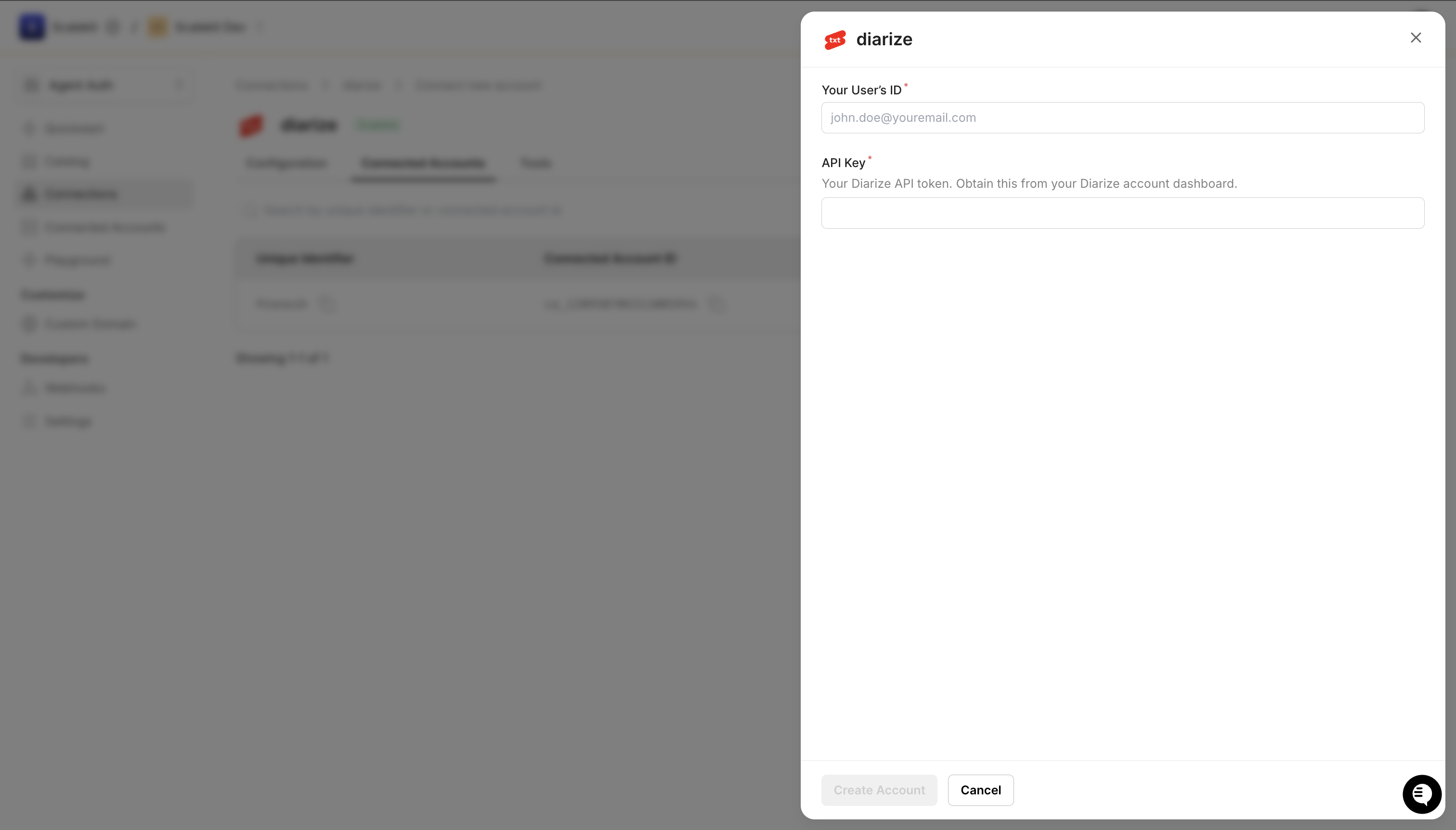
Open the connection you created and click the Connected Accounts tab → Add account.
-
Fill in:
- Your User’s ID — a unique identifier for this user in your system (e.g.,
user_123) - API Key — the Diarize API key you copied in step 1
- Your User’s ID — a unique identifier for this user in your system (e.g.,
-
Click Create Account.
Via API (for production)
// Never hard-code API keys — read from secure storage or user inputconst diarizeApiKey = getUserDiarizeKey(); // retrieve from your secure storeawait scalekit.actions.upsertConnectedAccount({connectionName: 'diarize',identifier: 'user_123', // your user's unique IDcredentials: { token: diarizeApiKey },});# Never hard-code API keys — read from secure storage or user inputdiarize_api_key = get_user_diarize_key() # retrieve from your secure storescalekit_client.actions.upsert_connected_account(connection_name="diarize",identifier="user_123",credentials={"token": diarize_api_key}) -
-
-
Make your first call
Section titled “Make your first call”quickstart.ts import { ScalekitClient } from '@scalekit-sdk/node'import 'dotenv/config'const scalekit = new ScalekitClient(process.env.SCALEKIT_ENV_URL,process.env.SCALEKIT_CLIENT_ID,process.env.SCALEKIT_CLIENT_SECRET,)const actions = scalekit.actionsconst connector = 'diarize'const identifier = 'user_123'// Make your first callconst result = await actions.executeTool({connector,identifier,toolName: 'diarize_get_job_status',toolInput: { job_id: 'YOUR_JOB_ID' },})console.log(result)quickstart.py import osfrom scalekit.client import ScalekitClientfrom dotenv import load_dotenvload_dotenv()scalekit_client = ScalekitClient(env_url=os.getenv("SCALEKIT_ENV_URL"),client_id=os.getenv("SCALEKIT_CLIENT_ID"),client_secret=os.getenv("SCALEKIT_CLIENT_SECRET"),)actions = scalekit_client.actionsconnection_name = "diarize"identifier = "user_123"# Make your first callresult = actions.execute_tool(tool_input={"job_id":"YOUR_JOB_ID"},tool_name="diarize_get_job_status",connection_name=connection_name,identifier=identifier,)print(result)
What you can do
Section titled “What you can do”Connect this agent connector to let your agent:
- Get job status — Retrieve the current status of a transcription job by its job ID
- Transcript download — Download the transcript output for a completed transcription job in JSON, TXT, SRT, or VTT format, including speaker diarization, segments, and word-level timestamps
- Create transcription job — Submit a new transcription and diarization job for an audio or video URL (YouTube, X, Instagram, TikTok)
Common workflows
Section titled “Common workflows”Tool calling
Use this connector when you want an agent to transcribe and diarize audio or video from YouTube, X, Instagram, or TikTok.
- Use
diarize_create_transcription_jobto submit a URL for transcription. Returns anid(job ID) and anestimatedTime(in seconds) for how long processing will take. - Use
diarize_get_job_statusto poll untilstatusisCOMPLETEDorFAILED. UseestimatedTimeto set a sensible timeout — do not give up before that time has elapsed. - Use
diarize_download_transcriptto retrieve the result once complete. Choosejsonfor structured speaker diarization data, ortxt,srt,vttfor plain-text and subtitle formats.
import time
# Step 1: Submit a transcription jobcreate_result = actions.execute_tool( connection_name='diarize', identifier='user_123', tool_name="diarize_create_transcription_job", tool_input={ "url": "https://www.youtube.com/watch?v=example", "language": "en", # optional — omit for auto-detection "num_speakers": 2, # optional — improves speaker diarization },)job_id = create_result.result["id"]estimated_seconds = create_result.result.get("estimatedTime", 120)deadline = time.time() + estimated_seconds * 2print(f"Job {job_id} submitted. Estimated: {estimated_seconds}s")
# Step 2: Poll until completewhile True: if time.time() > deadline: raise TimeoutError(f"Job {job_id} timed out after {estimated_seconds * 2}s") time.sleep(15) status_result = actions.execute_tool( connection_name='diarize', identifier='user_123', tool_name="diarize_get_job_status", tool_input={"job_id": job_id}, ) status = status_result.result["status"] print("Status:", status) if status == "COMPLETED": break if status == "FAILED": raise RuntimeError(f"Job {job_id} failed")
# Step 3: Download the diarized transcripttranscript_result = actions.execute_tool( connection_name='diarize', identifier='user_123', tool_name="diarize_download_transcript", tool_input={"job_id": job_id, "format": "json"},)# handle the transcript_result// Step 1: Submit a transcription jobconst createResult = await actions.executeTool({ connector: 'diarize', identifier: 'user_123', toolName: 'diarize_create_transcription_job', toolInput: { url: 'https://www.youtube.com/watch?v=example', language: 'en', // optional — omit for auto-detection num_speakers: 2, // optional — improves speaker diarization },});const jobId = createResult.data.id;const estimatedSeconds = createResult.data.estimatedTime ?? 120;const deadline = Date.now() + estimatedSeconds * 2 * 1000;console.log(`Job ${jobId} submitted. Estimated: ${estimatedSeconds}s`);
// Step 2: Poll until completelet status = 'PENDING';while (status !== 'COMPLETED' && status !== 'FAILED') { if (Date.now() > deadline) throw new Error(`Job ${jobId} timed out after ${estimatedSeconds * 2}s`); await new Promise(r => setTimeout(r, 15_000)); const statusResult = await actions.executeTool({ connector: 'diarize', identifier: 'user_123', toolName: 'diarize_get_job_status', toolInput: { job_id: jobId }, }); status = statusResult.data.status; console.log('Status:', status);}if (status === 'FAILED') throw new Error(`Job ${jobId} failed`);
// Step 3: Download the diarized transcriptconst transcriptResult = await actions.executeTool({ connector: 'diarize', identifier: 'user_123', toolName: 'diarize_download_transcript', toolInput: { job_id: jobId, format: 'json' },});// handle the transcriptResultTool list
Section titled “Tool list”Use the exact tool names from the Tool list below when you call execute_tool. If you’re not sure which name to use, list the tools available for the current user first.
diarize_create_transcription_job
#
Submit a new transcription and diarization job for an audio or video URL (YouTube, X, Instagram, TikTok). Returns a job ID that can be used to check status and download results. 5 params
Submit a new transcription and diarization job for an audio or video URL (YouTube, X, Instagram, TikTok). Returns a job ID that can be used to check status and download results.
url string required The URL of the audio or video content to transcribe (e.g. YouTube, X, Instagram, TikTok link) language string optional Language code for transcription (e.g. 'en', 'es', 'fr'). Defaults to auto-detection if not provided. num_speakers integer optional Expected number of speakers in the audio. Helps improve diarization accuracy. schema_version string optional Optional schema version to use for tool execution tool_version string optional Optional tool version to use for execution diarize_download_transcript
#
Download the transcript output for a completed transcription job in JSON, TXT, SRT, or VTT format, including speaker diarization, segments, and word-level timestamps. 4 params
Download the transcript output for a completed transcription job in JSON, TXT, SRT, or VTT format, including speaker diarization, segments, and word-level timestamps.
job_id string required The unique ID of the completed transcription job format string optional Output format for the transcript. Supported formats: 'json', 'txt', 'srt', 'vtt'. schema_version string optional Optional schema version to use for tool execution tool_version string optional Optional tool version to use for execution diarize_get_job_status
#
Retrieve the current status of a transcription job by its job ID. Returns job state (pending, processing, completed, failed), metadata, and an estimatedTime field (in seconds) indicating how long processing is expected to take. Use estimatedTime to determine polling frequency and max wait duration — for example, a 49-minute episode may have an estimatedTime of ~891s (~15 mins), so the agent should wait at least that long before giving up. 3 params
Retrieve the current status of a transcription job by its job ID. Returns job state (pending, processing, completed, failed), metadata, and an estimatedTime field (in seconds) indicating how long processing is expected to take. Use estimatedTime to determine polling frequency and max wait duration — for example, a 49-minute episode may have an estimatedTime of ~891s (~15 mins), so the agent should wait at least that long before giving up.
job_id string required The unique ID of the transcription job to check schema_version string optional Optional schema version to use for tool execution tool_version string optional Optional tool version to use for execution