


Miro connector
OAuth 2.0 productivityMiro is a visual collaboration platform for teams. Manage boards, sticky notes, shapes, cards, frames, connectors, images, and tags using the Miro REST...
Miro connector
-
Install the SDK
Section titled “Install the SDK”Terminal window npm install @scalekit-sdk/nodeTerminal window pip install scalekit -
Set your credentials
Section titled “Set your credentials”Add your Scalekit credentials to your
.envfile. Find values in app.scalekit.com > Developers > API Credentials..env SCALEKIT_ENVIRONMENT_URL=<your-environment-url>SCALEKIT_CLIENT_ID=<your-client-id>SCALEKIT_CLIENT_SECRET=<your-client-secret> -
Set up the connector
Section titled “Set up the connector”Register your Miro credentials with Scalekit so it handles the token lifecycle. You do this once per environment.
Dashboard setup steps
Register your Scalekit environment with the Miro connector so Scalekit handles the OAuth flow and token lifecycle for your users. Follow every step below from start to finish — by the end you will have a working connection.
-
Create a Miro app
You need a Miro OAuth app to get the Client ID and Client Secret that Scalekit will use to authorize your users.
Go to the Miro Developer Portal:
- Open miro.com/app/settings/user-profile/apps in your browser.
- Sign in with the Miro account you use to manage your integration.
- After signing in, you land on the My Apps page.
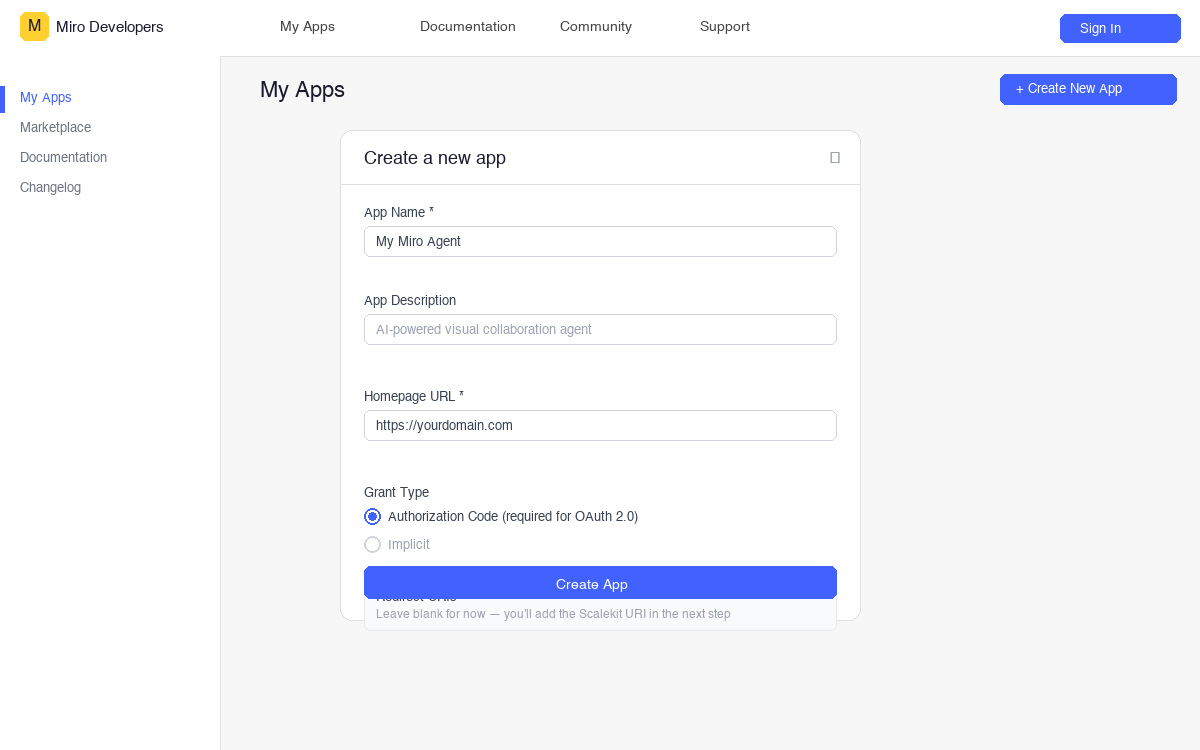
Create a new app:
-
Click Create New App (top right of the page).
-
Fill in the form:
Field What to enter App Name A recognizable name, e.g. My AI Collaboration AgentApp Description Brief description, e.g. AI agent for managing Miro boardsHomepage URL Your app’s public URL. For testing you can use https://localhostGrant Type Select Authorization Code — this is required for OAuth 2.0 -
Leave Redirect URIs blank for now. You will add it in the next step.
-
Click Create App.
After the app is created, Miro takes you to the app’s OAuth Settings page. Keep this tab open.
-
Copy the redirect URI from Scalekit
Scalekit gives you a callback URL that Miro will redirect users back to after they authorize your app. You need to register this URL in your Miro app.
In the Scalekit dashboard:
- Go to app.scalekit.com and sign in.
- In the left sidebar, click AgentKit.
- Click Create Connection.
- Search for Miro and click Create.
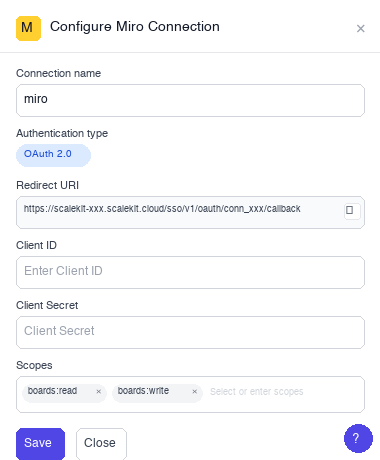
- A connection details panel opens. Find the Redirect URI field — it looks like:
https://<YOUR_ENV>.scalekit.cloud/sso/v1/oauth/conn_<ID>/callback
- Click the copy icon next to the Redirect URI to copy it to your clipboard.
-
Register the redirect URI and copy credentials
Switch back to the Miro Developer Portal tab.
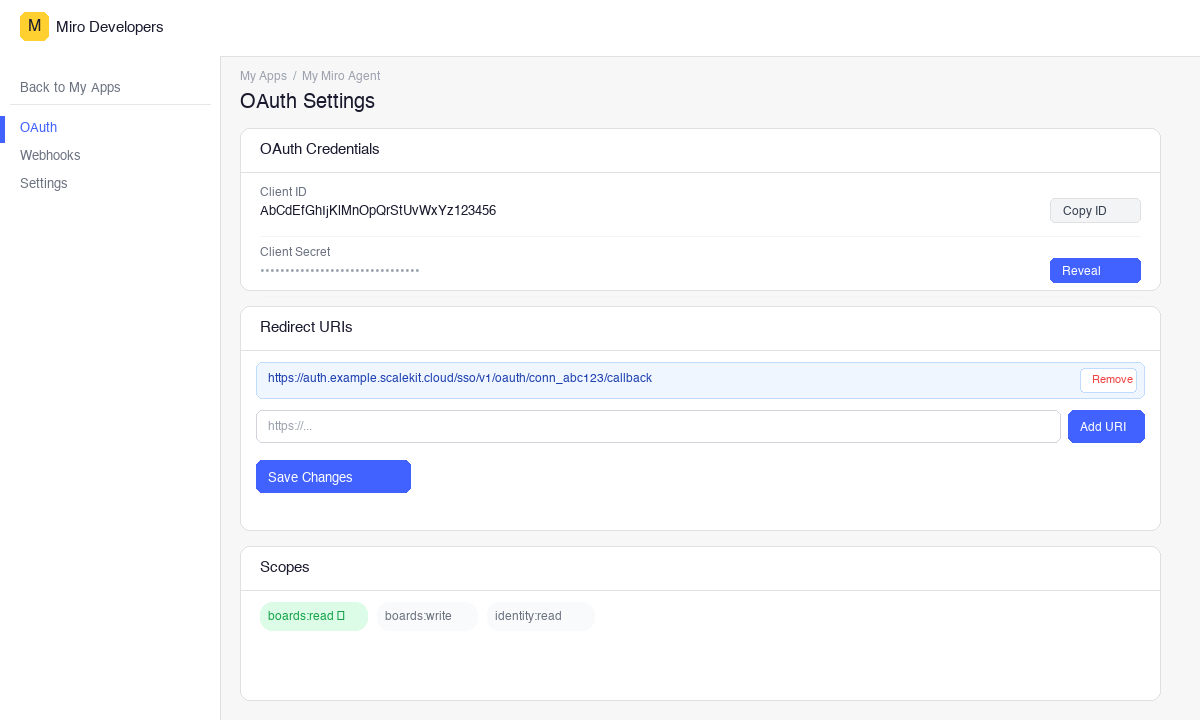
- Make sure you are on the OAuth Settings page of your app.
- Scroll to the Redirect URIs section.
- Paste the redirect URI you copied from Scalekit into the input box and click Add URI.
- Click Save Changes at the bottom of the page.
Copy your credentials:
- Scroll to OAuth Credentials at the top of the page.
- Client ID — shown in plain text. Click Copy ID to copy it.
- Client Secret — click Reveal to show the secret, then copy it.
Keep both values in a password manager or secrets vault. You will enter them into Scalekit in the next step.
-
Configure permissions (scopes)
Scopes control which Miro resources your app can access on behalf of each user. You select the scopes in Scalekit when saving your credentials.
Scope Access granted Plan required boards:readRead boards, members, and all board items All plans boards:writeCreate, update, and delete boards, members, and items All plans identity:readRead current user profile including email All plans team:readRead current team information All plans auditlogs:readRead audit logs for the organization Enterprise only organizations:readRead organization information Enterprise only organizations:teams:readRead teams within an organization Enterprise only organizations:teams:writeCreate and manage teams within an organization Enterprise only projects:readRead projects within teams Enterprise only projects:writeCreate and manage projects within teams Enterprise only For most integrations,
boards:readandboards:writeare sufficient. -
Add credentials in Scalekit
Switch back to the Scalekit dashboard tab.
-
Go to AgentKit > Connections and open the Miro connection you created in step 2.
-
Fill in the credentials form:
Field Value Client ID Paste the Client ID from step 3 Client Secret Paste the Client Secret from step 3 Permissions Enter the scopes your app needs, e.g. boards:read boards:write -
Click Save.
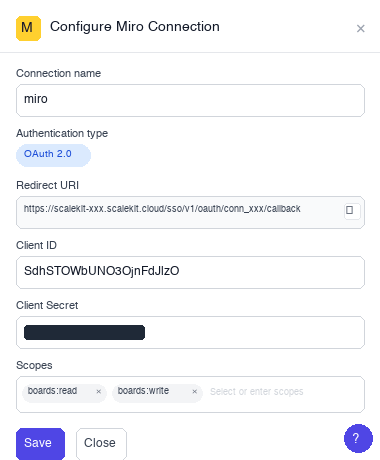
Your Miro connection is now configured. Scalekit will use these credentials to run the OAuth flow whenever a user connects their Miro account.
-
-
-
Authorize and make your first call
Section titled “Authorize and make your first call”quickstart.ts import { ScalekitClient } from '@scalekit-sdk/node'import 'dotenv/config'const scalekit = new ScalekitClient(process.env.SCALEKIT_ENV_URL,process.env.SCALEKIT_CLIENT_ID,process.env.SCALEKIT_CLIENT_SECRET,)const actions = scalekit.actionsconst connector = 'miro'const identifier = 'user_123'// Generate an authorization link for the userconst { link } = await actions.getAuthorizationLink({ connectionName: connector, identifier })console.log('Authorize Miro:', link)process.stdout.write('Press Enter after authorizing...')await new Promise(r => process.stdin.once('data', r))// Make your first callconst result = await actions.executeTool({connector,identifier,toolName: 'miro_boards_list',toolInput: {},})console.log(result)quickstart.py import osfrom scalekit.client import ScalekitClientfrom dotenv import load_dotenvload_dotenv()scalekit_client = ScalekitClient(env_url=os.getenv("SCALEKIT_ENV_URL"),client_id=os.getenv("SCALEKIT_CLIENT_ID"),client_secret=os.getenv("SCALEKIT_CLIENT_SECRET"),)actions = scalekit_client.actionsconnection_name = "miro"identifier = "user_123"# Generate an authorization link for the userlink_response = actions.get_authorization_link(connection_name=connection_name,identifier=identifier,)print("Authorize Miro:", link_response.link)input("Press Enter after authorizing...")# Make your first callresult = actions.execute_tool(tool_input={},tool_name="miro_boards_list",connection_name=connection_name,identifier=identifier,)print(result)
What you can do
Section titled “What you can do”Connect this agent connector to let your agent:
- List board members, tags, mindmap nodes — Returns a list of members on a Miro board
- Get connector, image, group items — Retrieves details of a specific connector (line/arrow) on a Miro board
- Create shape, embed, frame — Creates a shape item on a Miro board
- Remove item tag, board member — Removes a tag from a specific item on a Miro board
- Invite team member — Invites a user to a team by email (Enterprise only)
- Delete team, item, sticky note — Deletes a team from an organization (Enterprise only)
Common workflows
Section titled “Common workflows”Proxy API call
// Example: list boardsconst boards = await actions.request({ connectionName: 'miro', identifier: 'user_123', path: '/v2/boards', method: 'GET',});console.log('Boards:', boards);
// Example: create a sticky note on a boardconst stickyNote = await actions.request({ connectionName: 'miro', identifier: 'user_123', path: '/v2/boards/YOUR_BOARD_ID/sticky_notes', method: 'POST', body: { data: { content: 'Hello from my AI agent!' }, style: { fillColor: 'yellow' }, },});console.log('Sticky note created:', stickyNote);# Example: list boardsboards = actions.request( connection_name='miro', identifier='user_123', path="/v2/boards", method="GET")print("Boards:", boards)
# Example: create a sticky note on a boardsticky_note = actions.request( connection_name='miro', identifier='user_123', path="/v2/boards/YOUR_BOARD_ID/sticky_notes", method="POST", body={ "data": {"content": "Hello from my AI agent!"}, "style": {"fillColor": "yellow"}, })print("Sticky note created:", sticky_note)Execute a tool
const result = await actions.executeTool({ connector: 'miro', identifier: 'user_123', toolName: 'miro_app_card_create', toolInput: {},});console.log(result);result = actions.execute_tool( connection_name='miro', identifier='user_123', tool_name='miro_app_card_create', tool_input={},)print(result)Tool list
Section titled “Tool list”Use the exact tool names from the Tool list below when you call execute_tool. If you’re not sure which name to use, list the tools available for the current user first.
miro_app_card_create
#
Creates an app card item on a Miro board. 8 params
Creates an app card item on a Miro board.
board_id string required Unique identifier of the board. description string optional Description of the app card. parent_id string optional ID of parent frame to nest this item inside. position_x number optional X coordinate on the board. position_y number optional Y coordinate on the board. status string optional Status: disconnected | connected | disabled. title string optional Title of the app card. width number optional Width in board units. miro_app_card_delete
#
Deletes an app card item from a Miro board. 2 params
Deletes an app card item from a Miro board.
board_id string required Unique identifier of the board. item_id string required Unique identifier of the item. miro_app_card_get
#
Retrieves an app card item from a Miro board. 2 params
Retrieves an app card item from a Miro board.
board_id string required Unique identifier of the board. item_id string required Unique identifier of the item. miro_app_card_update
#
Updates an existing app card item on a Miro board. 9 params
Updates an existing app card item on a Miro board.
board_id string required Unique identifier of the board. item_id string required Unique identifier of the item. description string optional Description of the app card. parent_id string optional ID of parent frame to nest this item inside. position_x number optional X coordinate on the board. position_y number optional Y coordinate on the board. status string optional Status: disconnected | connected | disabled. title string optional Title of the app card. width number optional Width in board units. miro_audit_logs_get
#
Retrieves audit logs for the organization (Enterprise only). Returns events for the specified date range (max 90 days). 5 params
Retrieves audit logs for the organization (Enterprise only). Returns events for the specified date range (max 90 days).
created_after string required Start of date range in ISO 8601. created_before string required End of date range in ISO 8601. cursor string optional Pagination cursor. limit integer optional Max results per page (1-100). sorting string optional Sort order: asc | desc. miro_board_copy
#
Creates a copy of an existing Miro board, optionally in a different team. 2 params
Creates a copy of an existing Miro board, optionally in a different team.
board_id string required Unique identifier of the board to copy. team_id string optional Team ID to copy the board into. Defaults to the original board's team. miro_board_create
#
Creates a new Miro board. If no name is provided, Miro defaults to 'Untitled'. 4 params
Creates a new Miro board. If no name is provided, Miro defaults to 'Untitled'.
description string optional Board description (max 300 characters). name string optional Board name (max 60 characters). project_id string optional ID of the project/Space to add the board to. team_id string optional ID of the team to create the board in. miro_board_delete
#
Permanently deletes a Miro board and all its contents. 1 param
Permanently deletes a Miro board and all its contents.
board_id string required Unique identifier of the board to delete. miro_board_export_create
#
Creates a board export job for eDiscovery (Enterprise only). Returns a job ID to poll for status. 4 params
Creates a board export job for eDiscovery (Enterprise only). Returns a job ID to poll for status.
board_ids string required JSON array of board IDs to export, e.g. ["id1","id2"] org_id string required Organization ID. request_id string required Unique request ID (UUID) to identify this export job. format string optional Export format: pdf | csv. miro_board_export_job_get
#
Gets the status of a board export job (Enterprise only). 2 params
Gets the status of a board export job (Enterprise only).
job_id string required Export job ID. org_id string required Organization ID. miro_board_export_job_results_get
#
Retrieves the results/download URLs of a completed board export job (Enterprise only). 2 params
Retrieves the results/download URLs of a completed board export job (Enterprise only).
job_id string required Export job ID. org_id string required Organization ID. miro_board_export_jobs_list
#
Lists all board export jobs for an organization (Enterprise only). 3 params
Lists all board export jobs for an organization (Enterprise only).
org_id string required Organization ID. cursor string optional Pagination cursor. limit integer optional Max results. miro_board_get
#
Retrieves details of a specific Miro board by its ID. 1 param
Retrieves details of a specific Miro board by its ID.
board_id string required Unique identifier of the Miro board. miro_board_member_get
#
Retrieves details of a specific member on a Miro board. 2 params
Retrieves details of a specific member on a Miro board.
board_id string required Unique identifier of the board. member_id string required Unique identifier of the board member. miro_board_member_remove
#
Removes a member from a Miro board. 2 params
Removes a member from a Miro board.
board_id string required Unique identifier of the board. member_id string required Unique identifier of the member to remove. miro_board_member_update
#
Updates the role of a member on a Miro board. 3 params
Updates the role of a member on a Miro board.
board_id string required Unique identifier of the board. member_id string required Unique identifier of the board member to update. role string required New role for the member. Valid values: viewer, commenter, editor, coowner. miro_board_members_list
#
Returns a list of members on a Miro board. 1 param
Returns a list of members on a Miro board.
board_id string required Unique identifier of the board. miro_board_update
#
Updates the name or description of a Miro board. 3 params
Updates the name or description of a Miro board.
board_id string required Unique identifier of the board to update. description string optional New board description (max 300 characters). name string optional New board name (max 60 characters). miro_boards_list
#
Returns a list of Miro boards the authenticated user has access to. Supports filtering by team, project, owner, and search query. 0 params
Returns a list of Miro boards the authenticated user has access to. Supports filtering by team, project, owner, and search query.
miro_card_create
#
Creates a card item on a Miro board. Cards can have a title, description, assignee, and due date. 10 params
Creates a card item on a Miro board. Cards can have a title, description, assignee, and due date.
board_id string required Unique identifier of the board. assignee_id string optional User ID to assign the card to. card_theme string optional Card theme color as hex code (e.g. #2d9bf0). description string optional Description/body text of the card. due_date string optional Due date in ISO 8601 format (e.g. 2024-12-31T23:59:59Z). parent_id string optional ID of a parent frame to place the card inside. position_x number optional X coordinate on the board (0 = center). position_y number optional Y coordinate on the board (0 = center). title string optional Title of the card. width number optional Width of the card in board units. miro_card_delete
#
Deletes a card item from a Miro board. 2 params
Deletes a card item from a Miro board.
board_id string required Unique identifier of the board. item_id string required Unique identifier of the card to delete. miro_card_get
#
Retrieves details of a specific card item on a Miro board. 2 params
Retrieves details of a specific card item on a Miro board.
board_id string required Unique identifier of the board. item_id string required Unique identifier of the card item. miro_card_update
#
Updates the content, assignment, due date, or position of a card on a Miro board. 8 params
Updates the content, assignment, due date, or position of a card on a Miro board.
board_id string required Unique identifier of the board. item_id string required Unique identifier of the card to update. assignee_id string optional Updated assignee user ID. description string optional Updated card description. due_date string optional Updated due date in ISO 8601 format. position_x number optional Updated X coordinate on the board. position_y number optional Updated Y coordinate on the board. title string optional Updated card title. miro_connector_create
#
Creates a connector (line/arrow) between two existing items on a Miro board. 11 params
Creates a connector (line/arrow) between two existing items on a Miro board.
board_id string required Unique identifier of the board. end_item_id string required ID of the item where the connector ends. start_item_id string required ID of the item where the connector starts. caption string optional Text label to display on the connector. end_snap_to string optional Attachment point on the end item. Valid values: auto, top, right, bottom, left. end_stroke_cap string optional End endpoint cap style. Valid values: none, arrow, filled_arrow, circle, filled_circle, diamond, filled_diamond, bar, stealth. shape string optional Connector line style. Valid values: straight, elbowed, curved. start_snap_to string optional Attachment point on the start item. Valid values: auto, top, right, bottom, left. start_stroke_cap string optional Start endpoint cap style. Valid values: none, arrow, filled_arrow, circle, filled_circle, diamond, filled_diamond, bar, stealth. stroke_color string optional Line color as hex code. stroke_width string optional Line thickness as a string number. miro_connector_delete
#
Deletes a connector (line/arrow) from a Miro board. 2 params
Deletes a connector (line/arrow) from a Miro board.
board_id string required Unique identifier of the board. connector_id string required Unique identifier of the connector to delete. miro_connector_get
#
Retrieves details of a specific connector (line/arrow) on a Miro board. 2 params
Retrieves details of a specific connector (line/arrow) on a Miro board.
board_id string required Unique identifier of the board. connector_id string required Unique identifier of the connector. miro_connector_update
#
Updates the style, shape, or endpoints of a connector on a Miro board. 7 params
Updates the style, shape, or endpoints of a connector on a Miro board.
board_id string required Unique identifier of the board. connector_id string required Unique identifier of the connector to update. caption string optional Updated text label on the connector. end_stroke_cap string optional Updated end endpoint cap style (e.g. arrow, none, filled_arrow). shape string optional Updated line style. Valid values: straight, elbowed, curved. stroke_color string optional Updated line color as hex code. stroke_width string optional Updated line thickness as a string number. miro_connectors_list
#
Returns all connector (line/arrow) items on a Miro board. 2 params
Returns all connector (line/arrow) items on a Miro board.
board_id string required Unique identifier of the board. cursor string optional Cursor token from a previous response for pagination. miro_data_classification_board_get
#
Retrieves the data classification label for a specific board (Enterprise only). 3 params
Retrieves the data classification label for a specific board (Enterprise only).
board_id string required Unique identifier of the board. org_id string required Organization ID. team_id string required Team ID. miro_data_classification_board_set
#
Sets the data classification label for a specific board (Enterprise only). 4 params
Sets the data classification label for a specific board (Enterprise only).
board_id string required Unique identifier of the board. label_id string required Classification label ID. org_id string required Organization ID. team_id string required Team ID. miro_data_classification_org_get
#
Retrieves data classification label settings for the organization (Enterprise only). 1 param
Retrieves data classification label settings for the organization (Enterprise only).
org_id string required Organization ID. miro_data_classification_team_get
#
Retrieves data classification settings for a team (Enterprise only). 2 params
Retrieves data classification settings for a team (Enterprise only).
org_id string required Organization ID. team_id string required Team ID. miro_document_create
#
Creates a document item on a Miro board from a publicly accessible URL. 8 params
Creates a document item on a Miro board from a publicly accessible URL.
board_id string required Unique identifier of the board. url string required Publicly accessible URL of the document. height number optional Height in board units. parent_id string optional ID of parent frame to nest this item inside. position_x number optional X coordinate on the board. position_y number optional Y coordinate on the board. title string optional Title of the document item. width number optional Width in board units. miro_document_delete
#
Deletes a document item from a Miro board. 2 params
Deletes a document item from a Miro board.
board_id string required Unique identifier of the board. item_id string required Unique identifier of the item. miro_document_get
#
Retrieves a document item from a Miro board. 2 params
Retrieves a document item from a Miro board.
board_id string required Unique identifier of the board. item_id string required Unique identifier of the item. miro_document_update
#
Updates an existing document item on a Miro board. 9 params
Updates an existing document item on a Miro board.
board_id string required Unique identifier of the board. item_id string required Unique identifier of the item. height number optional Height in board units. parent_id string optional ID of parent frame to nest this item inside. position_x number optional X coordinate on the board. position_y number optional Y coordinate on the board. title string optional Title of the document item. url string optional New URL for the document. width number optional Width in board units. miro_embed_create
#
Creates an embed item on a Miro board from an oEmbed-compatible URL (YouTube, Vimeo, etc.). 9 params
Creates an embed item on a Miro board from an oEmbed-compatible URL (YouTube, Vimeo, etc.).
board_id string required Unique identifier of the board. url string required URL of the content to embed (oEmbed-compatible). height number optional Height in board units. mode string optional Embed mode: inline | modal. parent_id string optional ID of parent frame to nest this item inside. position_x number optional X coordinate on the board. position_y number optional Y coordinate on the board. preview_url string optional URL of preview image to display. width number optional Width in board units. miro_embed_delete
#
Deletes an embed item from a Miro board. 2 params
Deletes an embed item from a Miro board.
board_id string required Unique identifier of the board. item_id string required Unique identifier of the item. miro_embed_get
#
Retrieves an embed item from a Miro board. 2 params
Retrieves an embed item from a Miro board.
board_id string required Unique identifier of the board. item_id string required Unique identifier of the item. miro_embed_update
#
Updates an existing embed item on a Miro board. 10 params
Updates an existing embed item on a Miro board.
board_id string required Unique identifier of the board. item_id string required Unique identifier of the item. height number optional Height in board units. mode string optional Embed mode: inline | modal. parent_id string optional ID of parent frame to nest this item inside. position_x number optional X coordinate on the board. position_y number optional Y coordinate on the board. preview_url string optional URL of preview image to display. url string optional New embed URL. width number optional Width in board units. miro_frame_create
#
Creates a frame item on a Miro board. Frames group and organize other board items. 7 params
Creates a frame item on a Miro board. Frames group and organize other board items.
board_id string required Unique identifier of the board. fill_color string optional Background fill color as hex code (e.g. #ffffffff for transparent). height number optional Height of the frame in board units. position_x number optional X coordinate on the board (0 = center). position_y number optional Y coordinate on the board (0 = center). title string optional Title displayed at the top of the frame. width number optional Width of the frame in board units. miro_frame_delete
#
Deletes a frame item from a Miro board. 2 params
Deletes a frame item from a Miro board.
board_id string required Unique identifier of the board. item_id string required Unique identifier of the frame to delete. miro_frame_get
#
Retrieves details of a specific frame item on a Miro board. 2 params
Retrieves details of a specific frame item on a Miro board.
board_id string required Unique identifier of the board. item_id string required Unique identifier of the frame item. miro_frame_update
#
Updates the title, style, or position of a frame on a Miro board. 8 params
Updates the title, style, or position of a frame on a Miro board.
board_id string required Unique identifier of the board. item_id string required Unique identifier of the frame to update. fill_color string optional Updated background fill color as hex code. height number optional Updated height in board units. position_x number optional Updated X coordinate on the board. position_y number optional Updated Y coordinate on the board. title string optional Updated frame title. width number optional Updated width in board units. miro_group_create
#
Creates a group of items on a Miro board. Items in a group move together. 2 params
Creates a group of items on a Miro board. Items in a group move together.
board_id string required Unique identifier of the board. item_ids string required JSON array of item IDs to group, e.g. ["id1","id2"] miro_group_delete
#
Deletes a group from a Miro board (items remain but are ungrouped). 2 params
Deletes a group from a Miro board (items remain but are ungrouped).
board_id string required Unique identifier of the board. group_id string required Unique identifier of the group. miro_group_items_get
#
Retrieves a group and its items from a Miro board. 2 params
Retrieves a group and its items from a Miro board.
board_id string required Unique identifier of the board. group_id string required Unique identifier of the group. miro_groups_list
#
Lists all item groups on a Miro board. 2 params
Lists all item groups on a Miro board.
board_id string required Unique identifier of the board. cursor string optional Pagination cursor from previous response. miro_image_create
#
Creates an image item on a Miro board from a publicly accessible URL. 9 params
Creates an image item on a Miro board from a publicly accessible URL.
board_id string required Unique identifier of the board. url string required Publicly accessible URL of the image. height number optional Height of the image in board units. parent_id string optional ID of a parent frame to place the image inside. position_x number optional X coordinate on the board (0 = center). position_y number optional Y coordinate on the board (0 = center). rotation number optional Rotation angle in degrees. title string optional Display name/title for the image item. width number optional Width of the image in board units. miro_image_delete
#
Deletes an image item from a Miro board. 2 params
Deletes an image item from a Miro board.
board_id string required Unique identifier of the board. item_id string required Unique identifier of the image item to delete. miro_image_get
#
Retrieves details of a specific image item on a Miro board. 2 params
Retrieves details of a specific image item on a Miro board.
board_id string required Unique identifier of the board. item_id string required Unique identifier of the image item. miro_image_update
#
Updates the URL, title, position, or size of an image item on a Miro board. 8 params
Updates the URL, title, position, or size of an image item on a Miro board.
board_id string required Unique identifier of the board. item_id string required Unique identifier of the image item to update. position_x number optional Updated X coordinate on the board. position_y number optional Updated Y coordinate on the board. rotation number optional Updated rotation angle in degrees. title string optional Updated title for the image. url string optional Updated image URL. width number optional Updated width in board units. miro_item_delete
#
Deletes a specific item from a Miro board. 2 params
Deletes a specific item from a Miro board.
board_id string required Unique identifier of the board. item_id string required Unique identifier of the item to delete. miro_item_get
#
Retrieves details of a specific item on a Miro board by its item ID. 2 params
Retrieves details of a specific item on a Miro board by its item ID.
board_id string required Unique identifier of the board. item_id string required Unique identifier of the item. miro_item_tag_attach
#
Attaches an existing tag to a specific item on a Miro board. 3 params
Attaches an existing tag to a specific item on a Miro board.
board_id string required Unique identifier of the board. item_id string required Unique identifier of the item to attach the tag to. tag_id string required Unique identifier of the tag to attach. miro_item_tag_remove
#
Removes a tag from a specific item on a Miro board. Does not delete the tag from the board. 3 params
Removes a tag from a specific item on a Miro board. Does not delete the tag from the board.
board_id string required Unique identifier of the board. item_id string required Unique identifier of the item. tag_id string required Unique identifier of the tag to remove from the item. miro_item_tags_get
#
Returns all tags attached to a specific item on a Miro board. 2 params
Returns all tags attached to a specific item on a Miro board.
board_id string required Unique identifier of the board. item_id string required Unique identifier of the item. miro_items_bulk_create
#
Creates up to 20 board items in a single transactional request. Pass a JSON array of item objects as `items`. Each object must have a `type` field (sticky_note, text, shape, card, image, frame, etc.) and appropriate data. 2 params
Creates up to 20 board items in a single transactional request. Pass a JSON array of item objects as `items`. Each object must have a `type` field (sticky_note, text, shape, card, image, frame, etc.) and appropriate data.
board_id string required Unique identifier of the board. items string required JSON array of item objects, each with "type" and item-specific fields. miro_items_list
#
Returns all items on a Miro board. Optionally filter by item type. 1 param
Returns all items on a Miro board. Optionally filter by item type.
board_id string required Unique identifier of the board. miro_mindmap_node_create
#
Creates a mind map node on a Miro board (experimental API). Omit parent_node_id for the root node. 3 params
Creates a mind map node on a Miro board (experimental API). Omit parent_node_id for the root node.
board_id string required Unique identifier of the board. node_value string required Text content of the mind map node. parent_node_id string optional ID of parent mind map node (omit for root node). miro_mindmap_node_delete
#
Deletes a mind map node and all its children from a Miro board (experimental API). 2 params
Deletes a mind map node and all its children from a Miro board (experimental API).
board_id string required Unique identifier of the board. item_id string required Unique identifier of the item. miro_mindmap_node_get
#
Retrieves a specific mind map node from a Miro board (experimental API). 2 params
Retrieves a specific mind map node from a Miro board (experimental API).
board_id string required Unique identifier of the board. item_id string required Unique identifier of the item. miro_mindmap_nodes_list
#
Lists all mind map nodes on a Miro board (experimental API). 2 params
Lists all mind map nodes on a Miro board (experimental API).
board_id string required Unique identifier of the board. cursor string optional Pagination cursor from previous response. miro_oembed_get
#
Returns oEmbed data for a Miro board URL so it can be embedded as a live iframe in external sites. 4 params
Returns oEmbed data for a Miro board URL so it can be embedded as a live iframe in external sites.
url string required Full URL of the Miro board. format string optional Response format: json (default) or xml. maxheight integer optional Maximum embed height in pixels. maxwidth integer optional Maximum embed width in pixels. miro_org_get
#
Retrieves information about the organization (Enterprise only). 1 param
Retrieves information about the organization (Enterprise only).
org_id string required Organization ID. miro_org_member_get
#
Retrieves a specific member of an organization (Enterprise only). 2 params
Retrieves a specific member of an organization (Enterprise only).
member_id string required Member ID. org_id string required Organization ID. miro_org_members_list
#
Lists all members of an organization (Enterprise only). 5 params
Lists all members of an organization (Enterprise only).
org_id string required Organization ID. cursor string optional Pagination cursor. emails string optional Comma-separated list of emails to filter by. limit integer optional Max results per page. role string optional Filter by role: admin | member. miro_project_create
#
Creates a project (space) in a team (Enterprise only). 4 params
Creates a project (space) in a team (Enterprise only).
name string required Project name. org_id string required Organization ID. team_id string required Team ID. description string optional Project description. miro_project_delete
#
Deletes a project from a team (Enterprise only). 3 params
Deletes a project from a team (Enterprise only).
org_id string required Organization ID. project_id string required Project ID. team_id string required Team ID. miro_project_get
#
Retrieves a specific project (Enterprise only). 3 params
Retrieves a specific project (Enterprise only).
org_id string required Organization ID. project_id string required Project ID. team_id string required Team ID. miro_project_member_add
#
Adds a member to a project (Enterprise only). 5 params
Adds a member to a project (Enterprise only).
member_id string required Member ID to add. org_id string required Organization ID. project_id string required Project ID. team_id string required Team ID. role string optional Role: editor | commenter | viewer. miro_project_member_delete
#
Removes a member from a project (Enterprise only). 4 params
Removes a member from a project (Enterprise only).
member_id string required Member ID. org_id string required Organization ID. project_id string required Project ID. team_id string required Team ID. miro_project_members_list
#
Lists members of a project (Enterprise only). 5 params
Lists members of a project (Enterprise only).
org_id string required Organization ID. project_id string required Project ID. team_id string required Team ID. cursor string optional Pagination cursor. limit integer optional Max results. miro_projects_list
#
Lists all projects in a team (Enterprise only). 4 params
Lists all projects in a team (Enterprise only).
org_id string required Organization ID. team_id string required Team ID. cursor string optional Pagination cursor. limit integer optional Max results. miro_shape_create
#
Creates a shape item on a Miro board. Shapes can contain text and support rich styling. 14 params
Creates a shape item on a Miro board. Shapes can contain text and support rich styling.
board_id string required Unique identifier of the board. shape string required Shape type. Valid values: rectangle, round_rectangle, circle, triangle, rhombus, parallelogram, trapezoid, pentagon, hexagon, octagon, star, cross, right_arrow, left_right_arrow, cloud. content string optional Text content inside the shape (supports simple HTML). fill_color string optional Background fill color as hex code (e.g. #ff0000) or name. font_size string optional Font size for text inside the shape as a string number. height number optional Height of the shape in board units. parent_id string optional ID of a parent frame to place the shape inside. position_x number optional X coordinate on the board (0 = center). position_y number optional Y coordinate on the board (0 = center). rotation number optional Rotation angle in degrees. stroke_color string optional Border/stroke color as hex code. stroke_width string optional Border stroke width as a string number. text_align string optional Horizontal text alignment. Valid values: left, center, right. width number optional Width of the shape in board units. miro_shape_delete
#
Deletes a shape item from a Miro board. 2 params
Deletes a shape item from a Miro board.
board_id string required Unique identifier of the board. item_id string required Unique identifier of the shape to delete. miro_shape_get
#
Retrieves details of a specific shape item on a Miro board. 2 params
Retrieves details of a specific shape item on a Miro board.
board_id string required Unique identifier of the board. item_id string required Unique identifier of the shape item. miro_shape_update
#
Updates the content, style, or position of a shape item on a Miro board. 11 params
Updates the content, style, or position of a shape item on a Miro board.
board_id string required Unique identifier of the board. item_id string required Unique identifier of the shape to update. content string optional Updated text content inside the shape. fill_color string optional Updated fill color as hex code. height number optional Updated height in board units. parent_id string optional ID of a parent frame to move the shape into. position_x number optional Updated X coordinate on the board. position_y number optional Updated Y coordinate on the board. shape string optional Updated shape type (e.g. rectangle, circle, triangle). stroke_color string optional Updated stroke/border color as hex code. width number optional Updated width in board units. miro_sticky_note_create
#
Creates a sticky note item on a Miro board. 10 params
Creates a sticky note item on a Miro board.
board_id string required Unique identifier of the board. content string optional Text content of the sticky note (supports simple HTML tags). fill_color string optional Background color. Valid values: gray, light_yellow, yellow, orange, light_green, green, dark_green, cyan, light_pink, pink, violet, red, light_blue, blue, dark_blue, black, white. parent_id string optional ID of a parent frame to place the sticky note inside. position_x number optional X coordinate on the board (0 = center). position_y number optional Y coordinate on the board (0 = center). shape string optional Shape of the sticky note. Valid values: square, rectangle. text_align string optional Horizontal text alignment. Valid values: left, center, right. text_align_vertical string optional Vertical text alignment. Valid values: top, middle, bottom. width number optional Width of the sticky note in board units. miro_sticky_note_delete
#
Deletes a sticky note from a Miro board. 2 params
Deletes a sticky note from a Miro board.
board_id string required Unique identifier of the board. item_id string required Unique identifier of the sticky note to delete. miro_sticky_note_get
#
Retrieves details of a specific sticky note on a Miro board. 2 params
Retrieves details of a specific sticky note on a Miro board.
board_id string required Unique identifier of the board. item_id string required Unique identifier of the sticky note item. miro_sticky_note_update
#
Updates the content, style, or position of a sticky note on a Miro board. 10 params
Updates the content, style, or position of a sticky note on a Miro board.
board_id string required Unique identifier of the board. item_id string required Unique identifier of the sticky note to update. content string optional Updated text content of the sticky note. fill_color string optional Updated background color (e.g. yellow, blue, pink). parent_id string optional ID of a parent frame to move the sticky note into. position_x number optional Updated X coordinate on the board. position_y number optional Updated Y coordinate on the board. shape string optional Updated shape. Valid values: square, rectangle. text_align string optional Updated horizontal text alignment: left, center, right. width number optional Updated width of the sticky note. miro_tag_create
#
Creates a tag on a Miro board. Tags can be attached to items to categorize them. 3 params
Creates a tag on a Miro board. Tags can be attached to items to categorize them.
board_id string required Unique identifier of the board. title string required Tag text (max 120 characters, must be unique on the board). fill_color string optional Tag color. Valid values: red, light_green, cyan, yellow, magenta, green, blue, gray, violet, dark_green, dark_blue, black. miro_tag_delete
#
Deletes a tag from a Miro board. Detaches the tag from all items it was attached to. 2 params
Deletes a tag from a Miro board. Detaches the tag from all items it was attached to.
board_id string required Unique identifier of the board. tag_id string required Unique identifier of the tag to delete. miro_tag_get
#
Retrieves details of a specific tag on a Miro board. 2 params
Retrieves details of a specific tag on a Miro board.
board_id string required Unique identifier of the board. tag_id string required Unique identifier of the tag. miro_tag_update
#
Updates the title or color of a tag on a Miro board. 4 params
Updates the title or color of a tag on a Miro board.
board_id string required Unique identifier of the board. tag_id string required Unique identifier of the tag to update. fill_color string optional Updated tag color (e.g. red, blue, green, yellow). title string optional Updated tag text (max 120 characters, must be unique on the board). miro_tags_list
#
Returns all tags on a Miro board. 1 param
Returns all tags on a Miro board.
board_id string required Unique identifier of the board. miro_team_create
#
Creates a new team in an organization (Enterprise only). 3 params
Creates a new team in an organization (Enterprise only).
name string required Team name. org_id string required Organization ID. description string optional Team description. miro_team_delete
#
Deletes a team from an organization (Enterprise only). 2 params
Deletes a team from an organization (Enterprise only).
org_id string required Organization ID. team_id string required Team ID. miro_team_get
#
Retrieves a specific team in an organization (Enterprise only). 2 params
Retrieves a specific team in an organization (Enterprise only).
org_id string required Organization ID. team_id string required Team ID. miro_team_member_delete
#
Removes a member from a team (Enterprise only). 3 params
Removes a member from a team (Enterprise only).
member_id string required Member ID. org_id string required Organization ID. team_id string required Team ID. miro_team_member_get
#
Retrieves a specific member of a team (Enterprise only). 3 params
Retrieves a specific member of a team (Enterprise only).
member_id string required Member ID. org_id string required Organization ID. team_id string required Team ID. miro_team_member_invite
#
Invites a user to a team by email (Enterprise only). 4 params
Invites a user to a team by email (Enterprise only).
email string required User email. org_id string required Organization ID. team_id string required Team ID. role string optional Role: admin | member | guest. miro_team_member_update
#
Updates the role of a team member (Enterprise only). 4 params
Updates the role of a team member (Enterprise only).
member_id string required Member ID. org_id string required Organization ID. role string required New role: admin | member | guest. team_id string required Team ID. miro_team_members_list
#
Lists members of a team (Enterprise only). 4 params
Lists members of a team (Enterprise only).
org_id string required Organization ID. team_id string required Team ID. cursor string optional Pagination cursor. limit integer optional Max results. miro_team_settings_get
#
Retrieves settings for a team (Enterprise only). 2 params
Retrieves settings for a team (Enterprise only).
org_id string required Organization ID. team_id string required Team ID. miro_team_settings_update
#
Updates settings for a team (Enterprise only). 4 params
Updates settings for a team (Enterprise only).
org_id string required Organization ID. team_id string required Team ID. copy_access_level string optional Who can copy boards: team_only | company | anyone. sharing_policy string optional Board sharing policy: team_only | company | public. miro_team_update
#
Updates a team's name or description (Enterprise only). 4 params
Updates a team's name or description (Enterprise only).
org_id string required Organization ID. team_id string required Team ID. description string optional New description. name string optional New team name. miro_teams_list
#
Lists all teams in an organization (Enterprise only). 3 params
Lists all teams in an organization (Enterprise only).
org_id string required Organization ID. cursor string optional Pagination cursor. limit integer optional Max results per page. miro_text_create
#
Creates a text item on a Miro board. 11 params
Creates a text item on a Miro board.
board_id string required Unique identifier of the board. content string required Text content (supports HTML tags). color string optional Text color as hex code. fill_color string optional Background color as hex code. font_size string optional Font size as a string number (e.g. '14'). parent_id string optional ID of a parent frame to place the text inside. position_x number optional X coordinate on the board (0 = center). position_y number optional Y coordinate on the board (0 = center). rotation number optional Rotation angle in degrees. text_align string optional Text alignment. Valid values: left, center, right. width number optional Width of the text box in board units. miro_text_delete
#
Deletes a text item from a Miro board. 2 params
Deletes a text item from a Miro board.
board_id string required Unique identifier of the board. item_id string required Unique identifier of the text item to delete. miro_text_get
#
Retrieves details of a specific text item on a Miro board. 2 params
Retrieves details of a specific text item on a Miro board.
board_id string required Unique identifier of the board. item_id string required Unique identifier of the text item. miro_text_update
#
Updates the content, style, or position of a text item on a Miro board. 8 params
Updates the content, style, or position of a text item on a Miro board.
board_id string required Unique identifier of the board. item_id string required Unique identifier of the text item to update. color string optional Updated text color as hex code. content string optional Updated text content. font_size string optional Updated font size as a string number. position_x number optional Updated X coordinate on the board. position_y number optional Updated Y coordinate on the board. width number optional Updated width in board units. miro_token_info_get
#
Returns information about the current OAuth token including the authenticated user ID, name, team, and granted scopes. 0 params
Returns information about the current OAuth token including the authenticated user ID, name, team, and granted scopes.