
The Firecrawl MCP connector routes your AI agent's tool calls to Firecrawl's own MCP server through Scalekit. Each user connects their own Firecrawl access token once, and Scalekit sends it with every call, so your agent never handles credentials. It comes with 26 tools.
- Tools
- 26
- What they doRead · write · destructive
- 16 · 8 · 216 read8 write2 destructive
- Users sign in with
- Access token
What you can do
- Scrape web pages: pull content from any URL as markdown, JSON, or screenshots
- Search the web: run web searches and scrape the top results in the same step
- Crawl and map sites: discover every URL on a website and extract content from all its pages
- Run research agents: send an AI agent to browse the web and answer a question for you
- Search papers and code: find research papers, related citations, GitHub issues, pull requests, and docs
- Monitor pages for changes: schedule recurring checks on a URL and review what changed since the last run
Setup
Install the SDK
Terminal window npm install @scalekit-sdk/node dotenvTerminal window pip install scalekit-sdk-python python-dotenvSet your credentials
Add your Scalekit credentials to your
.envfile. Find values in app.scalekit.com > Developers > API Credentials..env SCALEKIT_ENVIRONMENT_URL=<your-environment-url>SCALEKIT_CLIENT_ID=<your-client-id>SCALEKIT_CLIENT_SECRET=<your-client-secret>Create the Firecrawl MCP connection
In AgentKit > Connections, create a Firecrawl MCP connection. The name you give it is the
connection_nameyour code passes. See Configure connections.Console steps with screenshots
Register your Firecrawl API key with Scalekit so it can authenticate and proxy scraping requests on behalf of your users. Firecrawl MCP uses API key authentication.
-
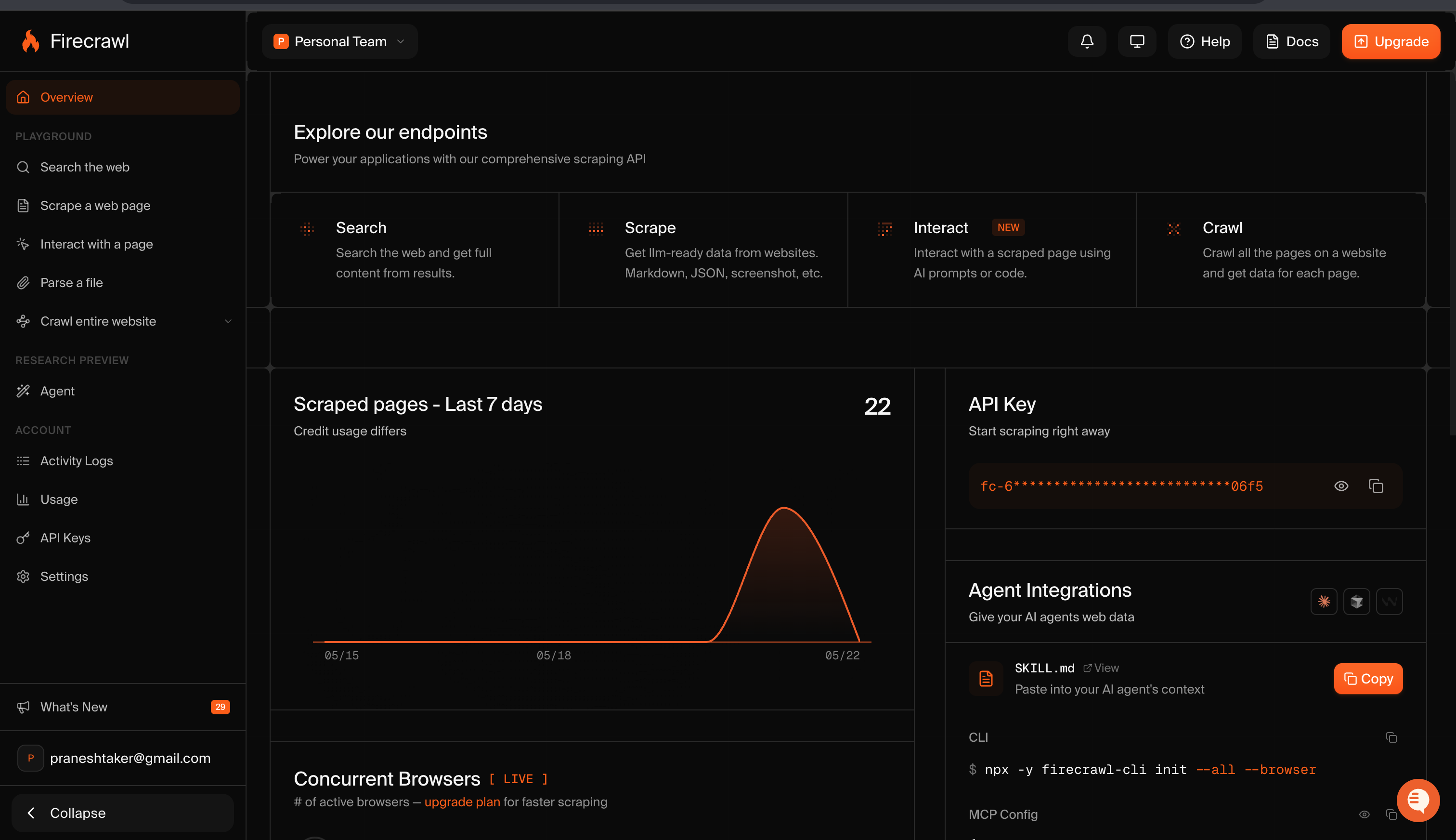
Get a Firecrawl API key
- Go to firecrawl.dev and sign in or create a free account.
- Your API key is shown on the Overview page under API Key. Copy it — it starts with
fc-.
-
Create a connection in Scalekit
- In the Scalekit dashboard, go to AgentKit → Connections → Create Connection.
- Search for Firecrawl MCP and click Create.
- Note the Connection name — use this as
connection_namein your code (e.g.,firecrawlmcp).
-
Add a connected account
Connected accounts link a specific user identifier in your system to a Firecrawl API key. Add one in the dashboard to test. In production, each user adds their own through the authorization link: they enter their credentials on the page it opens.
In the dashboard, to test
- Open the connection and click the Connected Accounts tab → Add account.
- Fill in Your User’s ID and API Key, then click Save.
From your backend, if your app already has the credentials
For example, when users enter them on a settings page in your app:
import { ConnectorStatus } from '@scalekit-sdk/node'const authorizationDetails = {details: {case: 'staticAuth',value: { details: { token: 'fc-...' } },},};let { connectedAccount } = await scalekit.actions.upsertConnectedAccount({connectionName: 'firecrawlmcp',identifier: 'user_123',authorizationDetails,});// Make sure the account is ACTIVE before the first tool call.if (connectedAccount?.status !== ConnectorStatus.ACTIVE) {({ connectedAccount } = await scalekit.actions.upsertConnectedAccount({connectionName: 'firecrawlmcp',identifier: 'user_123',authorizationDetails,}));}authorization_details = {"static_auth": {"token": "fc-..."}}response = scalekit_client.actions.upsert_connected_account(connection_name="firecrawlmcp",identifier="user_123",authorization_details=authorization_details,)# Make sure the account is ACTIVE before the first tool call.if response.connected_account.status != "ACTIVE":response = scalekit_client.actions.upsert_connected_account(connection_name="firecrawlmcp",identifier="user_123",authorization_details=authorization_details,)
-
Authorize a user and make your first call
quickstart.mts import { ScalekitClient } from '@scalekit-sdk/node'import 'dotenv/config'import { createInterface } from 'node:readline/promises'const scalekit = new ScalekitClient(process.env.SCALEKIT_ENVIRONMENT_URL,process.env.SCALEKIT_CLIENT_ID,process.env.SCALEKIT_CLIENT_SECRET,)const actions = scalekit.actionsconst connector = 'firecrawlmcp'const identifier = 'user_123'// Generate an authorization link for the userconst { link } = await actions.getAuthorizationLink({ connectionName: connector, identifier })console.log('Authorize Firecrawl MCP:', link)const rl = createInterface({ input: process.stdin, output: process.stdout })await rl.question('Press Enter after authorizing...')rl.close()// Make your first callconst result = await actions.executeTool({connector,identifier,toolName: 'firecrawlmcp_firecrawl_monitor_list',toolInput: {},})console.log(result)Terminal window npx tsx quickstart.mtsquickstart.py import osfrom scalekit import ScalekitClientfrom dotenv import load_dotenvload_dotenv()scalekit_client = ScalekitClient(env_url=os.getenv("SCALEKIT_ENVIRONMENT_URL"),client_id=os.getenv("SCALEKIT_CLIENT_ID"),client_secret=os.getenv("SCALEKIT_CLIENT_SECRET"),)actions = scalekit_client.actionsconnection_name = "firecrawlmcp"identifier = "user_123"# Generate an authorization link for the userlink_response = actions.get_authorization_link(connection_name=connection_name,identifier=identifier,)print("Authorize Firecrawl MCP:", link_response.link)input("Press Enter after authorizing...")# Make your first callresult = actions.execute_tool(tool_input={},tool_name="firecrawlmcp_firecrawl_monitor_list",connection_name=connection_name,identifier=identifier,)print(result)Terminal window python quickstart.pyEach user opens the link once and enters their Firecrawl MCP server credentials there. If your app already has a user's credentials, add the account from your backend instead, as the console steps above show. See Authorize a user for the full flow and statuses.
Tools
Pass the exact name toexecute_toolfirecrawlmcp_firecrawl_agent_statusRetrieve the status and results of a running AI research agent job by its ID.Read-onlyFirecrawl Agent Status
Retrieve the status and results of a running AI research agent job by its ID.
Inputs
idstringrequired- The unique identifier of the resource.
firecrawlmcp_firecrawl_check_crawl_statusCheck the progress and results of an in-progress crawl job by its ID.Read-onlyFirecrawl Check Crawl Status
Check the progress and results of an in-progress crawl job by its ID.
Inputs
idstringrequired- The unique identifier of the resource.
firecrawlmcp_firecrawl_developer_searchSearch an index built for coding agents covering GitHub issues, merged pull requests, repository READMEs, and curated documentation sites.Read-onlyFirecrawl Developer Search
Search an index built for coding agents covering GitHub issues, merged pull requests, repository READMEs, and curated documentation sites.
Inputs
querystringrequired- The developer question to search for: code behavior, a library or framework, an API contract, an error message, or a known bug.
kinteger- Maximum number of results to return.
skillsstring- Set to only to limit the search to agent-skill files.one of
only
firecrawlmcp_firecrawl_mapDiscover all indexed URLs on a website or within a URL subtree, with optional search filtering.Read-onlyFirecrawl Map
Discover all indexed URLs on a website or within a URL subtree, with optional search filtering.
Inputs
urlstringrequired- The URL of the page or website to scrape, crawl, or map.
ignoreQueryParametersboolean- Set to true to treat URLs differing only by query string as duplicates.
includeSubdomainsboolean- Set to true to include subdomains of the target domain.
limitnumber- Maximum number of results to return.
searchstring- Search term to filter URLs returned by the map.
sitemapstring- How to use the sitemap: include to discover URLs from it, only to crawl only sitemap URLs, skip to ignore it.one of
includeskiponly
firecrawlmcp_firecrawl_monitor_checkRetrieve the page-level diff results for a single monitor check run.Read-onlyFirecrawl Monitor Check
Retrieve the page-level diff results for a single monitor check run.
Inputs
checkIdstringrequired- The ID of a specific monitor check. Get it from firecrawlmcp_firecrawl_monitor_checks.
idstringrequired- The unique identifier of the resource.
limitinteger- Maximum number of results to return.
pageStatusstring- Filter check results to pages with this change status.one of
samenewchangedremovederror skipinteger- Number of items to skip for pagination.
firecrawlmcp_firecrawl_monitor_checksList the historical check runs for a monitor, with pagination.Read-onlyFirecrawl Monitor Checks
List the historical check runs for a monitor, with pagination.
Inputs
idstringrequired- The unique identifier of the resource.
limitinteger- Maximum number of results to return.
offsetinteger- Number of items to skip for pagination.
firecrawlmcp_firecrawl_monitor_getRetrieve the configuration and status of a single monitor by its ID.Read-onlyFirecrawl Monitor Get
Retrieve the configuration and status of a single monitor by its ID.
Inputs
idstringrequired- The unique identifier of the resource.
firecrawlmcp_firecrawl_monitor_listList all monitors configured for the authenticated account, with pagination.Read-onlyFirecrawl Monitor List
List all monitors configured for the authenticated account, with pagination.
Inputs
limitinteger- Maximum number of results to return.
offsetinteger- Number of items to skip for pagination.
firecrawlmcp_firecrawl_parseParse a local or uploaded document (PDF, Word, RTF, OpenDocument, spreadsheet, or HTML) into markdown, HTML, links, summary, targeted answers, or JSON matching a schema.Read-onlyFirecrawl Parse
Parse a local or uploaded document (PDF, Word, RTF, OpenDocument, spreadsheet, or HTML) into markdown, HTML, links, summary, targeted answers, or JSON matching a schema.
Inputs
contentTypestring- MIME type of the uploaded file, when using the hosted two-call upload flow.
declaredSizeBytesinteger- Declared size in bytes of the file being uploaded, when using the hosted two-call upload flow.
excludeTagsarray- HTML tags or CSS selectors to remove from extracted content.
filePathstring- Path to the document to parse. Local MCP reads this from the server filesystem; hosted MCP uses it for the first call of the upload flow.
formatsarray- Output formats to return. Accepted values: markdown, html, rawHtml, links, summary, json, query.
includeTagsarray- HTML tags or CSS selectors to restrict extraction to.
jsonOptionsobject- Options for JSON extraction: prompt and optional JSON Schema.
maxAgenumber- Maximum cache age in seconds; serve cached data up to this age for faster responses.
onlyMainContentboolean- Set to true to strip navigation, headers, footers, and other boilerplate.
parsersarray- Additional parsers to apply. Accepted values: pdf.
pdfOptionsobject- Options for PDF parsing, such as the maximum number of pages.
proxystring- Proxy tier to use when the document must be fetched remotely.one of
basicauto queryOptionsobject- Options for query-mode extraction: the prompt and response mode.
redactPIIboolean- Set to true to request redaction of personally identifiable information in the returned content.
removeBase64Imagesboolean- Set to true to strip inline base64-encoded images from the output.
skipTlsVerificationboolean- Set to true to skip TLS certificate validation (use for self-signed certs).
storeInCacheboolean- Set to true to cache this response for future maxAge-based lookups.
uploadRefstring- Upload reference returned by the first call of the hosted two-call upload flow; pass it on the follow-up call instead of filePath.
zeroDataRetentionboolean- Set to true to prevent Firecrawl from storing any data for this request. Requires an eligible authenticated account.
firecrawlmcp_firecrawl_research_inspect_paperRetrieve canonical metadata (title, abstract, authors, categories, dates) for one research paper by arXiv, PMC, PMID, or DOI identifier.Read-onlyFirecrawl Research Inspect Paper
Retrieve canonical metadata (title, abstract, authors, categories, dates) for one research paper by arXiv, PMC, PMID, or DOI identifier.
Inputs
paperIdstringrequired- The paper identifier: an arXiv, PMC, PMID, or DOI ID.
firecrawlmcp_firecrawl_research_read_paperRetrieve in-body passages from an indexed research paper relevant to a specific question.Read-onlyFirecrawl Research Read Paper
Retrieve in-body passages from an indexed research paper relevant to a specific question.
Inputs
paperIdstringrequired- The paper identifier: an arXiv, PMC, PMID, or DOI ID.
questionstringrequired- The specific question to find relevant passages for.
kinteger- Maximum number of passages to return.
firecrawlmcp_firecrawl_research_search_githubSearch indexed public GitHub issues, pull requests, and README content.Read-onlyFirecrawl Research Search GitHub
Search indexed public GitHub issues, pull requests, and README content.
Inputs
querystringrequired- The search query to run against indexed GitHub issues, pull requests, and READMEs.
kinteger- Maximum number of results to return.
firecrawlmcp_firecrawl_research_search_papersSearch research paper metadata and abstracts across biomedical, life-science, clinical, and arXiv sources by natural-language query.Read-onlyFirecrawl Research Search Papers
Search research paper metadata and abstracts across biomedical, life-science, clinical, and arXiv sources by natural-language query.
Inputs
querystringrequired- Natural-language query to search paper metadata and abstracts.
authorsarray- Filter results to these authors.
categoriesarray- Filter results to these subject categories.
fromstring- Only include papers published on or after this date.
kinteger- Maximum number of papers to return.
tostring- Only include papers published on or before this date.
firecrawlmcp_firecrawl_scrapeScrape a single URL and return its content in one or more formats (markdown, JSON, screenshot, etc.).Read-onlyFirecrawl Scrape
Scrape a single URL and return its content in one or more formats (markdown, JSON, screenshot, etc.).
Inputs
urlstringrequired- The URL of the page or website to scrape, crawl, or map.
excludeTagsarray- HTML tags or CSS selectors to remove from extracted content.
formatsarray- Output formats to return. Accepted values: markdown, html, rawHtml, screenshot, links, summary, branding, json, query, audio.
includeTagsarray- HTML tags or CSS selectors to restrict extraction to.
jsonOptionsobject- Options for JSON extraction: prompt and optional JSON Schema.
locationobject- Geographic location for localized content. Pass an object with country (ISO 3166-1 alpha-2 code) and optional languages array.
lockdownboolean- Set to true to serve from cache only, without any outbound network requests.
maxAgenumber- Maximum cache age in seconds; serve cached data up to this age for faster responses.
mobileboolean- Set to true to emulate a mobile browser viewport.
onlyMainContentboolean- Set to true to strip navigation, headers, footers, and other boilerplate.
parsersarray- Additional parsers to apply. Accepted values: pdf.
pdfOptionsobject- Options for PDF parsing, such as the maximum number of pages.
profileobject- Named browser profile to use for authenticated scraping.
proxystring- Proxy tier to use: basic for standard, stealth or enhanced for bot-resistant sites.one of
basicstealthenhancedauto queryOptionsobject- Options for query-mode extraction: the prompt and response mode.
removeBase64Imagesboolean- Set to true to strip inline base64-encoded images from the output.
screenshotOptionsobject- Options for screenshot capture, such as full-page and quality settings.
skipTlsVerificationboolean- Set to true to skip TLS certificate validation (use for self-signed certs).
storeInCacheboolean- Set to true to cache this response for future maxAge-based lookups.
waitFornumber- Milliseconds to wait for JavaScript to render before extracting content.
zeroDataRetentionboolean- Set to true to prevent Firecrawl from storing any data for this request.
firecrawlmcp_firecrawl_searchSearch the web and optionally scrape content from the top results.Read-onlyFirecrawl Search
Search the web and optionally scrape content from the top results.
Inputs
querystringrequired- The search query to send to Firecrawl web search.
enterprisearray- Search mode tier. Accepted values: default, anon, zdr.
excludeDomainsarray- Domains to exclude from search results.
filterstring- Advanced search filter string in Google tbs format.
includeDomainsarray- Restrict search results to these domains only.
limitnumber- Maximum number of results to return.
locationstring- Geographic location for localized scraping or search results.
scrapeOptionsobject- Scraping options applied to each page during crawl or search (formats, tags, etc.).
sourcesarray- Sources to include. Each item must have a type field. Accepted values for type: web, images, news.
tbsstring- Time-based search filter (e.g. qdr:d for past day, qdr:w for past week).
firecrawlmcp_firecrawl_agentStart an autonomous AI research agent that browses the web to answer a prompt.WriteFirecrawl Agent
Start an autonomous AI research agent that browses the web to answer a prompt. Returns a job ID; poll with firecrawlmcp_firecrawl_agent_status for results.
Inputs
promptstringrequired- Natural-language instruction to guide extraction or crawling.
schemaobject- JSON Schema defining the structure of data to extract.
urlsarray- List of URLs to extract structured data from.
firecrawlmcp_firecrawl_crawlStart a crawl job that extracts content from all pages of a website.WriteFirecrawl Crawl
Start a crawl job that extracts content from all pages of a website. Returns a job ID; use firecrawlmcp_firecrawl_check_crawl_status to poll for results.
Inputs
urlstringrequired- The URL of the page or website to scrape, crawl, or map.
allowExternalLinksboolean- Set to true to follow links to external domains.
allowSubdomainsboolean- Set to true to crawl subdomains of the target domain.
crawlEntireDomainboolean- Set to true to crawl all paths on the domain, not just the starting URL subtree.
deduplicateSimilarURLsboolean- Set to true to skip URLs that are similar to already-crawled URLs.
delaynumber- Milliseconds to wait between requests to avoid rate limiting.
excludePathsarray- URL path patterns to exclude from the crawl (e.g. ["/admin", "/login"]).
ignoreQueryParametersboolean- Set to true to treat URLs differing only by query string as duplicates.
includePathsarray- URL path patterns to restrict the crawl to (e.g. ["/blog/*"]).
limitnumber- Maximum number of results to return.
maxConcurrencynumber- Maximum number of concurrent requests during a crawl.
maxDiscoveryDepthnumber- Maximum link depth to follow from the starting URL.
promptstring- Natural-language instruction to guide extraction or crawling.
scrapeOptionsobject- Scraping options applied to each page during crawl or search (formats, tags, etc.).
sitemapstring- How to use the sitemap: include to discover URLs from it, only to crawl only sitemap URLs, skip to ignore it.one of
skipincludeonly
firecrawlmcp_firecrawl_feedbackSubmit concise quality feedback (rating, issues, tags, notes) for a completed search, scrape, parse, or map job.WriteFirecrawl Feedback
Submit concise quality feedback (rating, issues, tags, notes) for a completed search, scrape, parse, or map job.
Inputs
endpointstringrequired- The Firecrawl endpoint the feedback relates to. Accepted values: search, scrape, parse, map.one of
searchscrapeparsemap jobIdstringrequired- The ID of the completed job this feedback relates to.
ratingstringrequired- Your overall quality rating for the job.one of
goodbadpartial issuesarray- Short issue codes describing what went wrong with the job.
metadataobject- Small contextual key-value fields relevant to the feedback.
missingContentarray- Content types or topics that were missing from the job's results.
notestring- Free-form note with additional feedback context.
pageNumbersarray- Page numbers the feedback refers to, for multi-page jobs.
querySuggestionsstring- Alternative search queries that might yield better results.
tagsarray- Short tags categorizing the feedback.
urlstring- The URL the job relates to, if applicable.
valuableSourcesarray- URLs you found particularly useful in the job's results.
firecrawlmcp_firecrawl_interactRun code or a natural-language prompt in a live browser session for a previously scraped page.WriteFirecrawl Interact
Run code or a natural-language prompt in a live browser session for a previously scraped page.
Inputs
scrapeIdstringrequired- The ID of the active scrape session. Get it from firecrawlmcp_firecrawl_scrape when using interact.
codestring- Code snippet to execute in the browser session.
languagestring- Programming language for the code snippet to execute in the browser session.one of
bashpythonnode promptstring- Natural-language instruction to guide extraction or crawling.
timeoutnumber- Milliseconds to wait for the browser interaction to complete.
firecrawlmcp_firecrawl_monitor_createCreate a recurring Firecrawl monitor that scrapes a URL on a schedule and diffs results against the previous run.WriteFirecrawl Monitor Create
Create a recurring Firecrawl monitor that scrapes a URL on a schedule and diffs results against the previous run.
Inputs
bodyobjectrequired- Monitor configuration object. Include name, url, schedule (cron), and scrapeOptions.
firecrawlmcp_firecrawl_monitor_runTrigger an immediate check for a monitor outside its normal schedule.WriteFirecrawl Monitor Run
Trigger an immediate check for a monitor outside its normal schedule.
Inputs
idstringrequired- The unique identifier of the resource.
firecrawlmcp_firecrawl_monitor_updateUpdate monitor settings such as name, status, schedule, or scrape options.WriteFirecrawl Monitor Update
Update monitor settings such as name, status, schedule, or scrape options.
Inputs
bodyobjectrequired- Monitor configuration object. Include name, url, schedule (cron), and scrapeOptions.
idstringrequired- The unique identifier of the resource.
firecrawlmcp_firecrawl_search_feedbackSend structured feedback on a previous search result to help improve future results.WriteFirecrawl Search Feedback
Send structured feedback on a previous search result to help improve future results.
Inputs
ratingstringrequired- Your overall quality rating for the search result.one of
goodbadpartial searchIdstringrequired- The ID of a previous search result. Returned by firecrawlmcp_firecrawl_search.
missingContentarray- Content types or topics that were missing from the search results.
querySuggestionsstring- Alternative search queries that might yield better results.
valuableSourcesarray- URLs you found particularly useful in the search results.
firecrawlmcp_firecrawl_interact_stopEnd an active browser interaction session and release its resources.DestructiveFirecrawl Interact Stop
End an active browser interaction session and release its resources.
Inputs
scrapeIdstringrequired- The ID of the active scrape session. Get it from firecrawlmcp_firecrawl_scrape when using interact.
firecrawlmcp_firecrawl_monitor_deletePermanently delete a monitor and stop its scheduled checks.DestructiveFirecrawl Monitor Delete
Permanently delete a monitor and stop its scheduled checks.
Inputs
idstringrequired- The unique identifier of the resource.
No tools match.
Workflows
Scrape a page
Use firecrawlmcp_firecrawl_scrape to extract clean markdown content from any URL.
const result = await actions.executeTool({ connector: 'firecrawlmcp', identifier: 'user_123', toolName: 'firecrawlmcp_firecrawl_scrape', toolInput: { url: 'https://docs.example.com/getting-started', onlyMainContent: true, },});console.log(result.data);result = actions.execute_tool( connection_name="firecrawlmcp", identifier="user_123", tool_name="firecrawlmcp_firecrawl_scrape", tool_input={ "url": "https://docs.example.com/getting-started", "onlyMainContent": True, },)print(result.data)Search the web
Use firecrawlmcp_firecrawl_search to run a live web search and get scraped content from the top results.
const result = await actions.executeTool({ connector: 'firecrawlmcp', identifier: 'user_123', toolName: 'firecrawlmcp_firecrawl_search', toolInput: { query: 'best practices for API rate limiting 2026', limit: 5, },});console.log(result.data);result = actions.execute_tool( connection_name="firecrawlmcp", identifier="user_123", tool_name="firecrawlmcp_firecrawl_search", tool_input={ "query": "best practices for API rate limiting 2026", "limit": 5, },)print(result.data)Extract structured data from a URL
Use firecrawlmcp_firecrawl_scrape with the json format and a jsonOptions prompt (plus an optional JSON Schema) to pull structured data from a page.
const result = await actions.executeTool({ connector: 'firecrawlmcp', identifier: 'user_123', toolName: 'firecrawlmcp_firecrawl_scrape', toolInput: { url: 'https://example.com/pricing', formats: ['json'], jsonOptions: { prompt: 'Extract all pricing plan names and their monthly costs.', }, },});console.log(result.data);result = actions.execute_tool( connection_name="firecrawlmcp", identifier="user_123", tool_name="firecrawlmcp_firecrawl_scrape", tool_input={ "url": "https://example.com/pricing", "formats": ["json"], "jsonOptions": { "prompt": "Extract all pricing plan names and their monthly costs.", }, },)print(result.data)