
The Nimble MCP connector routes your AI agent's tool calls to Nimble's own MCP server through Scalekit. Each user connects their own Nimble access token once, and Scalekit sends it with every call, so your agent never handles credentials. It comes with 31 tools.
- Tools
- 31
- What they doRead · write · destructive
- 17 · 9 · 517 read9 write5 destructive
- Users sign in with
- Access token
Setup
Install the SDK
Terminal window npm install @scalekit-sdk/node dotenvTerminal window pip install scalekit-sdk-python python-dotenvSet your credentials
Add your Scalekit credentials to your
.envfile. Find values in app.scalekit.com > Developers > API Credentials..env SCALEKIT_ENVIRONMENT_URL=<your-environment-url>SCALEKIT_CLIENT_ID=<your-client-id>SCALEKIT_CLIENT_SECRET=<your-client-secret>Create the Nimble MCP connection
In AgentKit > Connections, create a Nimble MCP connection. The name you give it is the
connection_nameyour code passes. See Configure connections.Console steps with screenshots
Generate an API key from your Nimble account so Scalekit can authenticate your users’ web intelligence requests.
-
Create an API key in Nimble
- Sign in to app.nimbleway.com.
- In the left sidebar, click API Playground or look for the Create API Key item in the onboarding checklist at the bottom left.
- Click Create API Key.
In the Create API Key dialog:
- Enter a Key name that identifies this integration, for example
Agent Auth. - Click Create key.
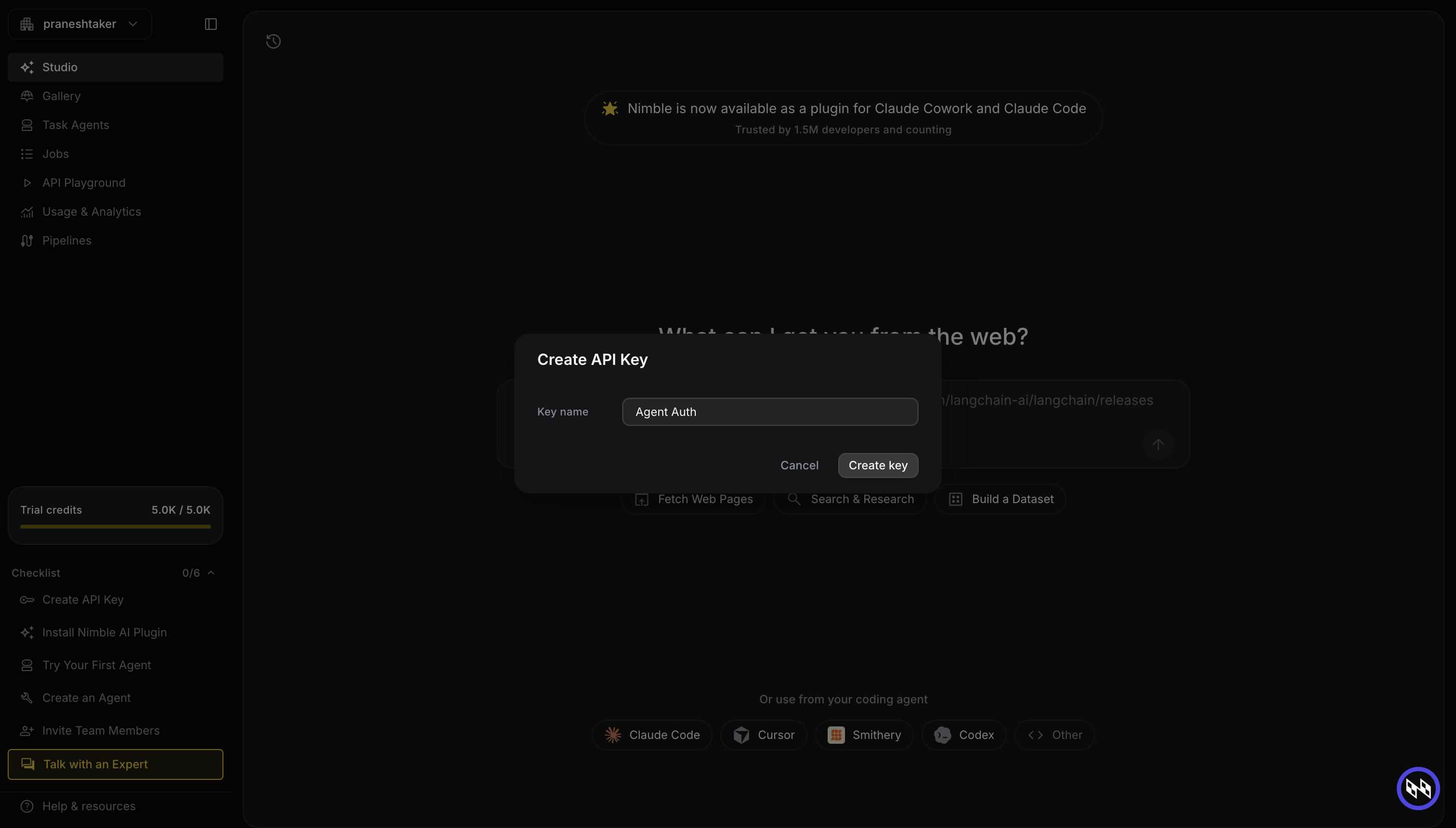
Nimble displays your new API key. Copy it immediately — it is only shown once.
-
Add the API key to Scalekit
- In the Scalekit dashboard, go to AgentKit > Connections > Create Connection.
- Search for Nimble MCP and click Create.
- In the API Key field, paste the key you copied.
- Click Save.
Scalekit validates the key and marks the connection as active. Your users can now execute Nimble tools through their own connected accounts.
-
Authorize a user and make your first call
quickstart.mts import { ScalekitClient } from '@scalekit-sdk/node'import 'dotenv/config'import { createInterface } from 'node:readline/promises'const scalekit = new ScalekitClient(process.env.SCALEKIT_ENVIRONMENT_URL,process.env.SCALEKIT_CLIENT_ID,process.env.SCALEKIT_CLIENT_SECRET,)const actions = scalekit.actionsconst connector = 'nimblemcp'const identifier = 'user_123'// Generate an authorization link for the userconst { link } = await actions.getAuthorizationLink({ connectionName: connector, identifier })console.log('Authorize Nimble MCP:', link)const rl = createInterface({ input: process.stdin, output: process.stdout })await rl.question('Press Enter after authorizing...')rl.close()// Make your first callconst result = await actions.executeTool({connector,identifier,toolName: 'nimblemcp_nimble_agent_templates_list',toolInput: {},})console.log(result)Terminal window npx tsx quickstart.mtsquickstart.py import osfrom scalekit import ScalekitClientfrom dotenv import load_dotenvload_dotenv()scalekit_client = ScalekitClient(env_url=os.getenv("SCALEKIT_ENVIRONMENT_URL"),client_id=os.getenv("SCALEKIT_CLIENT_ID"),client_secret=os.getenv("SCALEKIT_CLIENT_SECRET"),)actions = scalekit_client.actionsconnection_name = "nimblemcp"identifier = "user_123"# Generate an authorization link for the userlink_response = actions.get_authorization_link(connection_name=connection_name,identifier=identifier,)print("Authorize Nimble MCP:", link_response.link)input("Press Enter after authorizing...")# Make your first callresult = actions.execute_tool(tool_input={},tool_name="nimblemcp_nimble_agent_templates_list",connection_name=connection_name,identifier=identifier,)print(result)Terminal window python quickstart.pyEach user opens the link once and enters their Nimble MCP server credentials there. If your app already has a user's credentials, add the account from your backend instead, as the console steps above show. See Authorize a user for the full flow and statuses.
Tools
Pass the exact name toexecute_toolnimblemcp_nimble_agent_templates_getGet full details of a pre-built agent template.Read-onlyAgent Templates Get
Get full details of a pre-built agent template. When to use: - You have a template name from `nimblemcp_nimble_agent_templates_list` and want its full definition before basing a new agent on it. When NOT to use: - You don't know the template name — use `nimblemcp_nimble_agent_templates_list` first.
Inputs
template_namestringrequired- Template name as returned by `nimblemcp_nimble_agent_templates_list`.
tool_descriptionstring- No description.
tool_reasoningstring- No description.
nimblemcp_nimble_agent_templates_listList pre-built agent templates that can seed `nimblemcp_nimble_agents_create` via its `template` field.Read-onlyAgent Templates List
List pre-built agent templates that can seed `nimblemcp_nimble_agents_create` via its `template` field. When to use: - You want to see what pre-built agent templates exist before creating a custom agent. When NOT to use: - You already have a template name — use `nimblemcp_nimble_agent_templates_get` to inspect it.
Inputs
limitinteger- Maximum number of templates to return (1-100).default
50 offsetinteger- Offset for pagination. Use 0 for the first page.default
0 tool_descriptionstring- No description.
tool_reasoningstring- No description.
nimblemcp_nimble_agents_getGet full details of a specific agent including its input/output schema.Read-onlyAgents Get
Get full details of a specific agent including its input/output schema. Use after `nimblemcp_nimble_agents_list` to inspect an agent before running it. When to use: - You have an agent name and need to see its full schema before running it. When NOT to use: - You don't know the agent name — use `nimblemcp_nimble_agents_list` first.
Inputs
agent_idstringrequired- Exact agent name as returned by `nimblemcp_nimble_agents_list`.
tool_descriptionstring- No description.
tool_reasoningstring- No description.
nimblemcp_nimble_agents_listBrowse the catalog of pre-built Nimble agents.Read-onlyAgents List
Browse the catalog of pre-built Nimble agents. Use this as the first step when you want to run a structured extraction on a known site or data source. When to use: - You want to discover available agents for a specific domain or data source. - You want to paginate through all agents in the catalog.
Inputs
limitinteger- Maximum number of agents to return in one page (1-100).default
50 offsetinteger- Offset for pagination. Use 0 for the first page.default
0 querystring- Short keyword to filter agents by name or domain (e.g. 'amazon', 'linkedin'). Use 1-2 words for best results.
tool_descriptionstring- No description.
tool_reasoningstring- No description.
nimblemcp_nimble_agents_run_resultFetch the output of a completed agent run.Read-onlyAgents Run Result
Fetch the output of a completed agent run. Returns the run's output (text or structured JSON with trust/citation metadata). Call after `nimblemcp_nimble_agents_run_status` reports a terminal status. When to use: - An agent run has completed and you need its final output. When NOT to use: - The run may still be in progress — check `nimblemcp_nimble_agents_run_status` first.
Inputs
agent_idstringrequired- Agent id the run belongs to.
run_idstringrequired- Run id returned by `nimblemcp_nimble_agents_run`.
tool_descriptionstring- No description.
tool_reasoningstring- No description.
nimblemcp_nimble_agents_run_statusCheck the status of an agent run.Read-onlyAgents Run Status
Check the status of an agent run. While the status is not terminal (e.g. still pending/running), poll again after ~15-30 seconds. Once completed, fetch the output via `nimblemcp_nimble_agents_run_result`. When to use: - You started a run with `nimblemcp_nimble_agents_run` and want to check whether it has finished. When NOT to use: - You want crawl status — use `nimblemcp_nimble_crawl_status`. - You want extract template generation status — use `nimblemcp_nimble_extract_templates_generation_status`.
Inputs
agent_idstringrequired- Agent id the run belongs to.
run_idstringrequired- Run id returned by `nimblemcp_nimble_agents_run`.
tool_descriptionstring- No description.
tool_reasoningstring- No description.
nimblemcp_nimble_agents_runs_listList past and in-progress runs of an agent.Read-onlyAgents Runs List
List past and in-progress runs of an agent. When to use: - You want to see run history for a specific agent, including in-progress runs. When NOT to use: - You want details of one specific run — use `nimblemcp_nimble_agents_run_status` or `nimblemcp_nimble_agents_run_result`.
Inputs
agent_idstringrequired- Agent id whose runs to list.
limitinteger- Maximum number of runs to return (1-100).default
50 offsetinteger- Offset for pagination.default
0 tool_descriptionstring- No description.
tool_reasoningstring- No description.
nimblemcp_nimble_agents_statusCheck the current status of an agent generation.Read-onlyAgents Status
Check the current status of an agent generation. Status flow: in-progress → succeeded or failed. When to use: - You started a generation with `nimblemcp_nimble_agents_generate` or `nimblemcp_nimble_agents_update_from_agent` and want to check if it completed. When NOT to use: - You want crawl job status — use `nimblemcp_nimble_crawl_status`. - You want async task results — use `nimblemcp_nimble_task_results`.
Inputs
generation_idstringrequired- Server-assigned generation ID returned by `nimblemcp_nimble_agents_generate` or `nimblemcp_nimble_agents_update_from_agent`.
tool_descriptionstring- No description.
tool_reasoningstring- No description.
nimblemcp_nimble_crawl_listList crawl jobs, optionally filtered by status.Read-onlyCrawl List
List crawl jobs, optionally filtered by status. When to use: - You want to see all active or past crawl jobs in the account. - You want to filter crawls by their current status.
Inputs
limitinteger- Maximum number of crawl jobs to return. Default is 20.default
20 statusstring- Optional status filter (e.g. "queued", "running", "succeeded", "failed", "canceled").
tool_descriptionstring- No description.
tool_reasoningstring- No description.
nimblemcp_nimble_crawl_statusCheck the status and progress of a running or completed crawl job.Read-onlyCrawl Status
Check the status and progress of a running or completed crawl job. When to use: - You started a crawl with `nimblemcp_nimble_crawl_run` and want to check its progress or retrieve results. When NOT to use: - You want async task results from `nimble_extract_async` or `nimble_agent_run_async` — use `nimblemcp_nimble_task_results` for those.
Inputs
crawl_idstringrequired- The unique crawl identifier returned by `nimblemcp_nimble_crawl_run`.
tool_descriptionstring- Optional description of the tool's purpose.
tool_reasoningstring- Optional reasoning about why this tool was selected.
nimblemcp_nimble_extractExtract and parse content from a specific URL using Nimble's Extract API.Read-onlyExtract
Extract and parse content from a specific URL using Nimble's Extract API. This is a synchronous call — it waits for extraction to complete before returning. When to use: - You have a specific URL and need its content immediately. - You want structured content (markdown, text) from a single page. When NOT to use: - You need to extract many pages — use `nimblemcp_nimble_crawl_run` instead. - The page loads slowly — use `nimblemcp_nimble_extract_async` for async extraction.
Inputs
urlstringrequired- The URL to extract content from.
countrystring- Country code for geo-targeted rendering (e.g. "us").
driverstring- Optional browser driver tier for web extraction: "vx6" (fast HTTP, no JS), "vx8" (headless browser with JS rendering), "vx8-pro" (headful browser, complex interactions), "vx10" (stealth headless, strict bot mitigation), or "vx10-pro" (stealth headful, heavily bot-protected sites). If omitted, the backend selects. Escalate to vx8/vx8-pro for JavaScript-heavy pages, or vx10/vx10-pro for sites with strict bot mitigation, when a default extraction returns empty or truncated content.
localestring- Locale code for localized rendering (e.g. "en-US").
output_formatstring- Output format: "markdown" (default) or "text".default
markdown tool_descriptionstring- No description.
tool_reasoningstring- No description.
waitstring- Extra milliseconds to wait for dynamic content to load before extraction.
nimblemcp_nimble_extract_templates_generation_statusCheck the current status of an extract template generation.Read-onlyExtract Templates Generation Status
Check the current status of an extract template generation. Status flow: in-progress (pending/processing) → completed or failed. On completion, `template_name` and `version_id` are set and you can proceed to run the template. On failure, inspect `error` for diagnostics. When to use: - You started a generation with `nimblemcp_nimble_extract_templates_generate` or `nimblemcp_nimble_extract_templates_update_from_template` and want to check if it completed. When NOT to use: - You want crawl job status — use `nimblemcp_nimble_crawl_status`. - You want async task results — use `nimblemcp_nimble_task_results`.
Inputs
generation_idstringrequired- Server-assigned generation ID returned by `nimblemcp_nimble_extract_templates_generate` or `nimblemcp_nimble_extract_templates_update_from_template`.
tool_descriptionstring- No description.
tool_reasoningstring- No description.
nimblemcp_nimble_extract_templates_getGet full details of a specific extract template including its input/output schema.Read-onlyExtract Templates Get
Get full details of a specific extract template including its input/output schema. Use after `nimblemcp_nimble_extract_templates_list` to inspect a template before running it. The response includes the template's input_schema / output_schema, description, and metadata. When to use: - You have a template name and need to see its full schema before running it. When NOT to use: - You don't know the template name — use `nimblemcp_nimble_extract_templates_list` first.
Inputs
template_namestringrequired- Exact template name as returned by `nimblemcp_nimble_extract_templates_list`.
tool_descriptionstring- No description.
tool_reasoningstring- No description.
nimblemcp_nimble_extract_templates_listBrowse the catalog of extract templates.Read-onlyExtract Templates List
Browse the catalog of extract templates. Use this tool as the first step to find an existing template for a data collection task. Each template is purpose-built for a specific website or data type (e.g. Amazon products, LinkedIn profiles, Google Maps reviews). Typical workflow: list → get (inspect details) → run (collect data). When to use: - You want to discover available extract templates for a specific domain or data source. - You want to paginate through all templates in the catalog.
Inputs
limitinteger- Maximum number of templates to return in one page (1-100).default
50 querystring- Short keyword to filter templates by name or domain (e.g. 'amazon', 'linkedin'). Use 1-2 words for best results.
skipinteger- Offset for pagination. Use 0 for the first page.default
0 tool_descriptionstring- No description.
tool_reasoningstring- No description.
nimblemcp_nimble_mapDiscover all URLs on a website by crawling its pages and sitemap.Read-onlyMap
Discover all URLs on a website by crawling its pages and sitemap. Returns a flat list of URLs found on the site. Useful for understanding site structure before targeted extraction. When to use: - You need to enumerate the URL space of a site before deciding what to extract. - You want a quick snapshot of all discoverable links on a domain. When NOT to use: - You need the page content itself — use `nimblemcp_nimble_crawl_run` or `nimblemcp_nimble_extract`.
Inputs
urlstringrequired- Starting URL. The mapper will discover all linked URLs from this entry point.
domain_filterstring- Optional domain filter to restrict URL discovery.
limitstring- Maximum number of URLs to return. Omit for no limit.
sitemapstring- Sitemap strategy: "include", "skip", or "only".
tool_descriptionstring- No description.
tool_reasoningstring- No description.
nimblemcp_nimble_searchSearch the web using Nimble's Search API with configurable content richness.Read-onlySearch
Search the web using Nimble's Search API with configurable content richness. When to use: - You need web search results with optional AI-generated answers. - You want relevance-ranked results with snippet or full-page content. When NOT to use: - You need to extract the full content of a known URL — use `nimblemcp_nimble_extract`.
Inputs
querystringrequired- Search query text.
content_typestring- Filter by content type (e.g. ["article", "blog"]).
countrystring- Country code for geotargeted results (e.g. "us").
end_datestring- Filter results published on or before this date (ISO 8601).
exclude_domainsstring- Exclude results from these domains.
focusstring- Focus mode(s) for search: "general", "news", "academic", etc.default
general include_answerboolean- Whether to include an AI-generated answer synthesized from results. Default is false.default
false include_domainsstring- Restrict results to these domains only.
localestring- Locale code for localized search results (e.g. "en-US").
max_resultsinteger- Maximum number of results to return. Default is 3.default
3 max_subagentsinteger- Maximum subagents for deep search mode. Default is 3.default
3 output_formatstring- Output format for content: "markdown" (default) or "text".default
markdown search_depthstring- Depth of search: "lite" (default, faster) or "deep".default
lite start_datestring- Filter results published on or after this date (ISO 8601).
time_rangestring- Relative time range filter (e.g. "1d", "7d", "1m").
tool_descriptionstring- No description.
tool_reasoningstring- No description.
nimblemcp_nimble_task_resultsGet the status and results of an async task.Read-onlyTask Results
Get the status and results of an async task. Use this to retrieve results from `nimblemcp_nimble_extract_async` or `nimblemcp_nimble_agent_run_async` after initiating them. When to use: - You started an async extraction or agent run and want to poll for its results. When NOT to use: - You want crawl status — use `nimblemcp_nimble_crawl_status` for crawl jobs.
Inputs
task_idstringrequired- The task ID returned by `nimblemcp_nimble_extract_async` or `nimblemcp_nimble_agent_run_async`.
tool_descriptionstring- No description.
tool_reasoningstring- No description.
nimblemcp_nimble_agent_run_asyncStart an asynchronous agent run.WriteAgent Run Async
Start an asynchronous agent run. Returns immediately with a task ID. Use this for long-running extractions using a pre-built or custom agent. Poll results with `nimblemcp_nimble_task_results`. When to use: - You want to run a specific Nimble agent asynchronously without blocking. - You have a long-running agent job where you will poll for results. When NOT to use: - You want a synchronous agent result — use `nimblemcp_nimble_agents_run` instead.
Inputs
agentstringrequired- Name of the agent to run (from `nimblemcp_nimble_agents_list`).
paramsobjectrequired- Runtime input parameters for the agent.
callback_urlstring- Optional webhook URL to receive results when the job completes.
tool_descriptionstring- No description.
tool_reasoningstring- No description.
nimblemcp_nimble_agents_createCreate a new web search agent.WriteAgents Create
Create a new web search agent. All parameters are optional; pass `template` to start from a pre-built agent template (see `nimblemcp_nimble_agent_templates_list`), or describe the agent via name/goals/sources. When to use: - You want a persistent, reusable agent configured with specific goals, sources, and output schema. When NOT to use: - You just need a one-off custom extraction from a prompt and URL — use `nimblemcp_nimble_extract_templates_generate` instead.
Inputs
agent_namestring- Unique name for the agent.
descriptionstring- What the agent does.
display_namestring- Human-friendly display name.
effortstring- Default effort level: 'low', 'medium', 'high', 'x-high', or 'max'.
goalsstring- Goals guiding the agent's research.
output_schemastring- Optional JSON Schema for structured outputs.
skillstring- Skill/domain the agent specializes in.
sourcesstring- Source preferences: {allow: [...], block: [...], prioritize: str, avoid: str}.
suggested_questionsstring- Example questions for the agent.
templatestring- Optional agent template name to base the agent on (see `nimblemcp_nimble_agent_templates_list`).
tool_descriptionstring- No description.
tool_reasoningstring- No description.
use_casestring- One of: 'research', 'enrichment', 'dataset_building'.
nimblemcp_nimble_agents_generateKick off generation of a new custom agent.WriteAgents Generate
Kick off generation of a new custom agent. Returns a `generation_id`; poll it with `nimblemcp_nimble_agents_status` to get the generated agent name. When to use: - You need a custom extraction agent for a site that isn't covered by the pre-built catalog. - You want to generate an agent from a natural-language prompt and an example URL. When NOT to use: - A pre-built agent already covers the site — use `nimblemcp_nimble_agents_run` instead.
Inputs
promptstringrequired- Natural-language instruction describing what the agent should collect (e.g. 'Collect product name, price, and rating from Amazon product pages').
urlstringrequired- Example target URL that helps the generator understand page structure.
agent_namestring- Optional desired name for the generated agent.
input_schemastring- Optional JSON Schema object describing runtime input parameters.
output_schemastring- Optional JSON Schema object describing desired output fields.
tool_descriptionstring- No description.
tool_reasoningstring- No description.
nimblemcp_nimble_agents_runStart an asynchronous agent run.WriteAgents Run
Start an asynchronous agent run. Returns immediately with a run `id` and `status`. Poll `nimblemcp_nimble_agents_run_status` until the status is terminal, then fetch the output via `nimblemcp_nimble_agents_run_result`. When to use: - You want to run a pre-built or custom agent (existing or create-or-reuse by name) against a research question. When NOT to use: - You want a synchronous, one-off custom extraction from a URL and prompt — use `nimblemcp_nimble_extract_templates_run` instead.
Inputs
inputstringrequired- Natural-language research question or task for the agent.
agent_idstring- Existing agent id to run. Provide this or `agent_name`, not both.
agent_namestring- Stable agent name for create-or-reuse: an unseen name creates a new agent, an existing name reuses it and returns the same agent id across calls. Ignored if `agent_id` is set.
effortstring- Effort override for this run: 'low', 'medium', 'high', 'x-high', or 'max'.
input_datastring- Optional structured input rows for enrichment runs.
output_schemastring- Optional JSON Schema override for this run's structured output.
skillstring- Skill override for this run. One-time only against an existing agent; becomes the new agent's stored skill if this call creates it via `agent_name`.
sourcesstring- Source preferences override: {allow: [...], block: [...], prioritize: str, avoid: str}.
tool_descriptionstring- No description.
tool_reasoningstring- No description.
use_casestring- One of: 'research', 'enrichment', 'dataset_building'. Only settable when this run creates a new agent (via `agent_name`); against an existing agent it must match the agent's stored use_case.
nimblemcp_nimble_agents_update_from_agentCreate a refinement generation that starts from an existing agent.WriteAgents Update From Agent
Create a refinement generation that starts from an existing agent. Returns a `generation_id`; poll with `nimblemcp_nimble_agents_status` to get the updated agent. When to use: - You want to modify an existing agent's behavior using natural-language instructions. - You want to extend an agent's output schema without rebuilding from scratch. When NOT to use: - You want to build a brand-new agent — use `nimblemcp_nimble_agents_generate`.
Inputs
from_agentstringrequired- Agent name to refine. A new generation is created from this agent.
promptstringrequired- Natural-language refinement instruction (e.g. 'add a ratings field to the output').
tool_descriptionstring- No description.
tool_reasoningstring- No description.
nimblemcp_nimble_crawl_runStart a web crawl to extract content from multiple pages on a website.WriteCrawl Run
Start a web crawl to extract content from multiple pages on a website. The crawl discovers and visits pages starting from a given URL, following links up to the specified limit. Results are retrieved via `nimblemcp_nimble_crawl_status`. When to use: - You need to extract content from multiple pages on a site automatically. - You want link-following or sitemap-based URL discovery. When NOT to use: - You need content from a single known URL — use `nimblemcp_nimble_extract` instead. - You need results immediately — this is async; first pages complete ~1-2 min after dispatch.
Inputs
urlstringrequired- Starting URL for the crawl. The crawler discovers and visits linked pages from this entry point.
allow_external_linksboolean- Whether to follow links to external domains. Default is false.default
false allow_subdomainsboolean- Whether to follow links to subdomains of the starting URL. Default is false.default
false exclude_pathsstring- Optional regex patterns. URLs matching any pattern will be skipped.
include_pathsstring- Optional regex patterns. Only URLs matching at least one pattern will be crawled.
limitinteger- Maximum number of pages to crawl (default: 100). Higher limits take longer but provide more coverage.default
100 namestring- Optional human-readable name for this crawl job.
sitemapstring- How to use the site's sitemap: "include" (default), "skip", or "only".default
include tool_descriptionstring- Optional description of the tool's purpose.
tool_reasoningstring- Optional reasoning about why this tool was selected.
nimblemcp_nimble_extract_templates_generateKick off generation of a new custom extract template.WriteExtract Templates Generate
Kick off generation of a new custom extract template. Returns a `generation_id`; poll it with `nimblemcp_nimble_extract_templates_generation_status` to get the generated template. On completion the result carries the new `template_name` and `version_id`; use `template_name` with `nimblemcp_nimble_extract_templates_run` to execute it. When to use: - You need a custom extraction template for a site that isn't covered by the pre-built catalog. - You want to generate a template from a natural-language prompt and an example URL. When NOT to use: - A pre-built template already covers the site — use `nimblemcp_nimble_extract_templates_run` instead.
Inputs
promptstringrequired- Natural-language instruction describing what the template should collect (e.g. 'Collect product name, price, and rating from Amazon product pages').
urlstringrequired- Example target URL that helps the generator understand page structure.
input_schemastring- Optional JSON Schema object describing runtime input parameters.
namestring- Optional desired name for the generated template.
output_schemastring- Optional JSON Schema object describing desired output fields.
tool_descriptionstring- No description.
tool_reasoningstring- No description.
nimblemcp_nimble_extract_templates_runExecute an extract template against a target URL or set of parameters.WriteExtract Templates Run
Execute an extract template against a target URL or set of parameters. Returns structured data collected from the target page. The params dict must match the template's input_schema — use `nimblemcp_nimble_extract_templates_get` to inspect required fields. Possible issues if no results are returned: - The target URL may be unreachable or behind a login wall. - The page structure may have changed since the template was created. - Required params may be missing or malformed — check the template's input_schema. When to use: - You know the template name and want its structured output inline. When NOT to use: - You want an async run — use `nimblemcp_nimble_extract_templates_run_async` instead.
Inputs
paramsobjectrequired- Runtime input parameters built from the template's input_schema. Include all required keys. Example: {"url": "https://www.amazon.com/dp/B09V3KXJPB"}
templatestringrequired- Template name from `nimblemcp_nimble_extract_templates_list`, `nimblemcp_nimble_extract_templates_get`, or a completed generation.
tool_descriptionstring- No description.
tool_reasoningstring- No description.
nimblemcp_nimble_extract_templates_update_from_templateCreate a refinement generation that starts from an existing extract template.WriteExtract Templates Update From Template
Create a refinement generation that starts from an existing extract template. Returns a `generation_id`; poll with `nimblemcp_nimble_extract_templates_generation_status` to get the refined template. On success, use the returned `template_name` with `nimblemcp_nimble_extract_templates_run`. When to use: - You want to modify an existing extract template's behavior using natural-language instructions. - You want to extend a template's output schema without rebuilding from scratch. When NOT to use: - You want to build a brand-new template — use `nimblemcp_nimble_extract_templates_generate`.
Inputs
from_templatestringrequired- Template name to refine. A new generation is created from this template.
promptstringrequired- Natural-language refinement instruction (e.g. 'add a ratings field to the output').
tool_descriptionstring- No description.
tool_reasoningstring- No description.
nimblemcp_nimble_agents_deleteDelete an agent permanently.DestructiveAgents Delete
Delete an agent permanently. When to use: - You no longer need an agent and want to remove it from the account. When NOT to use: - You just want to stop a specific run — this deletes the agent configuration itself, not a run.
Inputs
agent_idstringrequired- Agent id to delete.
tool_descriptionstring- No description.
tool_reasoningstring- No description.
nimblemcp_nimble_agents_updateUpdate an existing agent via JSON Patch operations.DestructiveAgents Update
Update an existing agent via JSON Patch operations. When to use: - You need to change specific fields on an existing agent (e.g. its description, goals, or sources) without regenerating it. When NOT to use: - You want to refine an extract template's behavior with natural language — use `nimblemcp_nimble_extract_templates_update_from_template` instead.
Inputs
agent_idstringrequired- Agent id to update.
operationsarrayrequired- JSON Patch operations to apply. Each item: {op: 'add'|'remove'|'replace'|'move'|'copy'|'test', path: "/field", value: ...}. Example: [{"op": "replace", "path": "/description", "value": "New"}]
tool_descriptionstring- No description.
tool_reasoningstring- No description.
nimblemcp_nimble_crawl_terminateCancel a running or queued crawl job.DestructiveCrawl Terminate
Cancel a running or queued crawl job. When to use: - You want to stop a crawl that is no longer needed before it completes. When NOT to use: - The crawl has already succeeded or failed — it cannot be cancelled in a terminal state.
Inputs
crawl_idstringrequired- The unique crawl identifier to cancel.
tool_descriptionstring- No description.
tool_reasoningstring- No description.
nimblemcp_nimble_extract_asyncStart an asynchronous URL extraction.DestructiveExtract Async
Start an asynchronous URL extraction. Returns immediately with a task ID. Poll `nimblemcp_nimble_task_results` to retrieve the extracted content when ready. When to use: - You want to extract a URL without blocking while it renders. - The page is complex or slow to load. When NOT to use: - You need the result inline — use `nimblemcp_nimble_extract` for synchronous extraction.
Inputs
urlstringrequired- The URL to extract content from.
callback_urlstring- Optional webhook URL to receive results when extraction completes.
countrystring- No description.
driverstring- Optional browser driver tier for web extraction: "vx6" (fast HTTP, no JS), "vx8" (headless browser with JS rendering), "vx8-pro" (headful browser, complex interactions), "vx10" (stealth headless, strict bot mitigation), or "vx10-pro" (stealth headful, heavily bot-protected sites). If omitted, the backend selects. Escalate to vx8/vx8-pro for JavaScript-heavy pages, or vx10/vx10-pro for sites with strict bot mitigation, when a default extraction returns empty or truncated content.
localestring- No description.
output_formatstring- Output format: "markdown" (default) or "text".default
markdown tool_descriptionstring- No description.
tool_reasoningstring- No description.
waitstring- Extra milliseconds to wait for dynamic content.
nimblemcp_nimble_extract_templates_run_asyncStart an asynchronous extract template run.DestructiveExtract Template Run Async
Start an asynchronous extract template run. Returns immediately with a task ID. Use this for long-running template extractions or batch processing. Retrieve results later with `nimblemcp_nimble_task_results` using the returned task ID. When to use: - You want to run an extract template without blocking while it completes. - You have a long-running or batch extraction where you will poll for results. When NOT to use: - You want the result inline — use `nimblemcp_nimble_extract_templates_run` for a synchronous run.
Inputs
paramsobjectrequired- Runtime input parameters matching the template's input_schema. Example: {"url": "https://www.amazon.com/dp/B09V3KXJPB"}
templatestringrequired- Extract template name to execute. Get available templates from `nimblemcp_nimble_extract_templates_list`.
callback_urlstring- Optional webhook URL to receive results when the run completes.
tool_descriptionstring- No description.
tool_reasoningstring- No description.
No tools match.