


The Cloudflare connector lets your AI agent act in each user's Cloudflare account. Each user signs in to Cloudflare once, and Scalekit stores and refreshes their tokens, so your agent never handles credentials. It comes with 31 tools.
- Tools
- 31
- What they doRead · write · destructive
- 17 · 11 · 317 read11 write3 destructive
- Users sign in with
- OAuth
- OAuth app
- Scalekit's or your own
Setup
Install the SDK
Terminal window npm install @scalekit-sdk/node dotenvTerminal window pip install scalekit-sdk-python python-dotenvSet your credentials
Add your Scalekit credentials to your
.envfile. Find values in app.scalekit.com > Developers > API Credentials..env SCALEKIT_ENVIRONMENT_URL=<your-environment-url>SCALEKIT_CLIENT_ID=<your-client-id>SCALEKIT_CLIENT_SECRET=<your-client-secret>Create the Cloudflare connection
In AgentKit > Connections, create a Cloudflare connection. The name you give it is the
connection_nameyour code passes. See Configure connections.Scalekit credentials are available for Cloudflare, so you don't need to register an OAuth app. To show your own app on the consent screen, use your own credentials instead.
Use your own OAuth app
Register your Scalekit environment with Cloudflare so Scalekit handles the OAuth flow and token lifecycle for your users. Create a Cloudflare OAuth client, then add its Client ID and Client Secret to your Scalekit connection.
-
Copy the redirect URI from Scalekit
-
In the Scalekit dashboard, go to AgentKit > Connections > Create Connection. Find Cloudflare and click Create.
-
Click Use your own credentials and copy the redirect URI. It looks like
https://<SCALEKIT_ENVIRONMENT_URL>/sso/v1/oauth/<CONNECTION_ID>/callback.
-
-
Create an OAuth client in Cloudflare
-
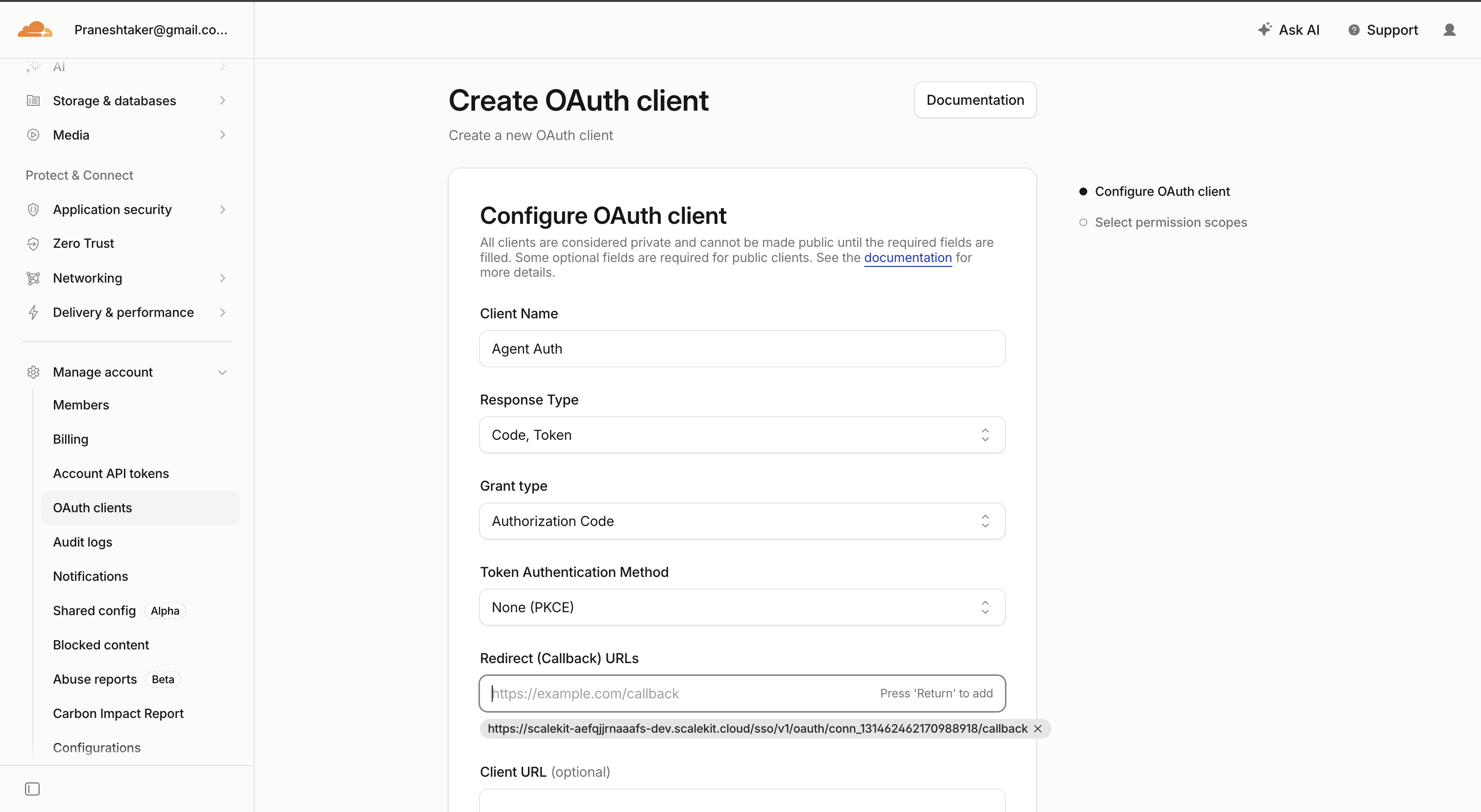
Sign in to the Cloudflare dashboard and go to Manage account > OAuth clients.
-
Click Create OAuth client.
-
Fill in the Configure OAuth client form:
- Client Name — for example,
Agent Auth - Response Type —
Code, Token - Grant type —
Authorization Code - Token Authentication Method —
None (PKCE) - Redirect (Callback) URLs — paste the redirect URI you copied from Scalekit, then press Return to add it
- Client Name — for example,
-
Click Next to continue to Select permission scopes.
-
-
Select permission scopes
Enable at least the scopes Scalekit requires:
Scope Required Zone Read ( zone.read)Yes DNS Read ( dns.read)Yes DNS Write ( dns.write)Only if your agent needs to manage DNS records Cache Purge ( cache.purge)Only if your agent needs to purge cached content Click Create to finish creating the OAuth client.
-
Copy your Client ID and Client Secret
- Cloudflare shows the Client ID and Client Secret once the client is created.
- Copy both values — the secret is shown only once.
-
Add credentials in Scalekit
- Return to the connection you created in Scalekit and enter:
- Client ID — from your Cloudflare OAuth client
- Client Secret — from your Cloudflare OAuth client
- Click Save.
- Return to the connection you created in Scalekit and enter:
-
Authorize a user and make your first call
quickstart.mts import { ScalekitClient } from '@scalekit-sdk/node'import 'dotenv/config'import { createInterface } from 'node:readline/promises'const scalekit = new ScalekitClient(process.env.SCALEKIT_ENVIRONMENT_URL,process.env.SCALEKIT_CLIENT_ID,process.env.SCALEKIT_CLIENT_SECRET,)const actions = scalekit.actionsconst connector = 'cloudflare'const identifier = 'user_123'// Generate an authorization link for the userconst { link } = await actions.getAuthorizationLink({ connectionName: connector, identifier })console.log('Authorize Cloudflare:', link)const rl = createInterface({ input: process.stdin, output: process.stdout })await rl.question('Press Enter after authorizing...')rl.close()// Make your first callconst result = await actions.executeTool({connector,identifier,toolName: 'cloudflare_account_list',toolInput: {},})console.log(result)Terminal window npx tsx quickstart.mtsquickstart.py import osfrom scalekit import ScalekitClientfrom dotenv import load_dotenvload_dotenv()scalekit_client = ScalekitClient(env_url=os.getenv("SCALEKIT_ENVIRONMENT_URL"),client_id=os.getenv("SCALEKIT_CLIENT_ID"),client_secret=os.getenv("SCALEKIT_CLIENT_SECRET"),)actions = scalekit_client.actionsconnection_name = "cloudflare"identifier = "user_123"# Generate an authorization link for the userlink_response = actions.get_authorization_link(connection_name=connection_name,identifier=identifier,)print("Authorize Cloudflare:", link_response.link)input("Press Enter after authorizing...")# Make your first callresult = actions.execute_tool(tool_input={},tool_name="cloudflare_account_list",connection_name=connection_name,identifier=identifier,)print(result)Terminal window python quickstart.pyEach user signs in once. See Authorize a user for the full flow and statuses.
Tools
Pass the exact name toexecute_toolcloudflare_access_application_getRetrieve details of a single Zero Trust Access application by ID.Read-onlyGet Access Application
Retrieve details of a single Zero Trust Access application by ID. Use List Access Applications to find an application ID.
Inputs
account_idstringrequired- The ID of the Cloudflare account
app_idstringrequired- The ID of the Access application to retrieve
cloudflare_access_application_listList all Zero Trust Access applications configured in a Cloudflare account, with optional filtering by name or domain.Read-onlyList Access Applications
List all Zero Trust Access applications configured in a Cloudflare account, with optional filtering by name or domain.
Inputs
account_idstringrequired- The ID of the Cloudflare account
domainstring- Filter applications by domain
namestring- Filter applications by name
pageinteger- Page number of results to return
per_pageinteger- Number of results per page
cloudflare_account_listList all Cloudflare accounts the current authenticated user has access to, with optional filtering by account name.Read-onlyList Accounts
List all Cloudflare accounts the current authenticated user has access to, with optional filtering by account name.
Inputs
directionstring- Sort direction for resultsone of
ascdesc namestring- Filter accounts by name (partial match supported)
pageinteger- Page number of results to return
per_pageinteger- Number of results per page
cloudflare_dns_record_getRetrieve details of a single DNS record by ID.Read-onlyGet DNS Record
Retrieve details of a single DNS record by ID. Use List DNS Records to find a record ID.
Inputs
dns_record_idstringrequired- The unique identifier of the DNS record to retrieve
zone_idstringrequired- The unique identifier for the zone the record belongs to
cloudflare_dns_record_listList, search, sort, and filter DNS records for a Cloudflare zone.Read-onlyList DNS Records
List, search, sort, and filter DNS records for a Cloudflare zone. Supports filtering by record type, name, and content.
Inputs
zone_idstringrequired- The unique identifier for the zone to list DNS records from
contentstring- Filter DNS records by content/value
directionstring- Sort direction (asc or desc)one of
ascdesc matchstring- Whether to match all or any filter conditionsone of
anyall namestring- Filter DNS records by name
orderstring- Field to order results byone of
typenamecontentttlproxied pageinteger- Page number for pagination (default 1)
per_pageinteger- Number of results per page (default 20, max 100)
typestring- Filter DNS records by typeone of
AAAAACAACERTCNAMEDNSKEYDSHTTPSLOCMXNAPTRNSPTRSMIMEASPFSRVSSHFPSVCBTLSATXTURI
cloudflare_firewall_rule_listList the firewall rules configured on a Cloudflare zone, including their filter expressions and actions.Read-onlyList Firewall Rules
List the firewall rules configured on a Cloudflare zone, including their filter expressions and actions.
Inputs
zone_idstringrequired- The unique identifier for the zone to list firewall rules from
pageinteger- Page number for pagination (default 1)
per_pageinteger- Number of results per page (default 20, max 100)
cloudflare_load_balancer_listList the Load Balancers configured on a Cloudflare zone.Read-onlyList Load Balancers
List the Load Balancers configured on a Cloudflare zone.
Inputs
zone_idstringrequired- The unique identifier for the zone to list load balancers from
cloudflare_page_rule_listList the page rules configured on a Cloudflare zone, including their URL targets, actions, and status.Read-onlyList Page Rules
List the page rules configured on a Cloudflare zone, including their URL targets, actions, and status.
Inputs
zone_idstringrequired- The unique identifier for the zone to list page rules from
statusstring- Filter page rules by statusone of
activedisabled
cloudflare_pages_project_listList Cloudflare Pages projects in an account.Read-onlyList Pages Projects
List Cloudflare Pages projects in an account.
Inputs
account_idstringrequired- The Cloudflare account identifier
cloudflare_user_getRetrieve the profile details of the currently authenticated Cloudflare user, including name, email, and account memberships.Read-onlyGet Current User
Retrieve the profile details of the currently authenticated Cloudflare user, including name, email, and account memberships.
Inputs
This tool takes no inputs.
cloudflare_worker_route_listList the Worker routes configured on a Cloudflare zone, showing which URL patterns dispatch to which Worker script.Read-onlyList Worker Routes
List the Worker routes configured on a Cloudflare zone, showing which URL patterns dispatch to which Worker script.
Inputs
zone_idstringrequired- The unique identifier for the zone to list routes from
cloudflare_worker_script_getDownload the raw JavaScript source of a Cloudflare Worker script by name.Read-onlyGet Worker Script
Download the raw JavaScript source of a Cloudflare Worker script by name. Use List Worker Scripts to find a script name.
Inputs
account_idstringrequired- The Cloudflare account identifier
script_namestringrequired- The name of the Worker script to retrieve
cloudflare_worker_script_listFetch a list of all uploaded Worker scripts in a Cloudflare account.Read-onlyList Worker Scripts
Fetch a list of all uploaded Worker scripts in a Cloudflare account. Returns script names, creation dates, and modification timestamps.
Inputs
account_idstringrequired- The Cloudflare account identifier
cloudflare_zone_analytics_dashboardRetrieve aggregate traffic analytics for a Cloudflare zone: requests, bandwidth, threats, and cache statistics over a time window.Read-onlyGet Zone Analytics
Retrieve aggregate traffic analytics for a Cloudflare zone: requests, bandwidth, threats, and cache statistics over a time window.
Inputs
zone_idstringrequired- The unique identifier for the zone to fetch analytics for
sincestring- Start of the analytics window (ISO 8601). Defaults to 6 hours ago.
untilstring- End of the analytics window (ISO 8601). Defaults to now.
cloudflare_zone_getRetrieve details of a single Cloudflare zone by ID, including status, name servers, and plan information.Read-onlyGet Zone
Retrieve details of a single Cloudflare zone by ID, including status, name servers, and plan information. Use List Zones to find a zone ID.
Inputs
zone_idstringrequired- The unique identifier for the zone to retrieve
cloudflare_zone_listList, search, sort, and filter all zones in the Cloudflare account.Read-onlyList Zones
List, search, sort, and filter all zones in the Cloudflare account. Returns zone details including status, name servers, and plan information.
Inputs
directionstring- Sort direction (asc or desc)one of
ascdesc matchstring- Whether to match all or any filter conditionsone of
anyall namestring- Filter zones by domain name (exact match)
orderstring- Field to order results byone of
namestatusaccount.idaccount.name pageinteger- Page number for pagination (default 1)
per_pageinteger- Number of results per page (default 20, max 50)
statusstring- Filter zones by statusone of
activependinginitializingmoveddeleteddeactivated
cloudflare_zone_setting_getRetrieve the current value of a single zone setting, such as ssl, always_use_https, min_tls_version, security_level, or cache_level.Read-onlyGet Zone Setting
Retrieve the current value of a single zone setting, such as ssl, always_use_https, min_tls_version, security_level, or cache_level.
Inputs
setting_namestringrequired- The name of the setting to retrieve
zone_idstringrequired- The unique identifier for the zone whose setting to retrieve
cloudflare_access_application_createCreate a new Zero Trust Access application to protect a domain behind Cloudflare Access authentication policies.WriteCreate Access Application
Create a new Zero Trust Access application to protect a domain behind Cloudflare Access authentication policies.
Inputs
account_idstringrequired- The ID of the Cloudflare account
domainstringrequired- The domain (and optional path) this application protects
namestringrequired- Display name of the application
session_durationstring- How long an authenticated session stays valid before re-authentication is required
typestring- Type of Access application
cloudflare_dns_record_createCreate a new DNS record in a Cloudflare zone.WriteCreate DNS Record
Create a new DNS record in a Cloudflare zone.
Inputs
contentstringrequired- DNS record content/value
namestringrequired- DNS record name (the subdomain or root domain)
typestringrequired- DNS record typeone of
AAAAACAACERTCNAMEDNSKEYDSHTTPSLOCMXNAPTRNSPTRSMIMEASPFSRVSSHFPSVCBTLSATXTURI zone_idstringrequired- The unique identifier for the zone to create the record in
priorityinteger- Priority for MX or SRV records
proxiedboolean- Whether the record is proxied through Cloudflare (orange-clouded)
ttlinteger- Time to live in seconds. 1 means automatic.
cloudflare_dns_record_updateReplace an existing DNS record's type, name, and content.WriteUpdate DNS Record
Replace an existing DNS record's type, name, and content. This is a full update — provide all fields you want the record to have, not just the ones changing.
- Idempotent
Inputs
contentstringrequired- DNS record content/value
dns_record_idstringrequired- The unique identifier of the DNS record to update
namestringrequired- DNS record name (the subdomain or root domain)
typestringrequired- DNS record typeone of
AAAAACAACERTCNAMEDNSKEYDSHTTPSLOCMXNAPTRNSPTRSMIMEASPFSRVSSHFPSVCBTLSATXTURI zone_idstringrequired- The unique identifier for the zone the record belongs to
priorityinteger- Priority for MX or SRV records
proxiedboolean- Whether the record is proxied through Cloudflare (orange-clouded)
ttlinteger- Time to live in seconds. 1 means automatic.
cloudflare_firewall_rule_createCreate a firewall rule on a Cloudflare zone that takes an action (block, challenge, allow, log, etc.) on requests matching a filter expression.WriteCreate Firewall Rule
Create a firewall rule on a Cloudflare zone that takes an action (block, challenge, allow, log, etc.) on requests matching a filter expression.
Inputs
actionstringrequired- Action to take when a request matches the expressionone of
blockchallengejs_challengemanaged_challengeallowlogbypass expressionstringrequired- Cloudflare filter expression that requests must match to trigger this rule
zone_idstringrequired- The unique identifier for the zone to create the rule in
descriptionstring- Description of the firewall rule
pausedboolean- Whether the rule is paused (inactive) on creation
cloudflare_load_balancer_createCreate a new Load Balancer on a Cloudflare zone, distributing traffic for a hostname across one or more origin pools.WriteCreate Load Balancer
Create a new Load Balancer on a Cloudflare zone, distributing traffic for a hostname across one or more origin pools.
Inputs
default_poolsarrayrequired- Ordered list of pool IDs ordinarily used to load balance traffic
fallback_poolstringrequired- Pool ID used when all default_pools are unhealthy
namestringrequired- The DNS hostname this load balancer will respond on
zone_idstringrequired- The unique identifier for the zone to create the load balancer in
descriptionstring- Description of this load balancer
enabledboolean- Whether the load balancer is enabled
proxiedboolean- Whether the hostname should be proxied through Cloudflare
session_affinitystring- Session affinity method used to bind a client to a originone of
nonecookieip_cookieheader steering_policystring- How traffic is steered across default_poolsone of
offgeodynamic_latencyrandomproximityleast_outstanding_requestsleast_connections ttlinteger- DNS TTL in seconds for this load balancer's hostname
cloudflare_page_rule_createCreate a page rule on a Cloudflare zone that applies one or more settings to requests matching a URL pattern.WriteCreate Page Rule
Create a page rule on a Cloudflare zone that applies one or more settings to requests matching a URL pattern.
Inputs
actionsarrayrequired- JSON array of {id, value} action objects to apply, e.g. cache_level, forwarding_url, always_use_https
url_patternstringrequired- URL pattern that requests must match to trigger this rule
zone_idstringrequired- The unique identifier for the zone to create the page rule in
priorityinteger- Priority order when multiple page rules match the same request. Higher numbers take precedence.
statusstring- Whether the page rule is active immediatelyone of
activedisabled
cloudflare_ruleset_entrypoint_updateDeploy or update the active ruleset for a phase (e.g.WriteUpdate Ruleset Phase Entry Point
Deploy or update the active ruleset for a phase (e.g. http_request_firewall_custom for WAF custom rules) on a Cloudflare zone. This replaces the entire set of rules for that phase, so include every rule you want active, not just the ones you're changing.
- Idempotent
Inputs
phase_namestringrequired- The ruleset phase to deploy to
rulesarrayrequired- Array of rule objects to make up this phase's ruleset
zone_idstringrequired- The unique identifier for the zone whose ruleset phase to update
descriptionstring- Description for this ruleset
cloudflare_worker_route_createCreate a Worker route on a Cloudflare zone that dispatches matching requests to a Worker script.WriteCreate Worker Route
Create a Worker route on a Cloudflare zone that dispatches matching requests to a Worker script. Use List Worker Scripts to find a script name first.
Inputs
patternstringrequired- URL pattern that triggers this route
zone_idstringrequired- The unique identifier for the zone to create the route in
scriptstring- Name of the Worker script to dispatch matching requests to
cloudflare_zone_createAdd a new domain (zone) to a Cloudflare account.WriteCreate Zone
Add a new domain (zone) to a Cloudflare account. After creation, update your domain's name servers to the ones Cloudflare returns to activate it.
Inputs
account_idstringrequired- The Cloudflare account to create the zone under
namestringrequired- The domain name to add as a zone
jump_startboolean- Automatically scan for existing DNS records when the zone is created
typestring- Whether Cloudflare hosts the full zone or only a partial (CNAME setup) zoneone of
fullpartial
cloudflare_zone_purge_cachePurge cached content for a Cloudflare zone.WritePurge Cache
Purge cached content for a Cloudflare zone. Purge everything, or scope the purge to specific file URLs, cache tags, or hostnames. Provide at most one of files, tags, or hosts when not purging everything.
- Idempotent
Inputs
zone_idstringrequired- The unique identifier for the zone whose cache to purge
filesarray- JSON array of exact file URLs to purge from cache
hostsarray- JSON array of hostnames to purge all cached content for
purge_everythingboolean- Purge all cached content for the zone
tagsarray- JSON array of Cache-Tag values to purge
cloudflare_zone_setting_updateChange the value of a single zone setting, such as ssl, always_use_https, min_tls_version, security_level, or cache_level.WriteUpdate Zone Setting
Change the value of a single zone setting, such as ssl, always_use_https, min_tls_version, security_level, or cache_level. Use Get Zone Setting first to see the current value and accepted options.
- Idempotent
Inputs
setting_namestringrequired- The name of the setting to update
valuestringrequired- The new value for the setting. Most Cloudflare settings take a string such as 'on', 'off', 'strict', or 'full'.
zone_idstringrequired- The unique identifier for the zone whose setting to update
cloudflare_access_application_deletePermanently delete a Zero Trust Access application and its policies.DestructiveDelete Access Application
Permanently delete a Zero Trust Access application and its policies. The protected domain becomes unprotected by Access. This cannot be undone.
Inputs
account_idstringrequired- The ID of the Cloudflare account
app_idstringrequired- The ID of the Access application to delete
cloudflare_dns_record_deletePermanently delete a DNS record from a Cloudflare zone.DestructiveDelete DNS Record
Permanently delete a DNS record from a Cloudflare zone. This cannot be undone.
Inputs
dns_record_idstringrequired- The unique identifier of the DNS record to delete
zone_idstringrequired- The unique identifier for the zone the record belongs to
cloudflare_worker_script_deletePermanently delete a Cloudflare Worker script by name.DestructiveDelete Worker Script
Permanently delete a Cloudflare Worker script by name. Any routes or triggers bound to it stop working. This cannot be undone.
Inputs
account_idstringrequired- The Cloudflare account identifier
script_namestringrequired- The name of the Worker script to delete
No tools match.


